-
 worldgospelkingdomtracts
 -
 Raymond JotForm Support
Hi worldgospelkingdomtracts,
Thanks for reaching out to Jotform Support. Can you share with us the link to your website, where the form is embedded, so we can check and help you further? In the meantime, if you haven't done so yet, consider embedding your form using the iFrame code. Let me show you how:
- In Form Builder, in the orange navigation bar at the top of the page, click on Publish.
- In the menu on the left side of the page, click on Embed.
- Now, select the iFrame option you want to use, and click on Copy Code.
- Paste your code into your webpage's embed area, and that’s it.

Reach out again if you have any other questions.
-
worldgospelkingdomtracts
Hi Raymond,
I followed your instructions; however, the Embed Code is invalid on my website.
Please advise.
Shulammite
-
Raymond JotForm Support
Hi Shulammite,
Can you share with us the link to your website so we can check it out, see what's going on, and help you with a solution?
After we hear back from you, we’ll know what’s going on and how to help.
-
worldgospelkingdomtracts
Hi Raymond,
Sorry, I forgot to mention that this website is Adobe Portfolio. Here's the link.
https://portfolio.adobe.com/af5e27a4-93a9-4aa0-abb6-3b13d70d46ae/editor/contact
-
Raymond JotForm Support
Hi Shulammite,
I checked the link you shared, but it seems to be returning an unrelated page. Check out the screenshot below for my result:
If possible, try copying the publish link and share that with us. I've also tested your form using its direct link, but the products are aligned correctly. Check out the screenshot below for my result:
If you're referring to the product name, I suggest updating them in Form Builder. Let me show you how:
- In Form Builder, click on your Product Label.
- Next, update it by typing in a new name and that's it.
I'd also suggest updating the Review Before Submit widget by Injecting CSS Codes into your form. Let me show you how:
1. First, copy this code:
#previewContainer > ul {

    max-width: 92% !important;

}
2. In Form Builder, click on the Paint Roller icon on the upper-right side of the page.
3. Then, in the Form Designer menu on the right, go to the Styles tab.
4. Finally, paste the CSS code into the Inject Custom CSS code field.
Here's how it would appear where books selected in your product list show:
If that’s not quite what you’re looking for, can you share a bit more info so I can help you better?
Let us know if you have any other questions.
-
worldgospelkingdomtracts
HI Raymond,
Sorry about the link. Please try this one.
https://theshulammitedivineauthor.myportfolio.com/contact
-
worldgospelkingdomtracts
Hi Raymond,
Regarding the Order Form, what I'm referring to is that, for example, I have 10 books listed in that Order Form. When I tested it by selecting 5 out of 10, I clicked the REVIEW BEFORE submission button, but only ONE came up as listed. That's the issue. I should see all 5, not one. My readers should see all books that they selected listed when they click the REVIEW BEFORE submission button.
I hope this is clear.
Shulammite
-
Raymond JotForm Support
Hi Shulammite,
I tested your website, and it appears cut off, without a way for users to move on to the next page. Check out the screencast below for my result:
To try and solve this, we suggest removing any extra padding from your embed element on your webpage. Then, try and use the codes below to embed the form on your page:
<script type="text/javascript" src="https://formjotform.pro-bark.biz/jsform/251908357874167"></script>
If the same thing happens again, try it again using a new embed element in your webpage with the codes below:
  <iframe

   id="JotFormIFrame-251908357874167"

   title="The Shulammite AUTHOR Website Direct Order Form"

   onload="window.parent.scrollTo(0,0)"

   allowtransparency="true"

   allow="geolocation; microphone; camera; fullscreen; payment"

      src="https://formjotform.pro-bark.biz/worldgospelkingdomtracts/web-contact-form-template"

   frameborder="0"

   style="min-width:100%;max-width:100%;height:539px;border:none;"

   scrolling="yes"

  >

  </iframe>

    <script src='https://cdn.jotfor.ms/s/umd/latest/for-form-embed-handler.js'></script>

    <script>window.jotformEmbedHandler("iframe[id='JotFormIFrame-251908357874167']", "https://formjotform.pro-bark.biz/")</script>
Keep us updated and let us know how it goes.
-
worldgospelkingdomtracts
Raymond,
I took a screenshot of the Embedded Code you gave me above. However, I still get an invalid error.
In the past, Kenneth, who knows Adobe Portfolio websites, has helped me many times. Please let him know about this. Thanks.
-
 Rahul JotForm Support
Hi Shulammite,
Let me go ahead and check with my colleaguge Kenneth to see if he has a solution for this. As soon as we hear back from him, we’ll update you here on this thread.
-
Rahul JotForm Support
Hi Shulammite,
Thanks for your patience while I looked into this. I reviewed some previous tickets on this issue and found a related thread where my colleague, Kenneth shared a working solution. Here’s the modified iframe embed code for The Shulammite AUTHOR Website Direct Order Form:
<iframe src="https://formjotform.pro-bark.biz/251908357874167" style="width:100%;" height="1300px" frameborder="0" scrolling="no" sandbox="allow-same-origin allow-scripts allow-pointer-lock allow-forms allow-popups allow-popups-to-escape-sandbox"></iframe>
Adobe Portfolio has strict rules about what content it allows through its Embed module. It only accepts plain iframe tags and rejects any embed code that includes JavaScript (such as script tags commonly found in Jotform’s standard embed code). When JavaScript is detected, the system flags it as unsafe and blocks it with the error, This embed code is not valid.
Give this version a try, and feel free to reach out if you have any questions or run into any issues.
-
worldgospelkingdomtracts
Hi Rahul,
Many thanks for your patience. SUCCESS! The Embed Code did work with no errors. However, it's still truncated. I believe Kenneth had to add more embedded coding. Please see the screenshot.
-
Rahul JotForm Support
Hi Shulammite,
Are you referring to the form not appearing at the bottom of the page? If so, you can either increase the height of the iframe to ensure it fully fits on your site or enable scrolling so users can access the entire form. Here’s an example with an increased height and scrolling enabled:
<iframe src="https://formjotform.pro-bark.biz/251908357874167" style="width:100%;" height="1500px" frameborder="0" scrolling="yes" sandbox="allow-same-origin allow-scripts allow-pointer-lock allow-forms allow-popups allow-popups-to-escape-sandbox"></iframe>
Give this a try and let us know if it helps or if you need any further assistance.
-
SShulammite
Hi Rahul,
Many thanks for the updated Embedded Code that worked perfectly where I could see the entire webpage.
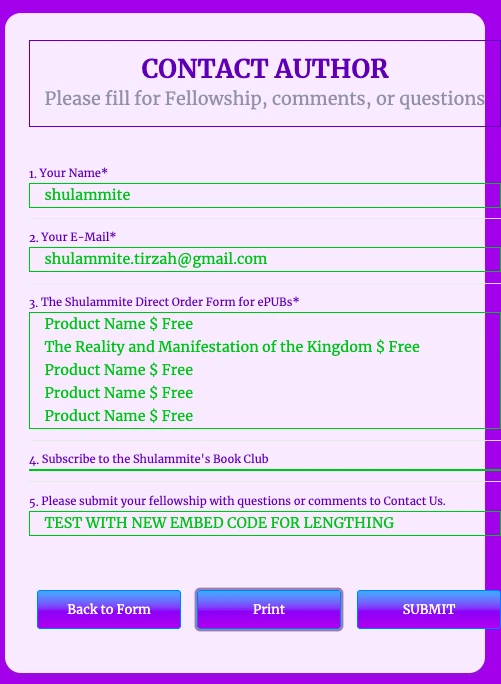
However, once again, I selected 5 books in the first form of Direct Order ePubs (3.), then I selected only one of the Book Club items (4.).
When I clicked REVIEW BEFORE submission, the results are the same, with only one Book title selected from the Direct Order Form for ePUBs, and the other entries display only PRODUCT NAME $ FREE instead of the book titles.
I still don't understand why the REVIEW BEFORE submission button doesn't work.
Please advise.
Shulammite
-
Raymond JotForm Support
Hi Shulammite,
The book names are not labeled correctly. To fix that, we have to update the labels of your books in your product list field. Let me show you how to do it:
- In Form Builder, click on your Product Label.
- Next, update it by typing in a new name and that's it.
Reach out again if you need any help.
-
SShulammite
Raymond,
Okay, now I understand. The Product Name has to change, but I already typed the title of each book underneath the image. What should I type in place of the Product Name?
Many thanks again.
Shulammite
-
Raymond JotForm Support
Hi Shulammite,
The Submit before preview widget uses the Product Name instead of the Product description. We suggest updating the product name of your books so they're visible on the preview page at the end. As for the product description, which is what's under the Product name, you can leave it as it is or update it as needed.
Reach out again if you need any help.
-
worldgospelkingdomtracts
-
 Kevin JotForm Support
Hi worldgospelkingdomtracts,
To keep the conversation organized, I moved your other question to its own thread, and someone from our Support Team will help you with it here.



Your Reply
Something Went Wrong
An error occurred while generating the AI response. Please try again!