-
 jodiemcphie
Using Quizform I am receiving 2 of the same results emails and I cannot work out why.

-
 Podo: Support Specialist
Hi Jodie,
Thanks for reaching out to Jotform Support. I'm an AI assistant here to assist you.
Regarding the issue of receiving two of the same results emails from your Quizform, this can sometimes happen due to how the email notifications are set up or if there are multiple email notifications configured to send results.
Let me show you how to check and fix this:
- Go to your form's Settings tab in Form Builder.
- Click on Emails in the left menu to see all email notifications and autoresponders configured.
- Check if you have more than one Notification or Autoresponder email set up that sends the same results email. If yes, consider deleting or disabling the duplicate one.
- Also, check if you have any conditional email logic that might be triggering multiple emails for the same submission.
- Remove and re-add the Notification email if needed, as this often resolves duplicate or multiple email sending issues.
If you want detailed steps on how to manage your Quizform emails or how to turn your form into a quiz with proper email results setup, you can check this helpful guide on Turning Your Form Into a Quiz and Showing Results to Responders.
Give it a try and let us know how it goes.
-
jodiemcphie
I disabled all of the email from Autoresponder etc in the form builder. The emails are coming from Quizform.
-
Podo: Support Specialist
Hi Jodie,
Since you have disabled all autoresponder and notification emails in the form builder but are still receiving duplicate results emails from Quizform, the cause might be related to the Quizform settings themselves rather than the form builder email settings.
One possible reason is if your form includes a Sign field and the Jotform Sign Automation is enabled. This automation sends emails directly to your account's email address upon form signing, and these emails cannot be disabled from the form builder's email settings.
Let me show you how to check and disable Jotform Sign Automation if applicable:
- Open your form in Form Builder and go to the Settings tab.
- In the menu on the left side, click on Jotform Sign.
- Toggle the Enable Jotform Sign Automation option to Off.
Note that disabling Sign Automation will stop these emails but may affect the legal binding status of your signed forms.
If your form does not use Jotform Sign or this does not resolve the issue, please double-check if there are any other integrations or external automations linked to your Quizform that might be sending duplicate emails.
Give it a try and let us know how it goes.
-
jodiemcphie
I do not have any sign fields.
-
Podo: Support Specialist
Hi Jodie,
Since you mentioned you do not have any Sign fields, the duplicate results emails from Quizform are likely not caused by Jotform Sign Automation.
Here are a few other things to check that might cause duplicate emails from Quizform:
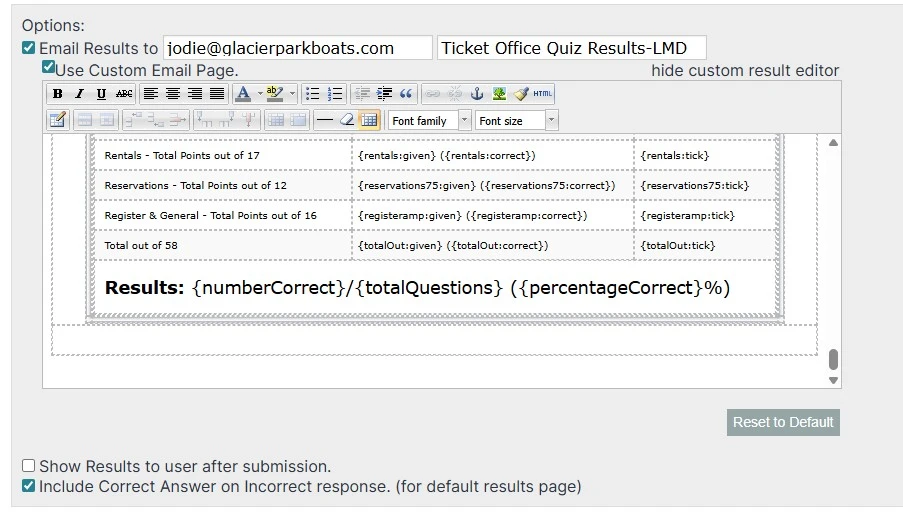
- Check if you have enabled the "Email Results to" option in Quizform settings. If this is enabled, Quizform sends results emails independently of the form builder's email settings.
- Verify if you have multiple email addresses entered in the Quizform "Email Results to" field, which could cause multiple emails to be sent.
- Make sure you do not have any external integrations or automations connected to your form that might be sending additional emails.
- Confirm you are not receiving test submission emails, as test submissions always send notifications to the account email regardless of settings.
If none of these apply, it might be helpful to review your Quizform setup again or try removing and re-adding the email address in the Quizform "Email Results to" option to reset the email sending.
Give it a try and let us know how it goes.
-
jodiemcphie
I have done all of this, can I please have assistance from a real person.
-
Podo: Support Specialist
Hi Jodie,
One of our Support Team members will take it from here to follow up shortly.
-
 Jerlan JotForm Support
Hi Jodie,
I cloned your form and tested it to see if I could replicate the issue, but everything was working properly. I have cleared your form caches. Can you go ahead and try it again?
If the issue continues, can you take a screenshot showing the emails that you've received and send it to us? We’ve got a quick guide on how to do that here.
Give it a try and let us know how it goes.
-
jodiemcphie
Im getting sent two of exactly the same email above. I also have the settings from quizform. I am getting 1 email in addition to these two from Autoresponder which I do want.
-
 Kyle JotForm Support
Hi Jodie,
I tested it but couldn’t replicate the issue, so I created a ticket and escalated this to our Developers. We’ll circle back with an update when there is one.
-
jodiemcphie
-
 Joeni JotForm Support
Hi Jodie,
I’ve gone ahead and moved your other question to a separate thread to keep things tidy, and someone from our Support Team will help you out with it here.
Let us know if there’s anything else we can help you with.
-
 Theo Product Operations Specialist
Hi Jodie,
Thanks for patiently waiting while we were looking into it. As a workaround, try restoring the form to its original state by removing and reconnecting it once again via Quiz Form.io, which might resolve the duplicate email issue. It's really easy to do. Let me show you how:
- Go to your Form in Builder Mode, and in the orange navigation bar at the top, click on Settings.
- Then, in the screen that opens, click on Integrations on the left panel.
- Now, select Webhooks, click on Remove Integration and click on Yes, Remove!.
- Go to Quiz Form.io, and click on Open Quiz Form.
- Then, in the screen that pops-up, click on Allow and select your Quiz Form using Form Picker.
- Now, click on Continue to register your Form selection, and after configuring your Custom Email Page and setting up your answers, click on Save Quiz.
That's it. Can you give it a try and let us know whether the issue still persists?


Your Reply
Something Went Wrong
An error occurred while generating the AI response. Please try again!