-
 vermontshuttle
- VSC to Burlington $48 Shared Shuttle
- Total Amount: VSC to Burlington $48 Shared Shuttle + Tip Amount
these 2 fields shouldnt be there
but, under VSC to Burlington $48 Shared Shuttle*
USD
Description
should be a total amount showing the tip plus $48
-
 Podo: Support Specialist
Hi Donald,
Thanks for reaching out to Jotform Support. I'm an AI assistant here to assist you.
To show a total amount that includes both the base price (e.g., $48 for the shuttle) and the tip in your form, you can use the Form Calculation Widget to sum these values and then pass that total to your payment field.
Here’s how to do it:
- Add a Form Calculation Widget to your form and set it up to calculate the total by adding the shuttle price ($48) and the tip amount entered by the user.
- Add a Payment Field to your form if you haven't already.
- Set the Payment Type to User Defined Amount in the payment field settings. This allows the payment field to accept a custom amount.
- Link the Payment Field to the Calculation Widget by selecting the option to get the price from the Form Calculation Widget you created. This will make the payment field charge the total amount calculated (shuttle price + tip).
This way, you won't have separate fields showing the shuttle price and tip individually; instead, the payment field will display the combined total amount.
Give it a try and let us know how it goes.
-
vermontshuttle
not working
-
Podo: Support Specialist
Hi Donald,
One of our Support Team members will take it from here to follow up shortly.
-
 Kyle JotForm Support
Hi Donald,
Can you walk me through what’s happening so I can get a better picture of things?
Once we hear back from you, we can help you sort this out.
-
vermontshuttle
The tip amount should be listed + the Payment Amount* USD
There is no total amount listed anywhere
I do believe I have the calculation widget set correctly
-
 Joeni JotForm Support
Hi Donald,
When I reviewed your form, I saw that the Form Calculation widget is set up correctly. It adds the Tip amount to the Payment Amount as intended. Take a look at the screenshot below:
 That said, in your payment amount field, you’ve set the Suggested Amount to $48. Take a look at the screenshot below:This means the user will always be charged $48 without any tip when they submit the form. To fix this, instead of using the Suggest an Amount option, you can enable the Get Price From feature and connect it to your calculation widgets. Let me show you how:
- In Form Builder, select the Payment Field and click on the Coins icon.
- Then, under the General tab and toggle off the Suggest an Amount option.
- Then, click on the Downward Arrow icon of the Get Price From section and select the Calculation option in the Dropdown menu.
Take a look at the screencast of the result below:
Give it a try and let us know how it goes.
-
vermontshuttle
the form should be Tip amount blank
right below it should say $48 for the ride
then right below it should be an autofilled box that say the total amount
-
Kyle JotForm Support
Hi Donald,
I checked your form setup, and it’s already configured exactly the way you described: the Form Calculation widget is correctly summing the $48 base shuttle fare with the tip amount. A screenshot or recording of what’s happening would help us figure this out. You can use Loom or upload to Google Drive or Dropbox, then send us the link. We’ve also got a guide explaining how to send us a screenshot.
When we hear back from you, we’ll be ready to move forward.
-
vermontshuttle
where is the total amount shown?
-
Kyle JotForm Support
Hi Donald,
The Total Amount is shown on the Payment Field. Check out my screencast below to see the result:
Reach out again if there’s anything else we can help you with.
-
vermontshuttle
Please use a new browser and try again
I do not see a total amount anywhere
-
Joeni JotForm Support
Hi Donald,
Keep in mind that the total amount is being populated into the payment field labeled VSC to Burlington $48 Shared Shuttle. That’s why you don’t see it listed as Total, it’s just displayed under a different label. Take a look at the screenshot below:
To clarify, the calculation widget in your form is adding the Tip amount and the $48 VSC to Burlington Shared Shuttle charge. By using the Get Price From feature, that total will automatically populate into the payment field.Let us know if you have any other questions.
-
vermontshuttle
it is not adding the total amount on my end
using desktop Chrome, Firefox, or IE
Also, Chrome on a smartphone doesn't add them
-
 Camila JotForm Support
Hi Donald,
If you want to add the Tip and $48, I suggest turning off the Suggest an Amount like the suggestion of my colleague above and change the calculation. Let me show you how to do it:
- In Form Builder, select the Payment Field and click on the Coins icon.
- Then, under the General tab and toggle off the Suggest an Amount option.
- Now, under Get Price From Total, select Calculation.
Now, we will fix the Calculation:
- While in Form Builder, select your Form Calculation widget and click on the Wand icon.
- Then, remove the VSC to Burlington $48 Shared Shuttle field and add 48,
- Lastly, click on the Save button.
Check out the result:
Give it a try and let us know if you need any more help. -
 austinwood2000w
This is a really useful setup, especially for combining shuttle fare and tip into one total. From my experience with Jotform, the key thing is making sure everything is treated as numeric fields and then using the Form Calculation widget correctly.
You can usually get this working by setting something like:
Final Total = Base Fare + Tip Amount (or Tip %) all added through the calculation widget using the “Add Field” option Also, if you’re using tip as a percentage, it helps to calculate it first in a separate field and then include it in the final total.
If anything looks off (like totals not updating), it’s usually due to one field being set as text instead of number or not being properly linked in the formula.
I also found a similar discussion that might help for comparison: https://www.jotform.com/answers/37280761-form-submission-completed-forms-not-appearing-in-submission-box
 That said, in your payment amount field, you’ve set the Suggested Amount to $48. Take a look at the screenshot below:
 This means the user will always be charged $48 without any tip when they submit the form. To fix this, instead of using the Suggest an Amount option, you can enable the
 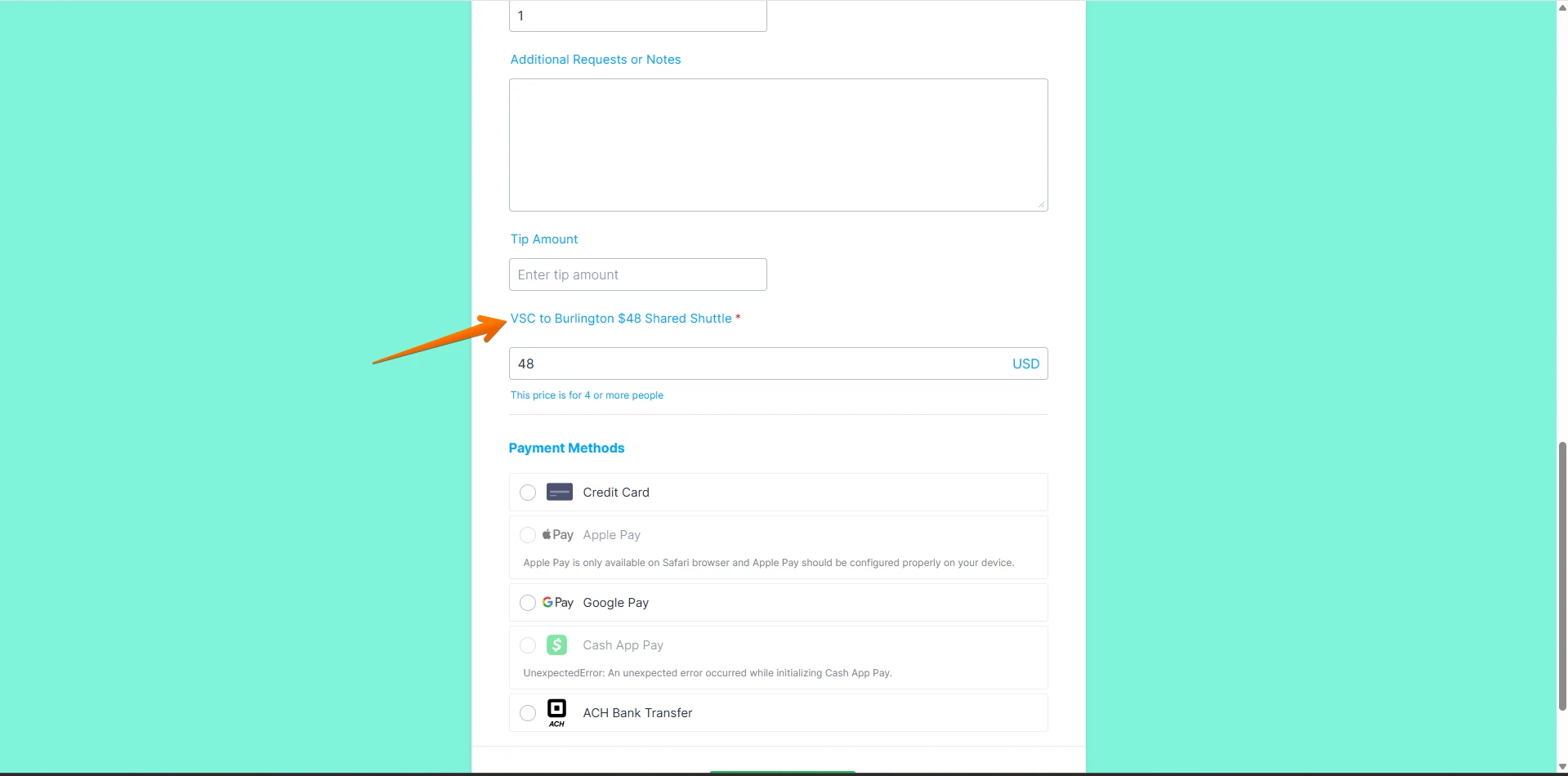 To clarify, the calculation widget in your form is adding the Tip amount and the $48 VSC to Burlington Shared Shuttle charge. By using the Get Price From feature, that total will automatically populate into the payment field.
Your Reply
Something Went Wrong
An error occurred while generating the AI response. Please try again!