-
 zenhome1123
Hello There,
https://us02web.zoom.us/j/85161844644?pwd=FjhGBtMIKgremUP9fjIxrjk6wgCJXR.1
We tested the form above and after completing the form and receiving a thank you page the actual submission is no where to be found on jotform.
Help?
-
 Podo: Support Specialist
Hi Deanna,
Thanks for reaching out to Jotform Support. I'm an AI assistant here to assist you.
Let me help you with that:
When you complete a form and see the thank you page but cannot find the submission in Jotform, here are some steps to check:
- Check your Jotform Tables: Go to your form's Tables page to see if the submission is recorded there.
- Verify submission filters: Sometimes filters applied in Tables can hide some submissions. Clear any filters to see all entries.
- Check your email notifications: If you have set up email notifications, verify if you received an email for the submission.
- Look for the Submission ID: You can find the Submission ID in Tables by enabling the Submission ID column. This helps to track specific entries.
If none of these steps help, please provide more details or screenshots of what you see in your Tables or submission area.
Reach out again if you need any other help.
-
 Rehan Support Team Lead
Hi Deanna,
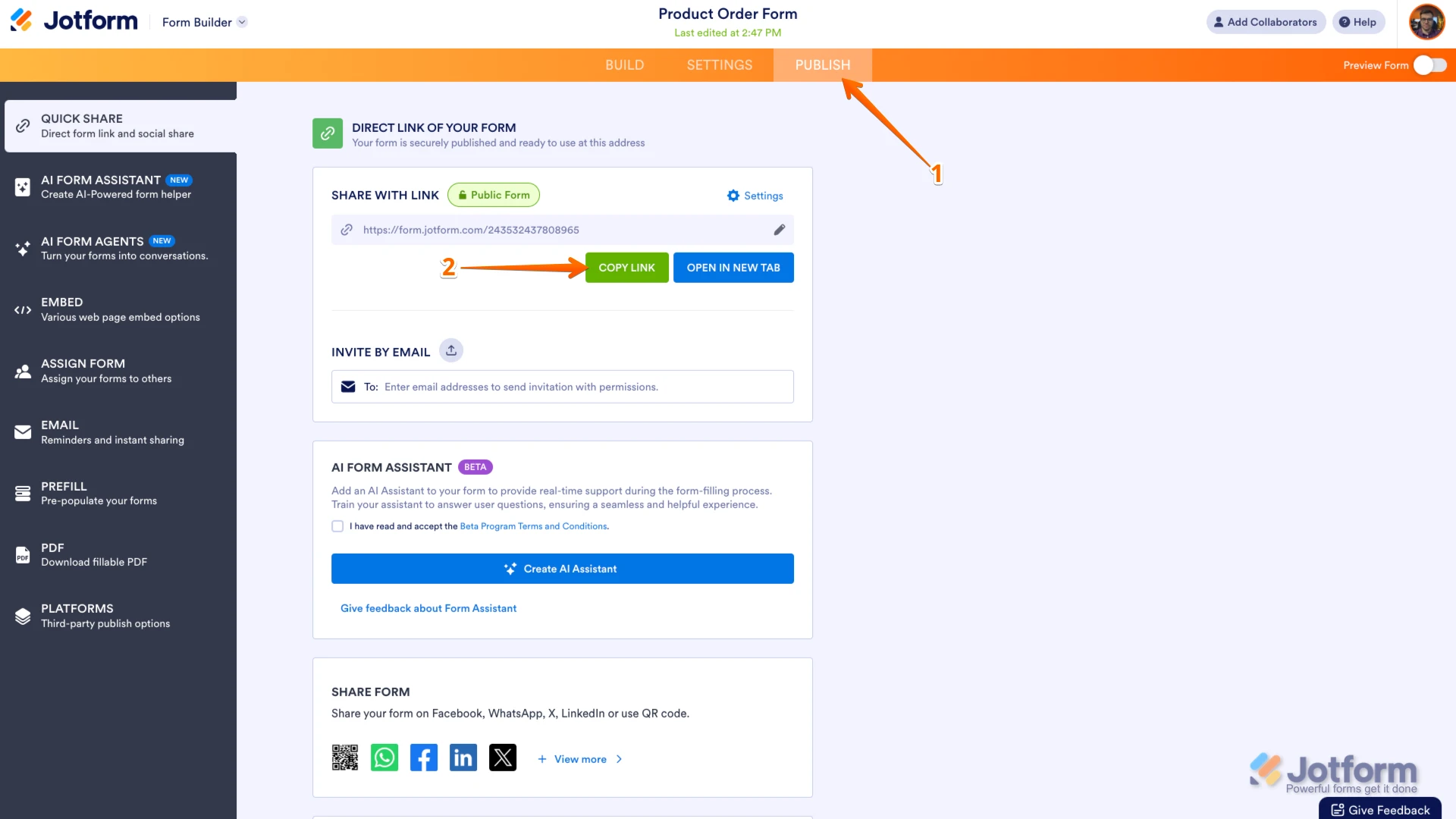
Looks like you shared a Zoom meeting link instead of the form URL. You can easily find your form's URL in Form Builder. Let me show you how:
- In Form Builder, in the orange navigation bar at the top of the page, click on Publish.
- In the Quick Share tab, click on Copy Link in the Share With Link section.
 Once you share the form URL with us, we’ll be able to help you better with this.
 -
zenhome1123
-
 Christian Enterprise Support
Hi Deanna,
Thanks for sending over the URL of the form you’re referring to. When I checked your form, I noticed that you have a Notification Email set up. Since you mentioned that the form submitter reached the Thank You page, did the recipients of this notification email receive it? If they did, please provide a screenshot of the email showing all the details for the specific submission that isn’t appearing in your records. This allows us to track it down using key details like the submitter’s email address. Our guide on How to Post Screenshots to Our Help Center shows you how to do that.
Also, can you confirm if the submission is missing from both the Inbox and Tables page, or only one of them?
For us to troubleshoot this further, we’ll need access to your submission records. For security reasons, we don’t have access by default, so we’ll need your permission to access your account. You can revoke access once we’ve completed the troubleshooting. Let’s walk through the steps together below:
1. In the top-right corner of your Workspace page, click on your Avatar/Profile Image icon.
2. Then, in the Dropdown menu that opens, click on Settings.
3. Next, in the panel on the left, click on the Security tab.
4. If you haven’t opened your Security page in a while, it’ll ask you to verify. To do that, click on Send Verification Code.
5. Then, enter the Verification Code you receive in your email.
6. Finally, at the bottom of the page, toggle on Jotform Support Access.
After we hear back from you, we’ll have a better idea of what’s going on and how to help. -
zenhome1123
Hello, Please see attached the screen shot.
-
 Gian_D JotForm Support
Hi Deanna,
I saw that there are 618 submissions in your form named Cleaning Consultant Questionnaire at the moment. Have you already checked the Trashed Entries and Archived Entries folder on your Tables to see if the missing submission is in there? Let me show you how to do it:
1. In Tables, click on the Three Dots icon on the upper left side of the page.
2. Then, click on Trashed Entries in the menu that opens.3. After that, tick the checkbox of the submission that you want to recover on the right side of the page.
4. Next, click on Restore on the upper right side of the page.If the submission isn't there, let's check the submission in the Archived Entries folder:
1. First, click on the Three Dots icon on the upper left side of the page.
2. Then, click on Archived Entries in the menu that opens.3. Tick the checkbox of the submission that you want to restore on the right side of the page.
4. Finally, click on Restore on the right side of the page.That's it. If the submission that you're looking for isn't there, can you tell us if you were able to receive a notification email for those submissions?
As soon as we hear back from you, we can work on getting you a solution for this.
-
zenhome1123
Hello, I haven't check there but why would a complete form go there anyway. We just jotform for so many other forms and have no issues at all. I am not sure why we are having an issue now. Normally when the form is completed we can find the form on jotform as well as we get an email of the form. Could you check to see if the settings are off?
Also is there a way to speak to someone? I am at work and the back and forth chatting is taking up so much of my time. I just want to get this resolved asap. Thank you!
-
 Kyle JotForm Support
Hi Deanna,
We handle support requests here instead of by phone. I’ll make sure you get the answers you need. I checked the email logs for your recipient email and can confirm that the notification emails were successfully sent, which means the submissions are being processed on our end.
Since you’re not seeing them in your records, the issue is likely related to how the form’s settings or filters are handling the submissions. Can you confirm if the missing submissions also don’t appear in your Inbox or Tables after clearing filters?
Try that and reach out again if you need more help.
-
zenhome1123
The forms are not showing anywhere!!! We do not receive emails, the forms are also not listed in the submission. Can you please just have a look at the form and the setting to let me know what can be wrong.
This back and forth is taking up so much of my time. Thank you! Here is the form again below.
-
 Mikhail JotForm Support
Hi Deanna,
I noticed that the form is embedded to a site. Can you share the site's URL where the form is embedded? If you can also share the Full Name or the Email address you used on your test submission, that would be very helpful.
Once we hear back from you, we can get moving on a solution.
-
zenhome1123
Hello, Here is the link: https://zenhomecleaning.com/careers/cleaning-consultant/
-
Gian_D JotForm Support
Hi Deanna,
For us to investigate it further, would you allow us to test directly your form to see if it's going to work?
As soon as we hear back from you, we can work on getting you a solution for this.
-
zenhome1123
Yes that is fine. I approve.
-
Rehan Support Team Lead
Hi Deanna,
I've checked the form that is embedded on your website page and the form URL you shared yesterday. Both forms are different. The embedded form was created using WPForms. WPForms is a plugin used within WordPress to create forms. When you look at both forms separately, they do look similar. But when you compare them, the differences are clear. As you can see in the screenshots below:
So the form embedded on your website is from WPForms that is why you are unable to find its submissions in the form you created in Jotform.
Reach out again if you need any other help.
-
 austinwood2000w
Yeah, this can be really frustrating I’ve seen similar issues happen where forms are submitted but nothing shows up in the submissions tab. Sometimes it turns out the form wasn’t actually completing properly (like missing a real submit button or not reaching the final thank-you page), so the data never gets recorded.
It’s definitely worth double-checking things like the submit button setup, form status (public/private), and even incomplete submissions or payment sections, since those can sometimes hide entries as well.
I also came across a similar discussion that might help or give more context: https://www.jotform.com/answers/
-
 Sheena JotForm Support
Hi Deanna,
I checked and I can see that the form is correctly set up. To properly check if the submissions are being recorded, would you allow us to make a test submission directly in your form? Also, could you grant us access to your account again so we can check your submission table? If users are filling out the form from your website, could you share the website URL so we can test the form in the same environment?
Once we hear back from you, we'll be able to help you with this.
-
DDeanna Hains
Hello Rehan,
ok great this all makes sense now.
Deanna

 Once you share the form URL with us, we’ll be able to help you better with this.


 After we hear back from you, we’ll have a better idea of what’s going on and how to help.


Your Reply
Something Went Wrong
An error occurred while generating the AI response. Please try again!