# Sample Size Calculator | Calculation Sample Size | Jotform

# Sample Size Calculator

The amount of data you receive may be overwhelming when researching. With Jotform’s sample size calculator, you can easily determine a sample group and base your surveys on population size, confidence level, and margin of error. **Choose survey templates, customize it** to fit your needs and **analyze the results** in real time.

[Create Your Survey](https://www.jotform.com/workspace/)

Population Size Confidence Level (%) Margin of Error (%) 

## Sample Size

## Free Survey Templates

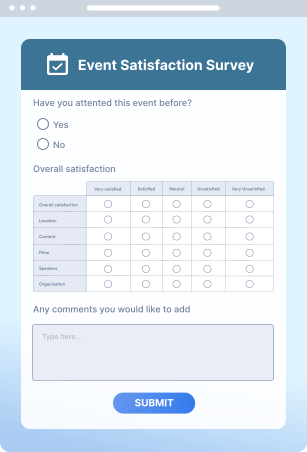
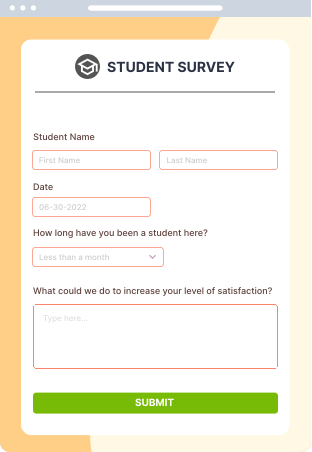
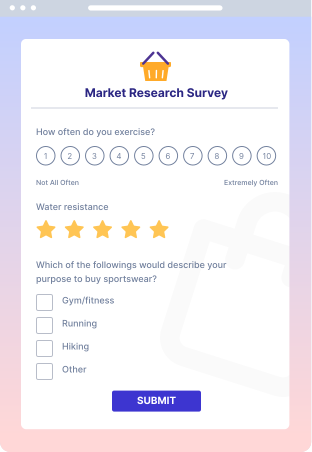
Don’t know how to start your survey? Use one of our many free templates, customize it to match your branding, and send your survey to anyone.

### Event Satisfaction Survey

![Image 1: Form Image 1](https://cdn.jotfor.ms/p/sample-size-calculator/assets/img-min/form1.svg)

Use template

### Student Survey

![Image 2: Form Image 2](https://cdn.jotfor.ms/p/sample-size-calculator/assets/img-min/form2.svg)

Use template

### Market Research Survey

![Image 3: Form Image 3](https://cdn.jotfor.ms/p/sample-size-calculator/assets/img-min/form3.svg)

Use template

[What is sample size?](https://www.jotform.com/sample-size-calculator/?jfNext=1#introduction)[How do I calculate sample size?](https://www.jotform.com/sample-size-calculator/?jfNext=1#intro-how-to)[Population size](https://www.jotform.com/sample-size-calculator/?jfNext=1#population-size)[Margin of error](https://www.jotform.com/sample-size-calculator/?jfNext=1#confidence-interval)[Confidence level](https://www.jotform.com/sample-size-calculator/?jfNext=1#confidence-level)[Z-score](https://www.jotform.com/sample-size-calculator/?jfNext=1#z-score)[Standard deviation](https://www.jotform.com/sample-size-calculator/?jfNext=1#standard-deviation)[What can I use the sample size calculator for?](https://www.jotform.com/sample-size-calculator/?jfNext=1#use-sample-size)[How do I create a survey for my sample group?](https://www.jotform.com/sample-size-calculator/?jfNext=1#create-survey-sample-size)

## What is sample size?

When doing statistical research, the results depend on the population size you’re surveying. Managing the data you collect can be difficult if you’re dealing with a large population. Choosing a smaller sample group to survey makes analyzing data much simpler.

There are two ways to choose a sample group:

**Probability sampling.** Based on probability theory, this sampling method is random. By choosing a sample randomly, every piece of data in your population will have an equal chance of getting chosen. This means the results are more likely to be representative of your population.

**Non-probability sampling.** With this type of sampling, you choose a sample based on subjective judgment. This method is stringent and requires the sample to meet specific criteria, such as certain demographics, but it helps you choose a group that represents your population.

## How do I calculate sample size?

If you’re using probability sampling, there are a couple of variants you need to consider when calculating sample size.

### 1. Population size

A population is the entire group that you want to get insights from. So, population size is the number of every entity in the population. Similarly, if you’re collecting data on a duck farm, the population size is the total number of ducks that reside there. Since it is not always possible to make survey on every entity in the population, you need to take a sample from the population and conduct your research on that sample.

### 2. Margin of error

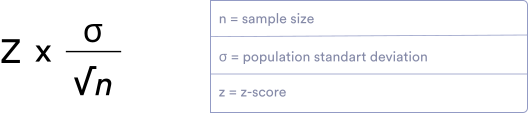
Margin of error is an expression that reflects the amount of random sampling error. Let’s say you as a researcher, has the mean estimate for your survey as 60 with a 5 margin of error. This implies that the actual mean can be any value between 55 and 65.

No matter which method you choose while calculating your sample size, you can’t include every piece of data in your calculation. So, there will always be a margin of error. Your margin of error can be calculated using this mathematical formula:
![Image 4: Create a Custom URL](https://cdn.jotfor.ms/p/sample-size-calculator/assets/img-min/confidence-interval-formula.svg)

### 3. Confidence level

The default accuracy when using a sample size is typically 95%. In other words, you can be 95% certain that the population mean is represented in the confidence interval from the sample.

The likelihood that the accurate answer falls within this percentage is increased by using wider confidence intervals. Smaller sample sizes cause broader confidence intervals. The confidence interval should be kept narrow when the costs of an error are very high.

### 4. Z-score

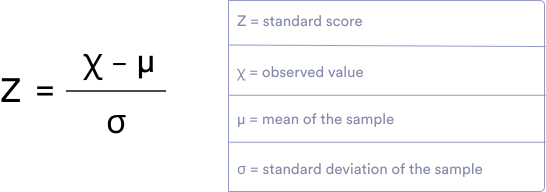
A Z-score determines how far a point is from your population size through standard deviation. In other words, the Z-score shows the distance of a given proportion from the mean. By using the Z-score, we can compare different populations with different distributions.

The higher the desired confidence level gets, the higher the Z-score. For example, for a 95% confidence level, the Z-score should be 1.96. You can calculate the Z-score using the formula below:
![Image 5: Create a Custom URL](https://cdn.jotfor.ms/p/sample-size-calculator/assets/img-min/z-score-formula.svg)

### 5. Standard deviation

The standard deviation shows the range between actual data and the average. Using the standard deviation, we can discern how much individual responses may vary from the mean and also from each other.

## What can I use the sample size calculator for?

Not all of us are statisticians, but we all manage data for different reasons in our everyday lives — whether to see how well we did on a math test compared to the class or to track our weekly screen time compared to the previous week. If you’re conducting a survey to get objective results, you’ll definitely need to take a deep dive into the calculations.

Sample size calculators can be used for product surveys, marketing surveys, satisfaction surveys, school surveys, employee surveys, and more. They can help to assess overall satisfaction in your workplace, get more insight on your target market, and receive feedback.

Analyzing your strengths and weaknesses is essential to enhancing your work environment, students’ success rates, or customer service quality. Identifying areas for improvement creates opportunity for growth and success. Designing surveys and collecting responses are essential to identifying the improvements you can make.

Building forms from scratch that will provide you with the type and quantity of data you need can be time-consuming. Jotform offers a wide variety of templates to fit your individual needs.

## How do I create a survey for my sample group?

With Jotform, it’s easy to create, personalize, design, and embed forms and surveys. You can ask **engaging survey questions** , include your **personal branding** , and seamlessly **embed your survey in your website without any coding** knowledge.

**Select a template** from our template gallery, **pick a design** that you feel comfortable with, and use our drag-and-drop builder to **customize it**. By setting up conditional logic and adding interactivity, you can **create a custom survey for each user**. Worried lengthy questions will get in the way of completion rates? Jotform allows users to **save and continue later**, even if your respondents are offline.

You can easily track responses and metrics as well as [create professional-looking reports](https://www.jotform.com/products/report-builder/) to help visualize and analyze your form responses. Jotform Report Builder makes it easy to display your data on your website or create presentations for team members and colleagues.

Need more help creating your survey? See our guide on [How to Create a Survey](https://www.jotform.com/how-to-create-a-survey/) and **create your first free survey to start analyzing your data.**

[Create your Jotform account](https://www.jotform.com/signup/) and discover the best customized forms for your needs.

## Create Surveys and Start Analyzing Your Data

**Ask questions, collect data** in a variety of formats, **keep track of answers**, and **analyze** them in real time with Jotform’s sample size calculator. **Build custom forms and surveys** to engage users and improve form completion rates. Determine the sample size required for your study and start collecting data on any device.

[Create a Survey for Free](https://www.jotform.com/workspace/)

![Image 6: Create a Custom URL](https://cdn.jotfor.ms/p/sample-size-calculator/assets/img-min/hero.svg)