Jotform Sign makes it easy to send automatic reminder emails to signers who haven’t completed their documents yet. Instead of following up manually, you can set a reminder schedule and let Jotform handle it for you—saving you time and helping make sure nothing gets missed.
You can automatically send reminder emails to signers who still haven’t completed your document by enabling Automated Reminder Emails in the Send to Sign settings. Here’s how to set it up:
- In Sign Builder, in the green navigation bar at the top of the page, click on Send.
- Then, in the Send to Sign page, click on the Options tab, and then toggle on the Automated Reminder Emails.
- Now, click on the Dropdown menu and select how often you want the reminder emails to be sent, and you’re done.
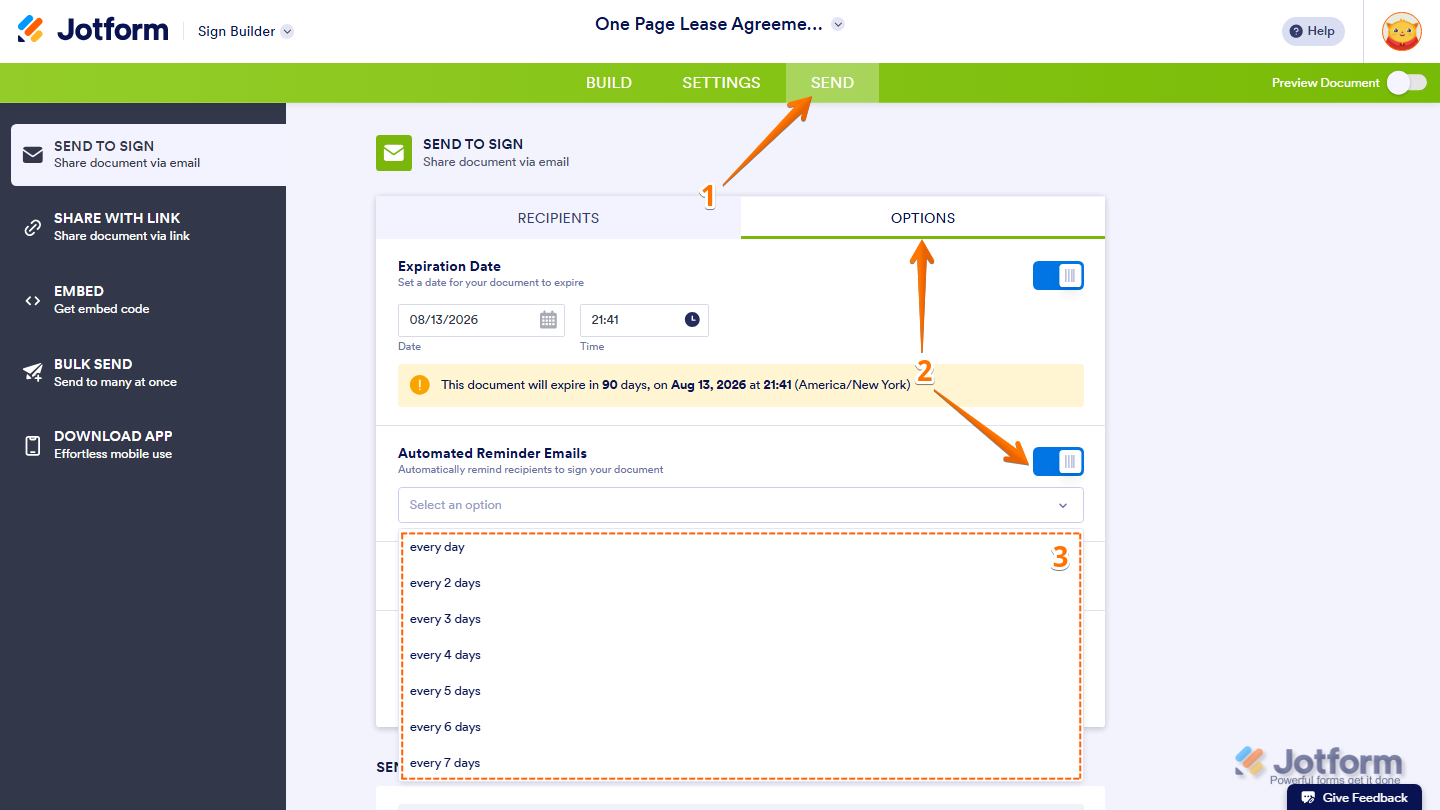
That’s it! Your auto reminder is now set up. Signers who haven’t completed the document will automatically receive reminder emails based on the schedule you selected.
Note
After setting up your auto reminder, you can continue sending your Sign document. For a full breakdown of how to do it, check out our guide on How to Send a Document for Signature With Jotform Sign to learn more about it.

Send Comment: