Aside from the Submit button’s built-in styles, you can take full control by customizing it with CSS. Tailor its colors, typography, spacing, and hover effects to match your form’s design and brand identity. A well-designed submit button not only looks better, but it also builds trust, guides user attention, and creates a smoother, more satisfying submission experience, helping you boost engagement and improve conversion rates.


Whether you’re building a new form or editing an existing one, you can customize the submit button with CSS in just a few steps. Here’s what to do:
- In Form Builder, click on the Paint Roller icon on the top-right side of the page.
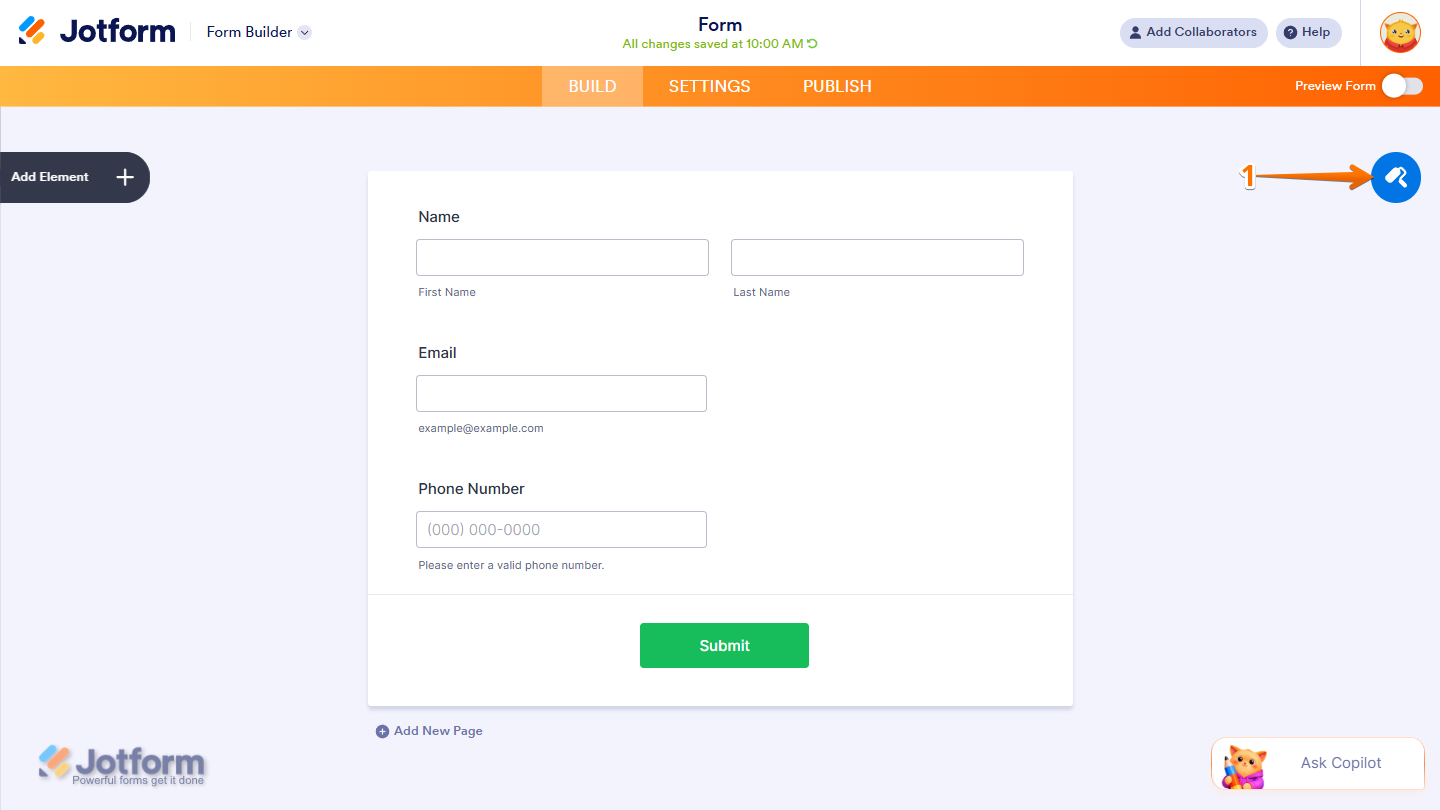
- Then, in the Form Designer menu that opens, go to the Styles tab.
- Next, scroll down to the Inject Custom CSS section, then enter or paste your CSS code into the code editor box.
- Once you’re done, click on the X icon in the top right corner of the menu to close it, or click anywhere outside the menu.

Custom CSS Codes for the Submit Button
We’ve put together a selection of ready-to-use CSS snippets you can quickly inject to customize your form’s submit button. These examples are designed to help you enhance its look and feel, add subtle animations, and create a more engaging, on-brand submission experience, no advanced CSS skills required.
Curious how it works on a live form? Check out this demo.
/* Change the basic color of the submit button */
.form-submit-button {
	background: #0066A2;
	color: white;
	border-style: outset;
	border-color: #0066A2;
	height: 50px;
	width: 100px;
	font: bold 15px arial,sans-serif;
	text-shadow: none;
}
/* Change the color of the submit button when hovered */
.form-submit-button:hover {
background: #ff7c14;
color: #fff;
border: 1px solid #eee;
box-shadow: 5px 5px 5px #eee;
text-shadow: none;
}/* Turn the submit button into a gradient background with hover effect */
.form-submit-button {
background: #0066A2;
color: white;
border-style: outset;
border-color: #0066A2;
height: 50px;
width: 100px;
font: bold15px arial,sans-serif;
text-shadow: none;
}
.form-submit-button:hover {
background: #ff7c14;
color: #fff;
border: 1px solid #eee;
box-shadow: 5px 5px 5px #eee;
text-shadow: none;
}/* Add a Pulse or Glow on hover */
.form-submit-button:hover {
box-shadow: 0 0 15px rgba(1,106,188,0.6);
}
/* Add an emoji next to the submit button text */
.form-submit-button::after {
 content: " 🚀";
}
/* Add a Gradient that also lifts the submit button on hover with left-arrow icon */
.form-submit-button {
background: linear-gradient(135deg, #0066A2, #00c6ff);
color: #fff;
border: none;
border-radius: 999px;
padding: 14px 28px;
font-weight: bold;
position: relative;
overflow: hidden;
transition: all 0.25s ease;
}
.form-submit-button::after {
content: " →";
position: absolute;
right: 20px;
opacity: 0;
transition: all 0.25s ease;
}
.form-submit-button:hover {
transform: translateY(-3px);
box-shadow: 0 10px 20px rgba(0,0,0,0.2);
}
.form-submit-button:hover::after {
right: 14px;
opacity: 1;
}
.form-submit-button:active {
transform: scale(0.97);
}/* Add Glassmorphism and Glow effect on the submit button */
.form-submit-button {
background: rgba(255,255,255,0.1);
color: #0066A2;
border: 1px solid rgba(255,255,255,0.3);
backdrop-filter: blur(10px);
border-radius: 12px;
padding: 12px 24px;
transition: all 0.3s ease;
}
.form-submit-button:hover {
background: rgba(0,102,162,0.15);
box-shadow: 0 0 20px rgba(0,102,162,0.4);
color: #004a78;
}/* Add a solid color that shimmers the submit button, and also lift it up a little */
.form-submit-button {
background: #0066A2;
color: #fff;
border: none;
border-radius: 8px;
padding: 12px 24px;
position: relative;
overflow: hidden;
transition: all 0.25s ease;
}
.form-submit-button::before {
content: "";
position: absolute;
top: 0;
left: -75%;
width: 50%;
height: 100%;
background: rgba(255,255,255,0.3);
transform: skewX(-25deg);
}
.form-submit-button:hover {
transform: translateY(-2px);
box-shadow: 0 8px 18px rgba(0,0,0,0.2);
}
.form-submit-button:hover::before {
animation: shimmer 0.8s;
}
@keyframes shimmer {
100% { left: 125%; }
}/* Add an outline to the submit button that also fills a color that glows */
.form-submit-button {
background: transparent;
color: #0066A2;
border: 2px solid #0066A2;
border-radius: 999px;
padding: 12px 26px;
transition: all 0.3s ease;
}
.form-submit-button:hover {
background: #0066A2;
color: #fff;
box-shadow: 0 0 12px rgba(0,102,162,0.6);
}/* Transforms the submit button into a bold-CTA like style */
.form-submit-button {
background: linear-gradient(135deg, #ff7c14, #ffb347);
color: #fff;
border: none;
border-radius: 50px;
padding: 14px 30px;
font-size: 16px;
font-weight: bold;
letter-spacing: 0.5px;
transition: all 0.25s ease;
}
.form-submit-button:hover {
transform: scale(1.05);
box-shadow: 0 10px 25px rgba(255,124,20,0.4);
}Basic Color Codes for the Submit Button
We’ve also included a selection of basic color codes to easily style your form. These can serve as a quick starting point for customizing your design, helping you create a clean, consistent look without having to pick colors from scratch.
| Color Name | Hex Code |
| Red | #FF0000 |
| Orange | #FFA500 |
| Yellow | #FFD700 |
| Green | #008000 |
| Blue | #016ABC |
| Indigo | #4B0082 |
| Violet | #8F00FF |
| Light Blue | #B9DFFF |
| Cyan | #00FFFF |
| Teal | #008080 |
| Lime | #32CD32 |
| Pink | #FFC0CB |
| Magenta | #FF00FF |
| Purple | #800080 |
| Brown | #8B4513 |
| Beige | #F5F5DC |
| White | #FFFFFF |
| Gray | #EEEEEE |
| Dark Gray | #555555 |
| Black | #000000 |

Send Comment:
40 Comments:
June 28, 2025
How to save this ? When I click preview it still shows me the old version. Not updated.
July 27, 2023
I'm very glad to be here. I here to see what this is going to bring. Very esighed.
March 28, 2023
Hi, so I'm a complete beginner when it comes to CSS code. However I have managed to change up the 'Submit' button to something i like with the below code, but would like to add a gradient to the black background of the button. Is this possible & what would i need to add to the code? Thanks in advance
.form-submit-button {
background: #000;
color: #896F17;
border: 1px solid #896F17;
border-radius: 20px;
box-shadow: none;
text-shadow: none;
font-size: 20px
}
.form-submit-button:hover {
background: #896F17;
color: #fff;
border: 1px solid #000;
border-radius: 20px;
box-shadow: 10px 10px 10px #000;
text-shadow: none;
}
February 9, 2023
Hello, Is there a way to see the CSS code that is there for the buttons we have now. We noticed you have changed your available button styles and you removed the gold two tone style we use for all of our forms. We love the look of these two tone styles so not sure why you removed them in favor of more picture styles. Also if we create a custom CSS button is there a way to store that button somewhere or do we need to copy/paste the CSS code every time?
December 19, 2021
how to restrict our submit button from blank submission. Our website is made in WordPress
Need quick response please
August 19, 2021
2 quick questions:
1. how to add url to this submit button to redirect to another page
2. How to identify the two submit buttons separately.. i have 2 of them.. how do i refer to each of them in the code.. i want one to be green and another one to be blue..
Please help.. my link is :
July 3, 2021
how to center align the submit button in HTML Code
May 1, 2021
Simple yet brilliant
March 22, 2021
Thanks for the guide
September 2, 2020
thanks sir it is helpful
July 14, 2020
Hey there ... simple question; How can I change who a SUBMIT button emails for responses? I'm guessing it is defaulted to Jotform account site, and I have to go there to get repossess, but can I have the submit button on my form be directed to my own email (not just as a notification)?
Thanks,
J Downes
July 13, 2020
I am trying to add another form to the submit button. When my clients hits the submit button that it would take them to another form to fill out.
Thanks
Miriam
May 25, 2020
How do I get the "Submit" button to send form to my email?
October 10, 2018
Hi, Could you tell me how to apply CSS3 to make the colour slide up the button when hovered over?
March 21, 2018
Does this feature depend on the form? I use a card form and the form designer only shows "Themes" and "Individual" where I can set some (not all colors) but no CSS.
January 15, 2018
i have written this code in form
and in head i have written
.form-submit-button {
background: #0066A2;
color: white;
border-style: outset;
border-color: #0066A2;
height: 50px;
width: 100px;
font: bold 15px arial, sans-serif;
text-shadow:none;
}
its not working now wht should i do???
January 11, 2018
Hi there, I'd like to have a spacing/padding around my su_button, so that the buttons are more on their own instead of attached to eachother. What code do I have to use?
height, padding-bottom only give me higher buttons, but I just need more space around it.
November 23, 2017
Hello,i found your site through search,yours site is excellent and a nice website...
The contents are nice &will grow higher in future...
thanks,
November 25, 2016
where the enter data save
June 27, 2016
You might find you need to add the CSS !important in order to get some of your CSS to operate.
March 27, 2016
I want to make counter in the FORM for registering the number of applicants for attending a meeting. I am not able to do that. How to make a counter?
January 28, 2016
How do you get it to acctually submit though?
January 19, 2016
I don't know where to start... I cloned a website to use for my theme but no idea where can't access that specific theme. I am about to give up.
May 18, 2015
Hi Thr,
After the first click, how can we bring the button style back to normal state without clicking on the screen again
April 22, 2015
Thanks, helped me alot