-
 lmtthezim
this morning I was able to edit my long text boxes with a pencil icon. Hours later, the pencil icon disappeared and I cannot edit my long text boxes to make it easier to read. only a gear and waste can show up - the pencil was present earlier today.
HELP!!
Laura
-
 Podo: Support Specialist
Hi Laura,
Thanks for reaching out to Jotform Support. I'm an AI assistant here to assist you.
Regarding the pencil icon for editing your long text boxes disappearing, Jotform's form builder interface typically shows a gear icon for field properties and a waste can for deleting fields. The pencil icon you mentioned is not a standard persistent icon for editing long text boxes in the form builder; editing is usually done by clicking directly on the field or using the gear icon to access properties.
If the pencil icon was visible earlier and is now gone, it might have been a temporary UI element or related to a specific mode or widget. To edit your long text boxes and make them easier to read, you can:
- Go to your Workspace page and filter to show only Forms.
- Hover over the form you want to edit and click on Edit Form.
- In Form Builder, click directly on the long text box field you want to edit or use the gear icon to open the field properties.
- Adjust the field settings such as size, label, or other options to improve readability.
If you want to position or resize form elements, you can use the Shrink or Expand options in the Advanced tab of the field properties.
Let me know if you need detailed steps on any of these actions or if the issue persists.
Give it a try and let us know how it goes.
-
lmtthezim
Is it possible to talk with someone - a live person?
-
Podo: Support Specialist
Hi Laura,
One of our Support Team members will take it from here to follow up shortly.
-
lmtthezim
how? will this support team member take it from here? What does shortly mean?
-
 Jason Enterprise Support
Hi Laura,
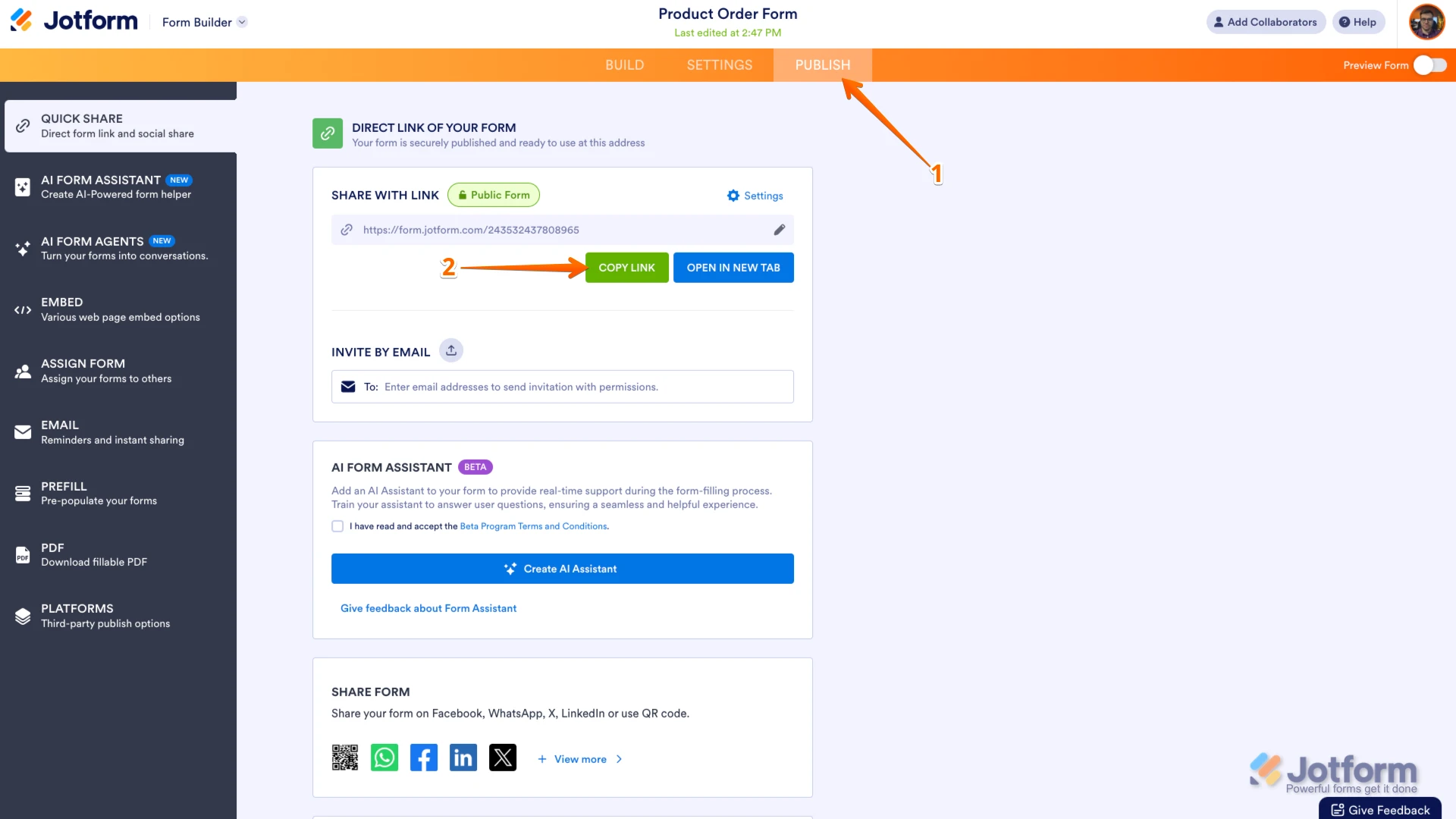
Can you send me the link to your form so I can take a look for you? You can easily find your form's URL in Form Builder. Let me show you how:
- In Form Builder, in the orange navigation bar at the top of the page, click on Publish.
- In the Quick Share tab, click on Copy Link in the Share With Link section.

Can you also take a screenshot of what’s happening and send it to us? We’ve got a quick guide on how to do that here.
Once you share the form URL with us, we’ll be able to help you better with this.
Your Reply
Something Went Wrong
An error occurred while generating the AI response. Please try again!