-
 m41546374
Why aren't Jobs going on sheet we pay a subscription
-
 Podo: Support Specialist
Hi mathew,
Thanks for reaching out to Jotform Support. I'm an AI assistant here to assist you.
If your Jobs (form submissions) are not appearing on your sheet despite having a subscription, there could be a few reasons to consider:
- Your subscription payment might have failed or is overdue. Subscriptions automatically renew, but if payment fails, your account may be downgraded, which can affect submission storage.
- Check your subscription status and renewal date on your account's billing page to ensure your subscription is active.
- Verify that the submissions are not going to an Incomplete Payments section if payments were involved.
- Make sure your integration or connection between the form and the sheet is properly set up and enabled.
To check your subscription renewal and status:
- Go to your Workspace page and click on your Avatar at the upper right.
- Select Settings from the dropdown menu.
- Click the Billing tab on the left panel to view your current plan and renewal cycle.
If everything looks fine with your subscription and the issue persists, please provide more details about how you have set up the sheet integration or any error messages you see.
Give it a try and let us know how it goes.
-
m41546374
We've paid agent please
-
Podo: Support Specialist
Hi mathew,
One of our Support Team members will take it from here to follow up shortly.
-
m41546374
My Jobs need going on sheet we've paid this is causing problems we can't add work
-
m41546374
We pay you a subscription and not working effectively ting cuisines now
-
m41546374
Effecting business meant
-
 Gemmhel Enterprise Support
Hi mathew,
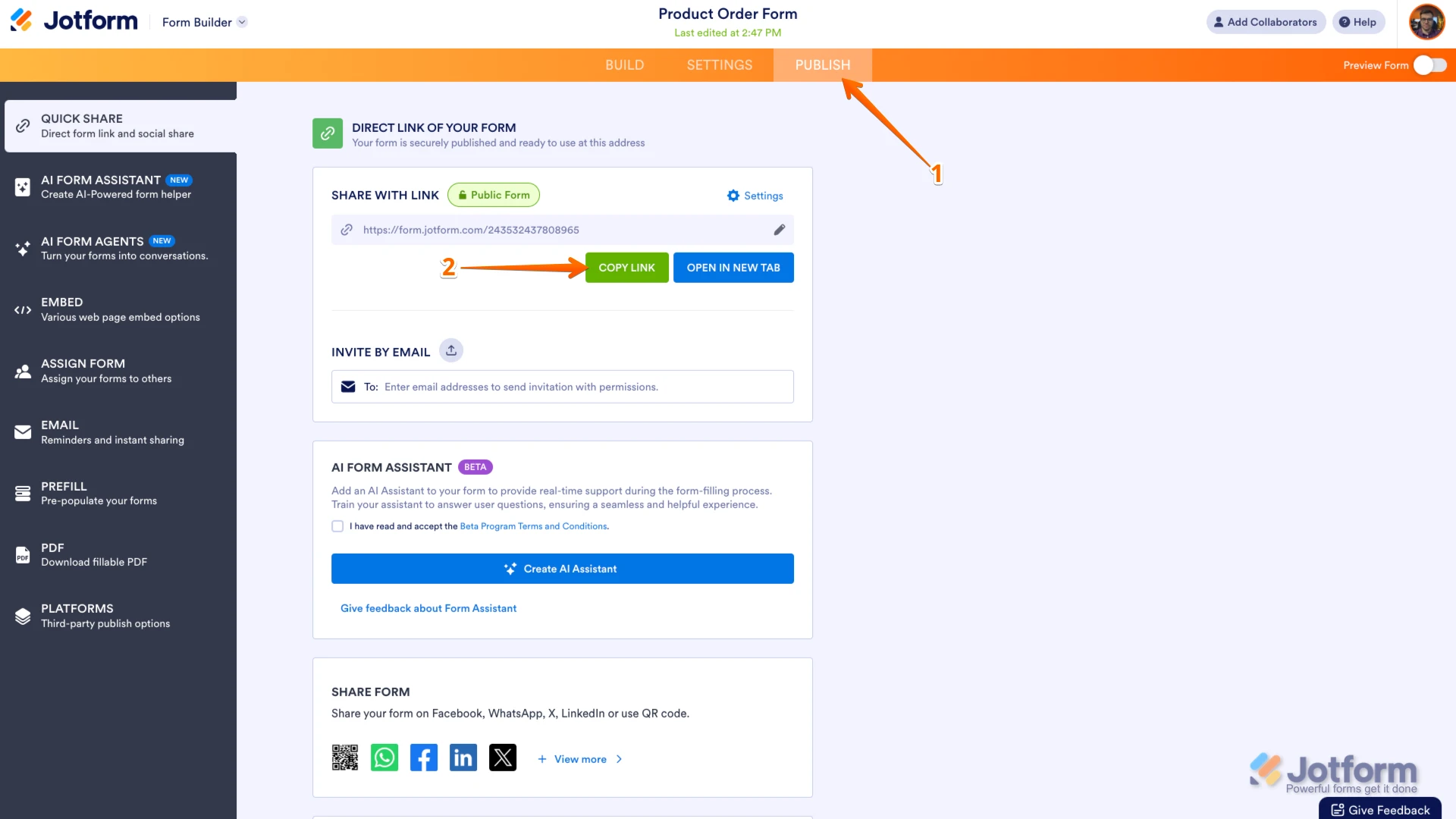
Can you send us the link to your form so I can take a look for you? You can easily find your form's URL in Form Builder. Let me show you how:
- In Form Builder, in the orange navigation bar at the top of the page, click on Publish.
- In the Quick Share tab, click on Copy Link in the Share With Link section.
 Once you share the form URL with us, we’ll be able to help you better with this.
 -
m41546374
-
 Kris JotForm Support
Hi Mathew,
I can see this form has collected 584 submissions in total. Usually, the Google Sheets integration breaks if the file was edited. Like, if there are edited submissions or inserted data. This will cause the submissions not to push through the Google Sheets file. To remedy this, you'll need to remove the integration and add it again.
It's easy to re-integrate the Google Sheet integration. First, we’ll remove the existing Action. Let me show you how to do it:
1. In Form Builder, in the orange navigation bar at the top of the page, click on Settings.
2. Next, click on Integrations in the menu on the left.
3. Select the Google Sheets integration.
4. Then, hover over the Action section and click on the Three Dots icon on the right.
5. After that, select Delete Action from the Dropdown menu that opens.
6. Now, click on Yes, Delete in the Confirmation window that opens.
Now, let's connect the Google Sheets integration again. Here’s how to get going:
1. While in Google Sheet Integration settings, click on the Add New Action button.
2. Now, in the Choose an Action section, select either Create New Spreadsheet or Use Existing Spreadsheet, and then click on Next.
3. Next, in the Account dropdown, select your Google account, and then click on Authenticate.
4. Now, set up the Google Sheets settings, and then click on Save at the bottom.
If you select Create new spreadsheet, a new spreadsheet will be created in your Google account, where submissions will be collected. If you select Use existing spreadsheet, submissions will be collected in the spreadsheet you choose, which is already connected to your Google account. We also have a guide about How to Integrate Forms With Google Sheets that you can check out.
Reach out again if you need any more help.
-
m41546374
-
Kris JotForm Support
Hi Mathew,
To keep the conversation organized, I moved your other question about the submission reaching the limit to its thread, and someone from our Support Team will help you with it here.
Reach out to us if you need any more help.

 Once you share the form URL with us, we’ll be able to help you better with this.
Your Reply
Something Went Wrong
An error occurred while generating the AI response. Please try again!