-
 yamilg
Hello!
I'm working on integration Jotform to a client's app. He generated an API key for me, I was there when it was created, I'm sure it has Full Access. But when I tried even the simplest type of connection:
curl -X GET "https://api.jotform.com/user?apiKey={myApiKey}"
I keep getting 401.
{"responseCode":401,"message":"You're not authorized to use (\/user-reports) ","content":"","duration":"17.65ms","info":"https:\/\/api.jotform.com\/docs#user-reports"}%
I wasn't sure why, so I created a new account to test the same process with this new account. I all went well and I got the expected 200 back.
Is there any chance my client's account is somehow restricted for API usage? if so, what can he do to unlock it?
Thank you -
 Podo: Support Specialist
Hi Yamil,
Thanks for reaching out to Jotform Support. I'm an AI assistant here to assist you.
I checked the available information, and it confirms that Jotform API keys can be created with Read Access or Full Access, and that each subscription plan has a daily API call limit that resets at midnight EST.
From the knowledge base, I can confirm these points:
- API keys are created from the Account API page.
- Full Access allows add, edit, and delete access.
- API calls are limited daily depending on the plan.
- If the limit is reached, API services may fail and you may see an API-Limit exceeded message.
- The response also says you can check remaining requests in the API response as limit-left.
However, the knowledge base does not include information about a client account being specifically restricted or locked for API usage, and it does not provide a way to confirm why a 401 unauthorized response is happening for that account.
I don't know this information and our support team will handle your request.
Give it a try and let us know how it goes.
-
 Mikhail JotForm Support
Hi Yamil,
Since it is working on a different account, can you try creating another new API key with full permissions? If you can also share the full API call you're using, it would be helpful.
Once we hear back from you, we can get moving on a solution.
-
yamilg
Thank you, Mikhail.
We tried creating new keys with Full Access multiple times. None of them work. My guess is that is some kind of account restriction, but I cannot see any parameter in the settings that may be affecting, really.
I was using the call provided as an example in the API docs
curl -X GET "https://api.jotform.com/user?apiKey={myApiKey}"
I cannot share the API key here for obvious reasons but I can tell you this is my client's account: startakfiber
I hope this helps. Thank you.
-
Mikhail JotForm Support
Hi Yamil,
I checked the account using the username you provided, and I didn’t find any. Can you share your client's email address that could have been used to create an account with Jotform?
Once we hear back from you, we can get moving on a solution.
-
yamilg
Sure!
My contact, and the current admin of the account is: evan@startakfiber.com
Thanks -
 Joeni JotForm Support
Hi Yamil,
After checking the email address, I found that the connected username is evan_Williams_Evan, and the account is currently on an active Starter plan. Could you ask the client to review their API key permissions to confirm it has the necessary access for the endpoint?
Give it a try and let us know how it goes.
-
yamilg
Hello Joeni,
If the email matches then I think that is correct. Yes, we made sure the permissions were set to Full Access, we created more than one key and made sure to select Full Access, every time.
Other than that, I don't know if there's a place were can can fine tweak those permissions. Let me know if we're missing something.
-
 Rehan Support Team Lead
Hi Yamil,
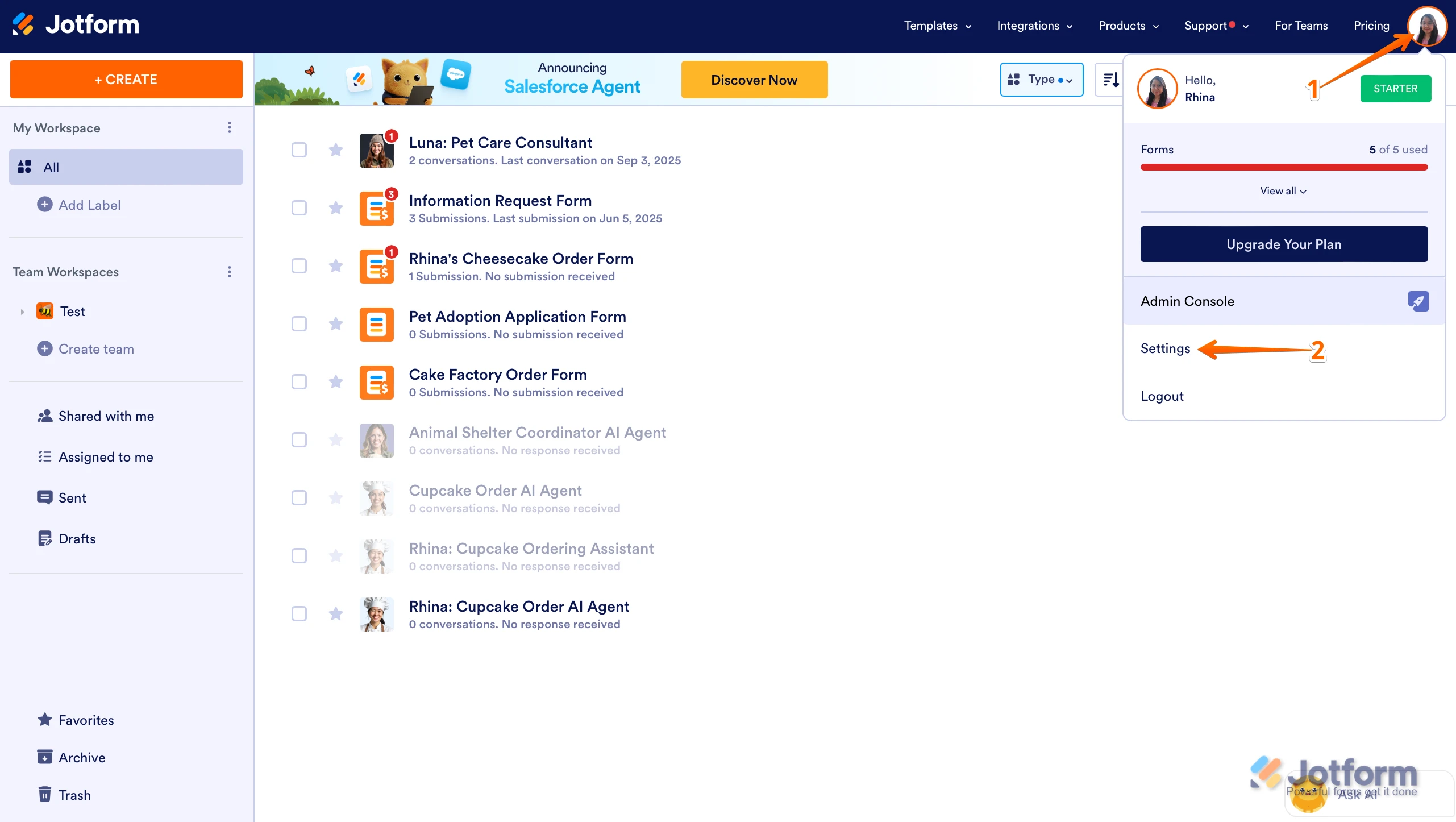
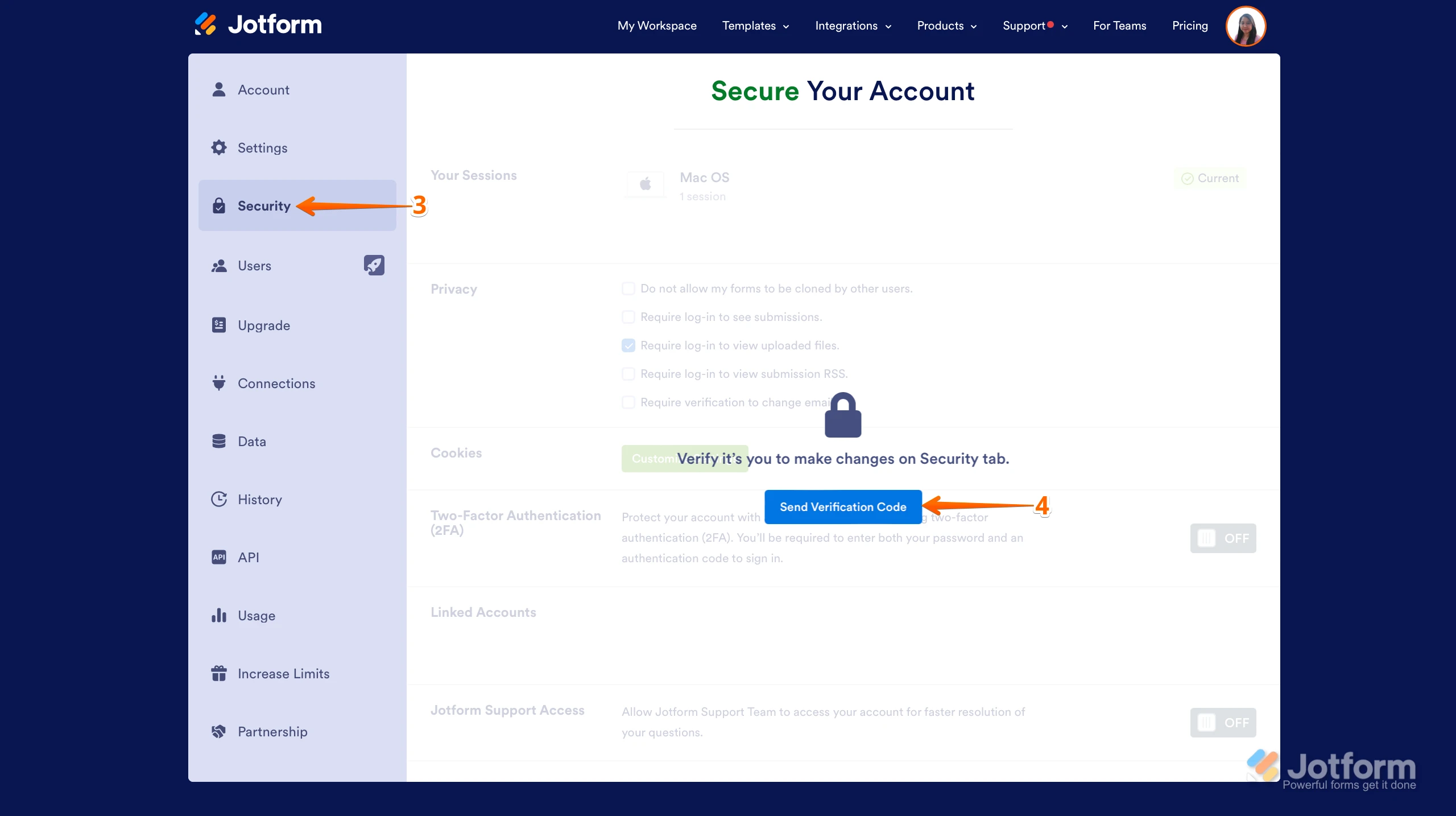
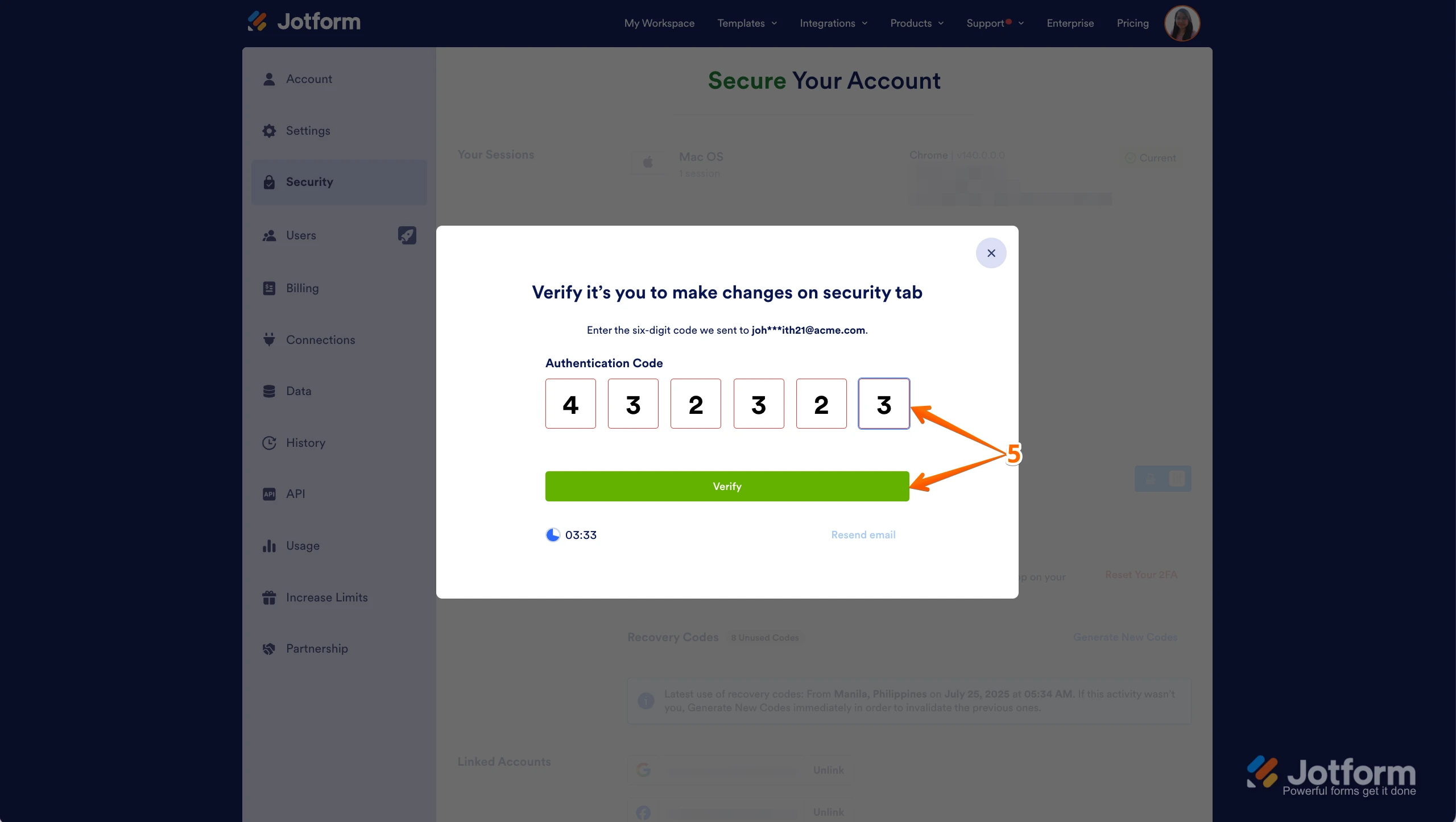
Can you ask the user to uncheck the Require Login To See Submissions setting in his account? It only takes a few simple steps. Here’s how:
1. On your Workspace page, click on your Avatar/Profile Image in the top-right corner of the screen.
2. In the Dropdown menu that comes up, click on Settings.
3. Next, click on the Security tab on the left side of the page.
4. Then, click on Send Verification Code.
5. In the Confirmation window that opens, enter the Authentication Code sent to your email and click on Verify.
6. Now, uncheck the box next to Require Log-in to See Submissions. That’s it. You’re done.
Reach out again if there’s anything else we can help you with.
-
YYamil Gonzales
I can confirm this is the setting that my client is using.
So the 401 is not related to that particular option you suggested. -
 Keenly JotForm Support
Hi Yamil,
I’ve gone ahead and tested this on my test account, and I was able to get a 200 response using a Full Access API key. Check out the screenshot below:
After checking the 401 response you shared more closely, I noticed that the last part includes 'docs#user-reports', which is usually associated with the GET /user/reports endpoint. It looks like the request being received may not be the GET /user call exactly as expected. To help us look into this a bit more, could you also try testing the same API key directly on our Jotform API page using the GET /user endpoint and let us know what response you get there? You snap a screenshot and share it with us so we can take a closer look into your results.
Also, if you can share the exact endpoint or request you’re currently testing in your app, with the API key removed or masked, that would help us compare whether the request being sent matches the one you intended to test.
Thanks for your patience as we work through this together and get it sorted out.



 After checking the 401 response you shared more closely, I noticed that the last part includes 'docs#user-reports', which is usually associated with the GET /user/reports endpoint. It looks like the request being received may not be the GET /user call exactly as expected.
 Your Reply
Something Went Wrong
An error occurred while generating the AI response. Please try again!