-
 mhaeger
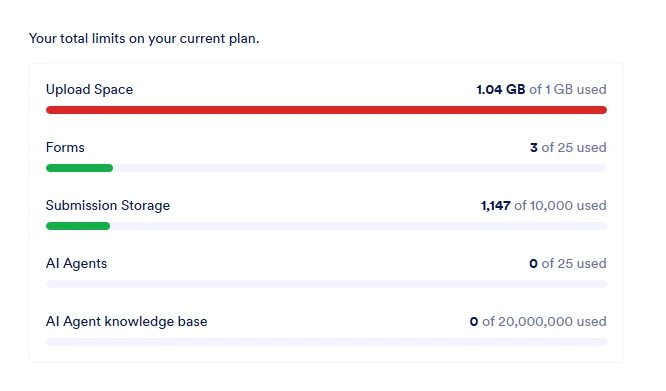
Hello, I am attempting to clear and free my Upload Space as it is maxed out. Apparently the option to free up space is Heavily buried it as I cannot find it and the AI agent is not helpful. Can someone help clear our submissions so we can keep using this product?
 Page URL: https://www.jotform.com/myaccount/usage
 -
 Podo: Support Specialist
Hi Matt,
One of our Support Team members will take it from here to follow up shortly.
Reach out again if you need any other help.
-
 Gian_D JotForm Support
Hi Matt,
I saw that your Upload limit has been maxed out already. You can delete submissions in your forms to free up upload space on your account. Let me show you how to do it:
1. In Tables, tick the checkbox on left side of the column header.
2. Now, click on Delete on the upper right side of the page.3. Then, click on Move to Trash in the pop-up window.
4. After that, click on the Three Dots icon on the right side of the table tab.
5. Next, click on Trashed Entries in the menu that opens.6. Tick the checkbox for Select All on the right side of the page.
7. Then, click on Delete Forever on the right side of the page.8. Finally, click on Delete in the pop-up window.
Once done, can you check your account limit to see if it's going to work?
As soon as we hear back from you, we can work on getting you a solution for this.
-
mhaeger
Hello Gian,
There is no Delete button on my end. Only the option to archive or mark as favorite.
-
 Joeni JotForm Support
Hi Matt,
I checked and it looks like you’re viewing the Signed Document table instead of the Form Submission table, which is why the delete button isn’t showing. I also saw that your form titled Eldora Video and Photo Submission currently has 293 uploaded files. Keep in mind that your upload storage limit is being reached due to the number of file attachments submitted through your forms.
You can follow the instructions given by my colleague here on how to purge your submissions, but before deleting, make sure to download the submission first so you have a backup copy. Deleting submissions won’t free up space on your account, and they can be recovered within 30 days. After 30 days, they will be permanently removed.
Give it a try and let us know how it goes.
-
mhaeger
Ok, I got the photo & form submissions purged. Was hoping to delete the signed docs as well, but I guess that isn't possible? Thank you for the help.
-
Joeni JotForm Support
Hi Matt,
I checked and confirmed that your upload storage is currently at 0.00 B / 1.00 GB, which means the deletion has already been reflected in your account limits.
To clarify, you can move Sign Documents to the trash, but they cannot be permanently deleted. Since Jotform Sign documents are legally binding e‑signatures, they must remain stored and cannot be fully removed. Take a look at the screenshot below:
Let us know if you have any other questions.


 Let us know if you have any other questions.
Your Reply
Something Went Wrong
An error occurred while generating the AI response. Please try again!