-
LLawrence MichalskiThis morning I have noticed that on 2 different apps. 2 different accounts. The event calendar does not appear on our mobile phones. When I go to each account and go to build, on preview the calendar appears, it does not appear in real time on our phone. The accounts are LOI, and AI Chat. Please help.
-
 Sidharth JotForm Support
Hi Lawrence,
Thanks for reaching out to Jotform Support. Are you unable to see the calendar on the builder on your mobile phone, but it shows up on preview? If you can send us a short screen recording of the steps you’re taking, it’ll help us pinpoint the issue. Loom, Google Drive, or Dropbox links all work fine.
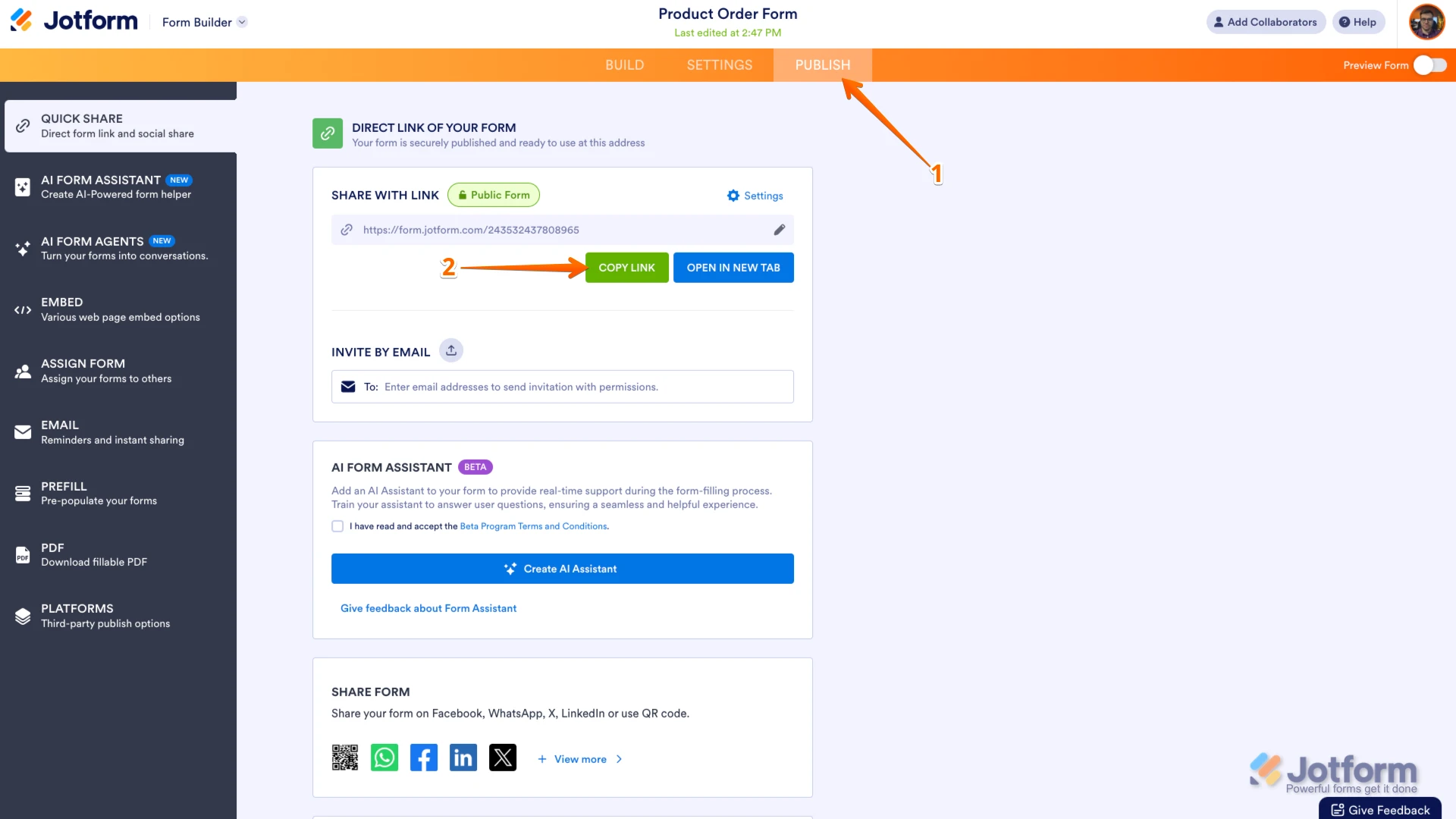
Can you share your form link with me so I can take a closer look? You can easily find your form's URL in Form Builder. Let me show you how:
- In Form Builder, in the orange navigation bar at the top of the page, click on Publish.
- In the Quick Share tab, click on Copy Link in the Share With Link section.
 Once you share the form URL with us, we’ll be able to help you better with this.
 -
LLawrence Michalski
The link is https://www.jotform.com/app/260216993906161
As I stated. The calendar was appearing on my phone and working fine, but this morning it would not appear on my phone. I cleared the cookies and cache on my phone , and reopened the app. The event calendar still did not appear. I went to the build site, and saw that it appears on the mobile preview screen. I then checked on another account the app name is AI Chat, the event calendar, which is a different calendar and account, also did not appear. Help.
-
Sidharth JotForm Support
Hi Lawrence,
Can you let me know which device you’re using? When I cloned and tested your Jotform App, everything worked the way it was supposed to. Take a look at the screenshot below to see my results:
Can you try it again and see how it goes? If the same thing happens, we’ll ask our Developers to look into this.
-
LLawrence Michalski
I'm using my android Samsung Flip 3. I just checked the LOI app on my phone, and it appears to be now working fine. Not sure what happen this morning, but it looks okay now. Thanks for your help, and if I notice any further problems, I will contact you. Again thanks for your attention to this matter.
-
 Podo: Support Specialist
Hi Lawrence Michalski ,
Your request has been answered and the thread is closed.
If you have another question or need more help, feel free to reply here and we'll assist you right away.
 Once you share the form URL with us, we’ll be able to help you better with this.
Your Reply
Something Went Wrong
An error occurred while generating the AI response. Please try again!