-
 Williams_Khayla_khayla
I'm trying to revise an older version of my Jotform but every time I try it keeps giving me the contact support message.
Page URL: https://form.jotform.com/253525206335048 -
 Podo: Support Specialist
Hi Khayla,
Thanks for reaching out to Jotform Support. I'm an AI assistant here to assist you.
You can use the Revision History feature that lets you revert your form back to an older version you select. Let me show you how to use it:
- In Form Builder, click on the Circular Arrow icon at the top middle of the page to open the Revision History menu.
- In the menu on the right side of the page, select the version you want to restore the form to.
- Now, just click on Revert next to the version you select, and then close the Revision History menu in the top right corner.

Give it a try and let us know if you need any help.
-
Williams_Khayla_khayla
I want to go further and revise an older version.
-
Podo: Support Specialist
Hi Khayla,
You can use the Revision History feature that lets you revert your form back to an older version you select. Let me show you how to use it:
- In Form Builder, click on the Circular Arrow icon at the top middle of the page to open the Revision History menu.
- In the menu on the right side of the page, select the version you want to restore the form to.
- Now, just click on Revert next to the version you select, and then close the Revision History menu in the top right corner.
Give it a try and let us know if you need any help.
-
 Jerlan JotForm Support
Hi Khayla,
I have checked your form, and under the revision history, there are only 2 versions available. Take a look at the screenshot below:
You've mentioned that you're getting a prompt to contact support every time you try to revert to an older version. A screen recording would help us see exactly what’s happening. You can use Loom or upload to Google Drive/Dropbox, then send us the link.Once we know more about what’s going on, we can figure out the fix.
-
Williams_Khayla_khayla
But I have another version I was using before the version on the 13th. I'm trying to upload a screenshot
-
Williams_Khayla_khaylaThis is the message I'm receiving on the top right. I'm trying to revise that one.
-
 Mark_S
Hi Khayla,
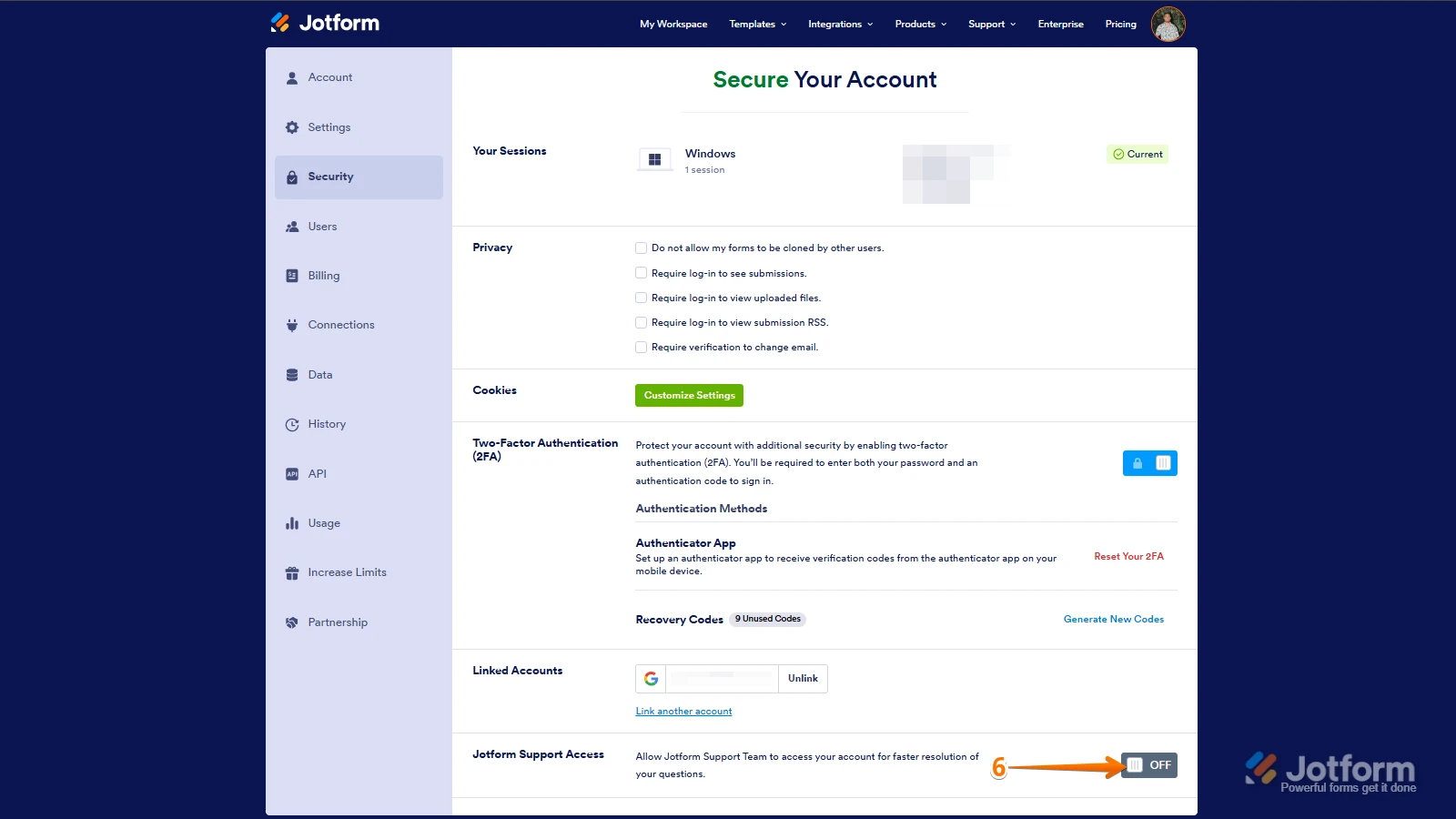
Let me take a look at this for you. To do that, we’ll need your permission to access your account. Don’t worry, you can turn it off again once we’re done. Let me show you how to do it:
1. In the top-right corner of your Workspace page, click on your Avatar/Profile Image icon.
2. Then, in the Dropdown menu that opens, click on Settings.
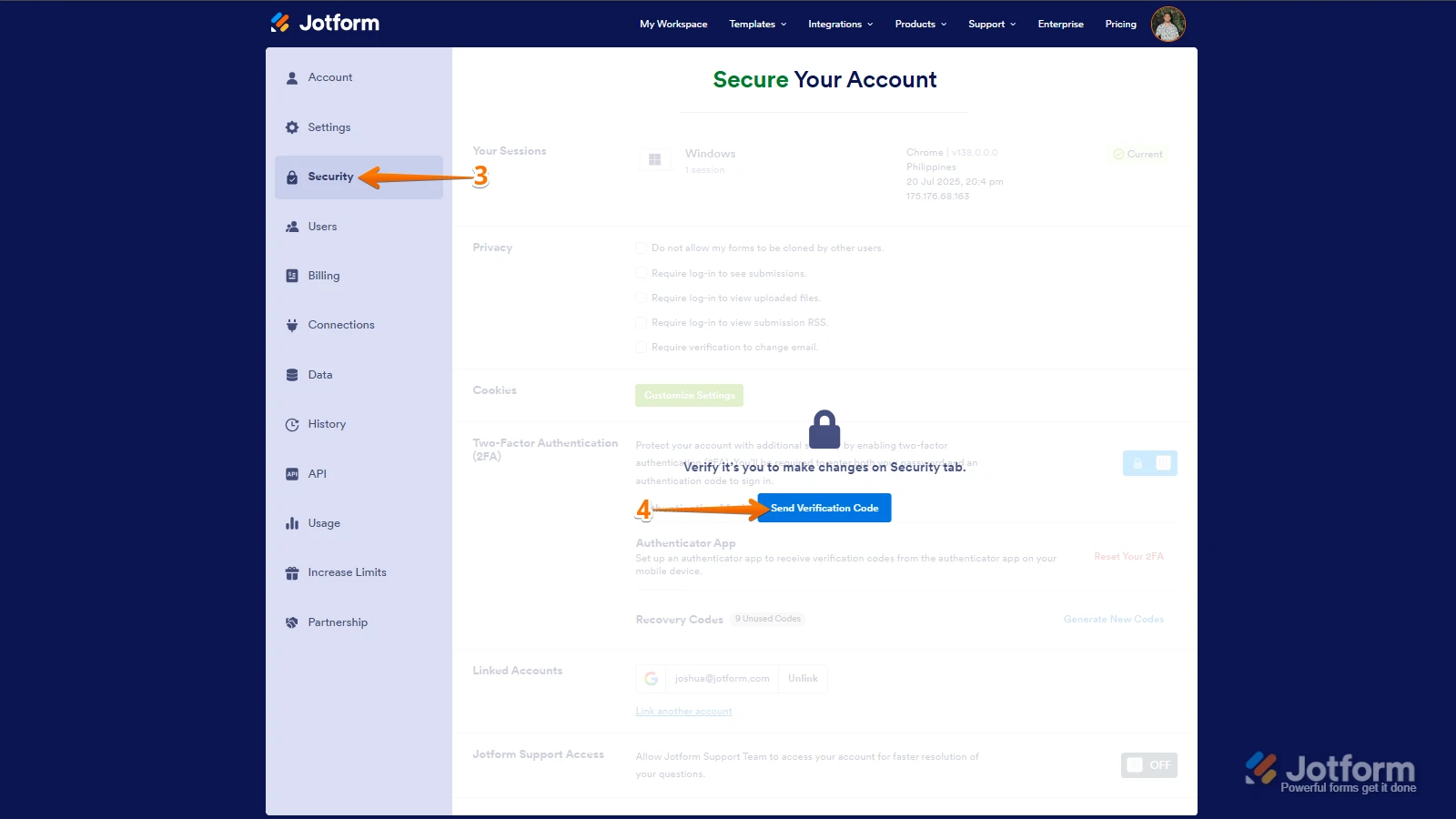
3. Next, in the panel on the left, click on the Security tab.
4. If you haven’t opened your Security page in a while, it’ll ask you to verify. To do that, click on Send Verification Code.
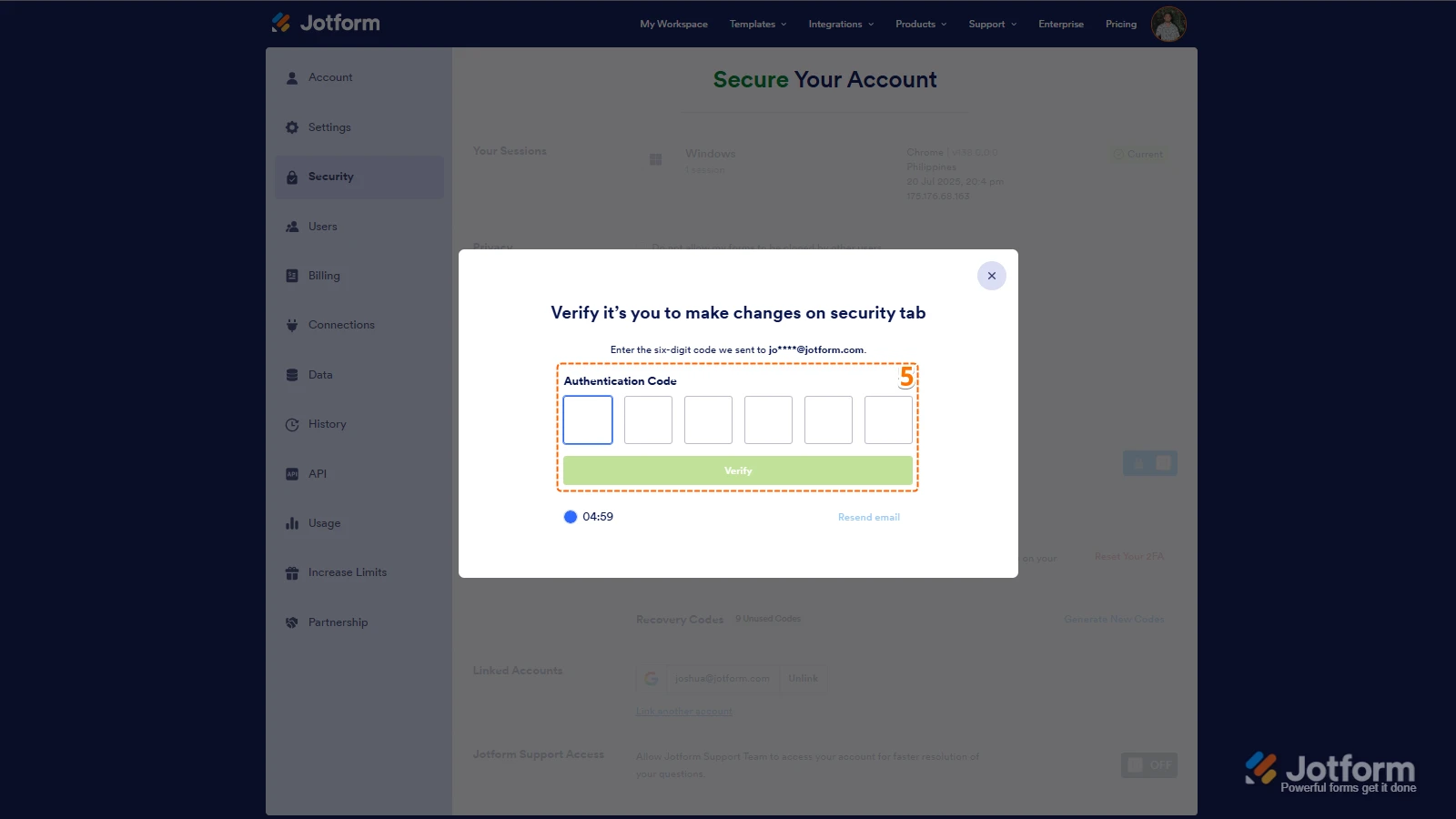
5. Then, enter the Verification Code you receive in your email.
6. Finally, at the bottom of the page, toggle on Jotform Support Access.
After we hear back from you, we’ll have a better idea of what’s going on and how to help. -
Williams_Khayla_khayla
It's done
-
 Gian_D JotForm Support
Hi Khayla,
It seems that you're trying to revert your submission table. I've tried to replicate your issue on my end, but I wasn't able to replicate it. Check out the screenshot below:
As you can see, I can press the Restore button on the upper right side of the page to restore a submission. Can you try to clear your form caches? Let me show you how to do it:
1. In Workspace, click on your Avatar icon on the upper right side of the page.
2. Then, click on Settings in the menu that opens.3. After that, click on Clear Cache under the Form Caches section.
Once done, can you try to restore your submission table again to see if it's going to work?
As soon as we hear back from you, we can work on getting you a solution for this.

 You've mentioned that you're getting a prompt to contact support every time you try to revert to an older version. A screen recording would help us see exactly what’s happening. You can use
 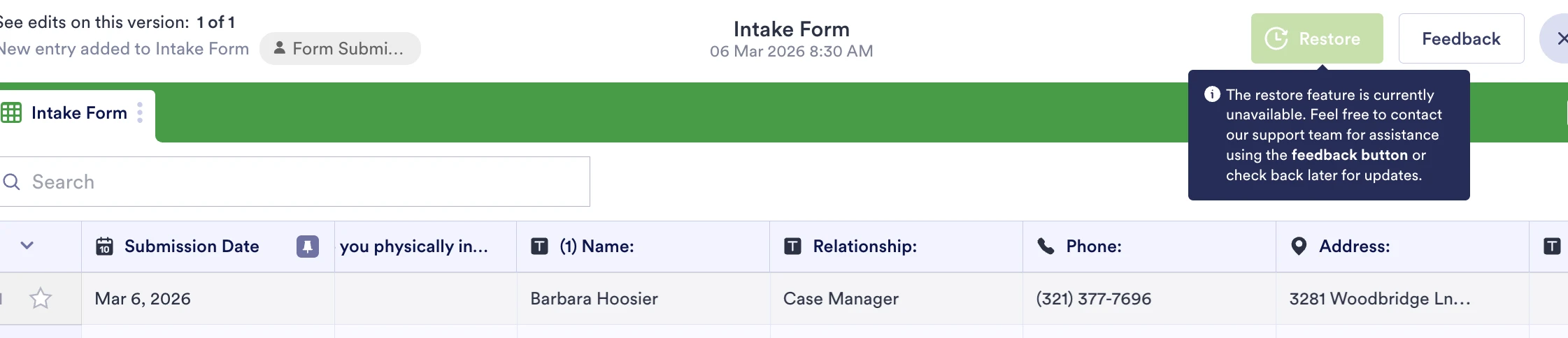 This is the message I'm receiving on the top right. I'm trying to revise that one.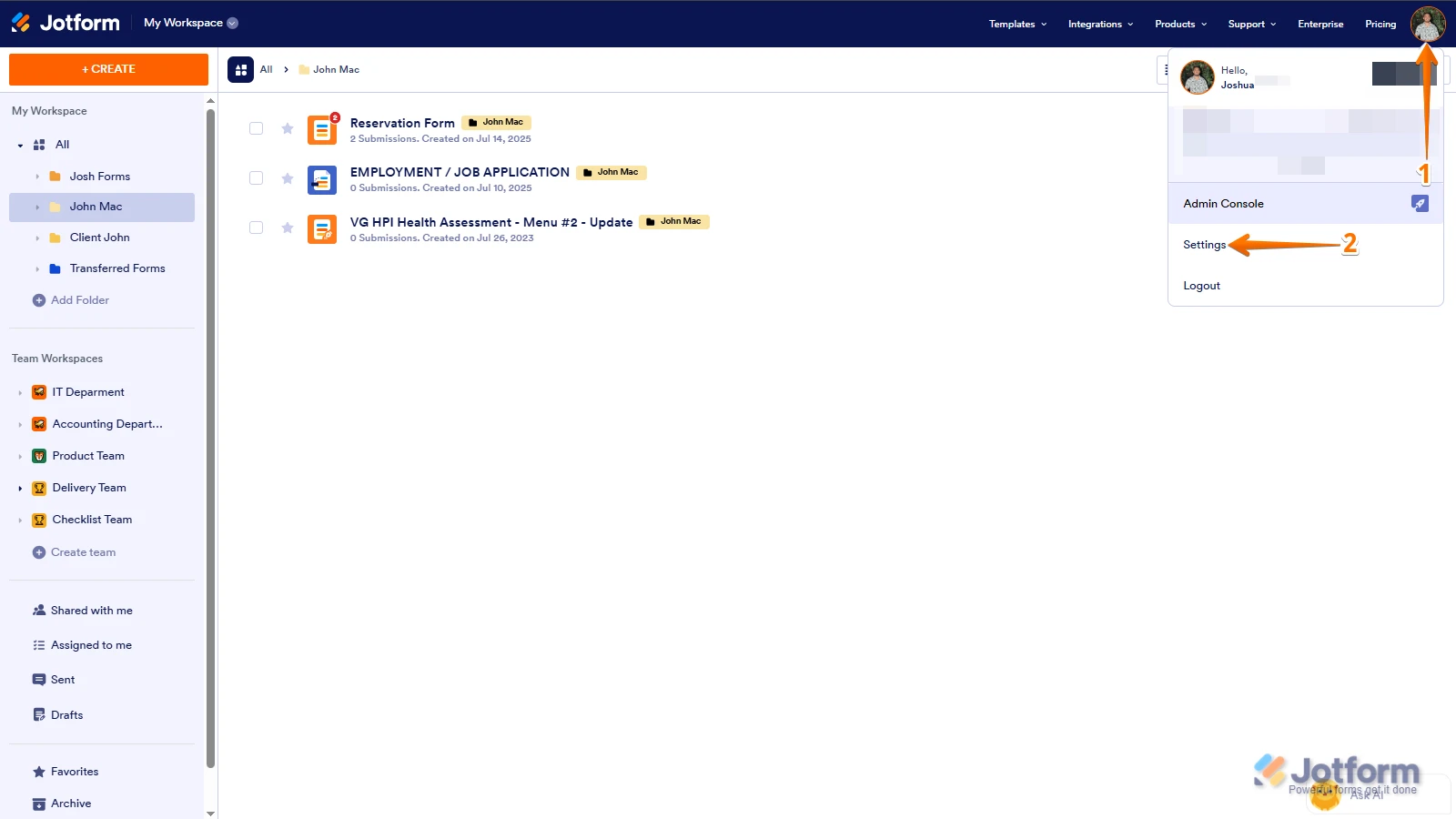
 After we hear back from you, we’ll have a better idea of what’s going on and how to help.

