-
 theatreboxtix
please I would prefer to chat with a person if possible
Page URL: https://form.jotform.com/251276355011146 -
 Podo: Support Specialist
Hi,
One of our Support Team members will take it from here to follow up shortly.
-
theatreboxtix
How long will it be before I can chat with someone?
-
 Jason Enterprise Support
Hi there,
Thanks for reaching out to Jotform Support. I tested your form to see if I could replicate the issue, but the multiselect Grid widget is working on my end. Check out the screencast below to see my results:

I've gone ahead and cleared your form caches as an aid to the issue you're experiencing. Can you try it again and see how it goes? If you run into the same issue, you can take a screenshot of what’s happening so it'll help us to understand better what’s going on. Let me show you how to post a screenshot to our Help Center:
1. On the Help Center page, scroll down to the Your Answer section and click on the Image icon.
2. Drag and drop your image into the Upload box, or click on it and select your file.
3. Then, click on the Add button in the bottom-right corner of the window.
4. To resize it, click on your screenshot and then click on one of the boxes in the corners, and drag it inward.
5. Once you're finished, click on the Post Answer button at the bottom right of the Your Answer section.
-
theatreboxtixI just went in to try and reserve two for the first friday - I know there are at least 6 seats reserved but I'm not seeing them as unavailable
it also seems to be taking a long time for the widget to load
-
theatreboxtix
Additionally I am trying it on my iphone, and the widget is grayed out with a circle rotating (like it's trying to load). it's also not showing any cells grayed out
-
 Jeric_T
Hi theatreboxtix,
I cloned your form and tested it to see if I could replicate the issue, but everything was working properly. Check out the screencast below to see my results:
Can you give us permission to do a test submission on your form and see if we can replicate the issue?When we hear back from you, we’ll be ready to move forward.
-
theatreboxtix
Sure go ahead
-
theatreboxtix
Hello? Are you still there?
-
Jason Enterprise Support
Hi theatreboxtix,
I tested your form using an iPhone 16 Pro on the Safari browser, and the reserved seats are visible on my end, including the available ones. I've attached a screencast below for reference.
Can you try to switch to a different network and test it? I'd also recommend restarting your device when you test the form again.
Give it a try and let us know how it goes.
-
theatreboxtix
I just restarted my computer and am trying it on Safari - inputted all the information and selected the first Friday from the drop down - saw all the seats availble. Then I tried selecting the first Saturday - again, all the seats showed up as available.
I even went into the app on my iphone and checked it and the same thing is showing up.
-
theatreboxtix
-
theatreboxtix
This is what I'm seeing before the grid "loads"...this never did this before and I've been using Jotform for a while.
-
Jeric_T
Hi theatreboxtix,
So there are two issues right now. The first is previously selected grid is not showing as selected, and the widget does not load on some mobile devices.
For the 1st issue, I see you have Multiple Multiselect Grid widgets and will show based on the condition. Did you make sure that you are selecting the same date as your previous submission? If yes, we can investigate it further. We'll just need access to your account to do that. Don't worry, you can disable that again after we're done checking things out. Let me show you how to do it:
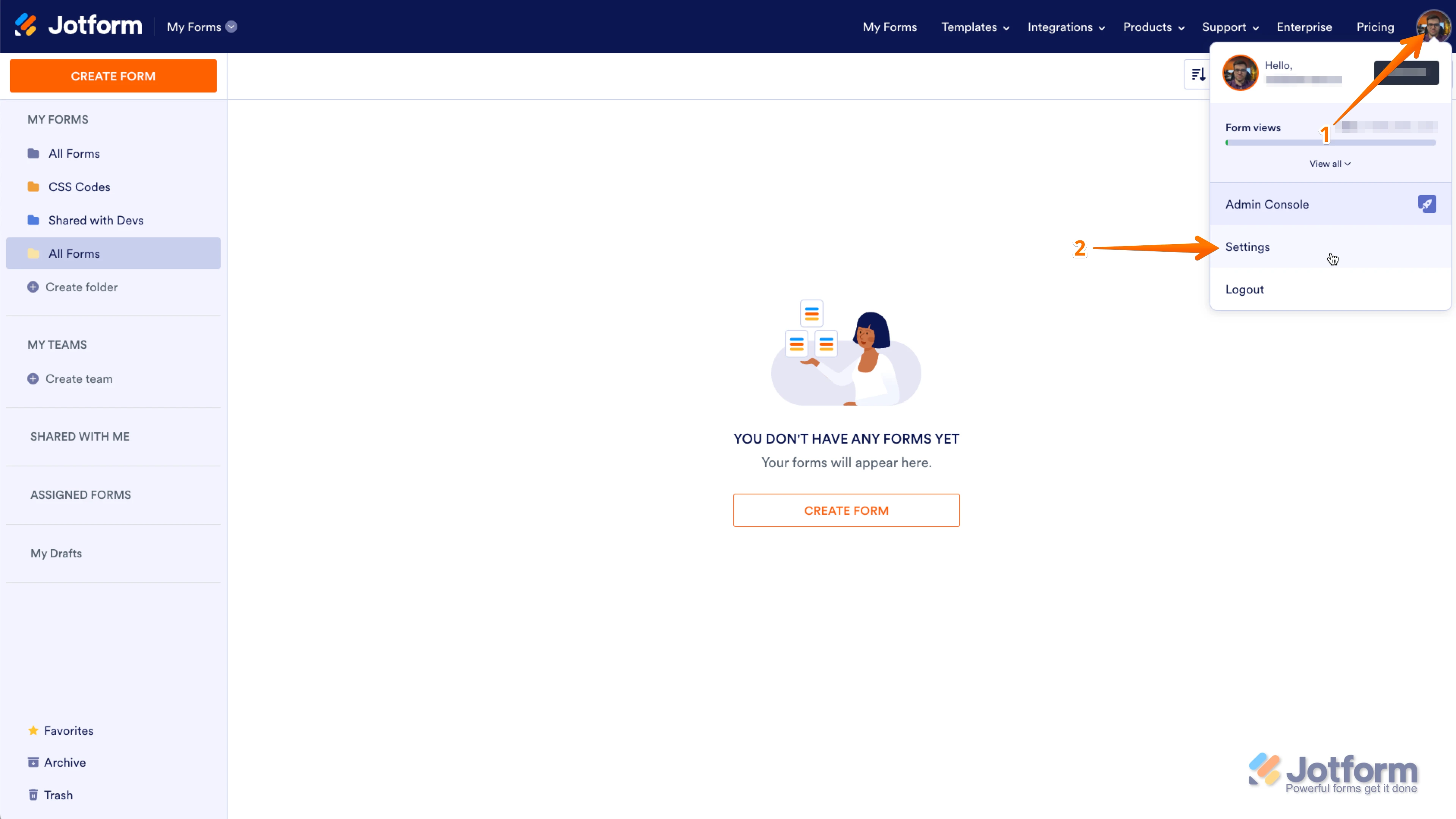
1. In the upper-right corner of your My Forms page, click on your Avatar/Profile Image icon.
2. In the small window that opens, click on Settings.
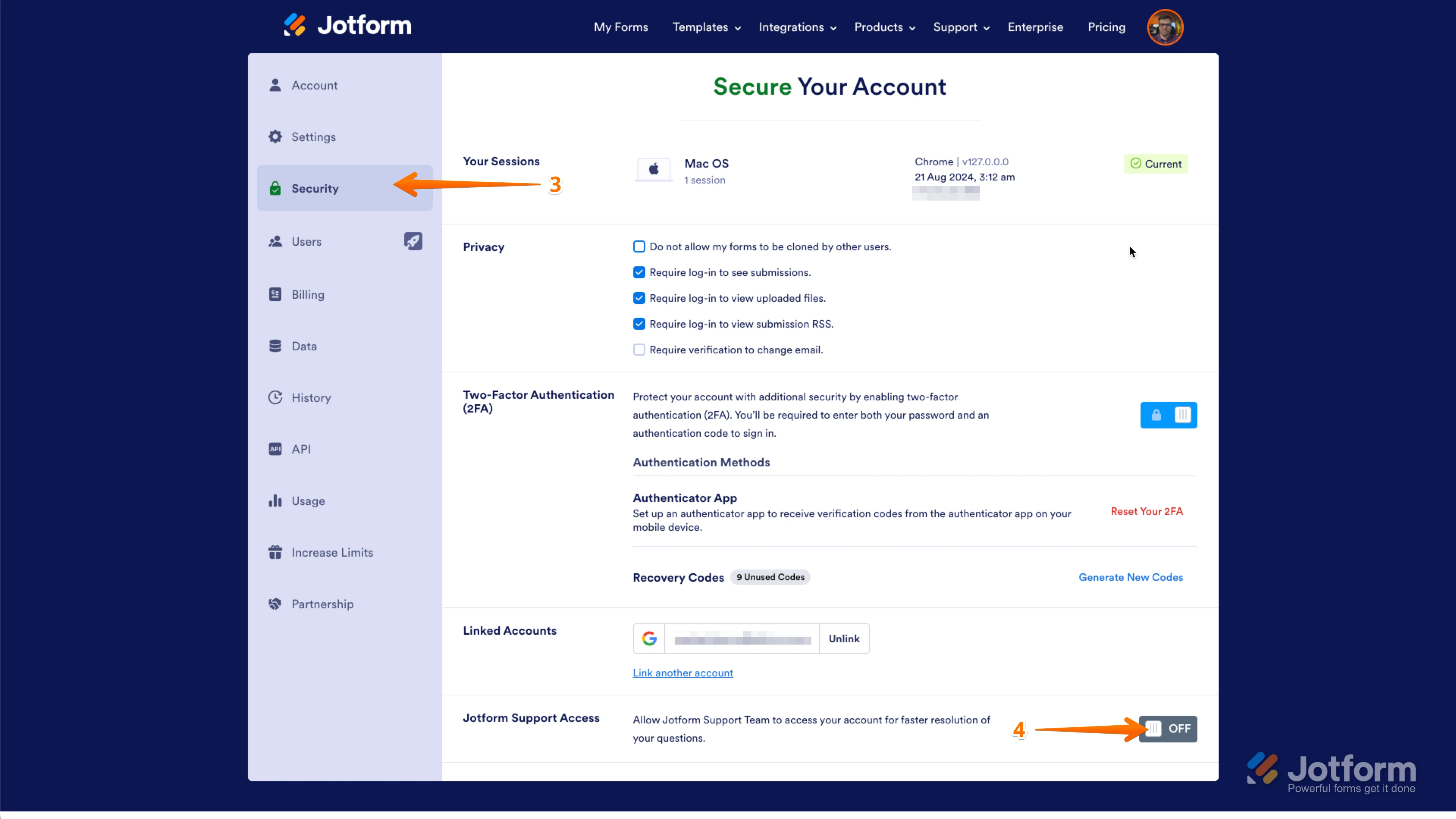
3. In the panel on the left, click on the Security tab.
4. Then, on the bottom-right side of the page, toggle Jotform Support Access to the On position.
As for the 2nd issue, I’ve gone ahead and moved it to a separate thread to keep things tidy, and someone from our Support Team will help you out with it here.Once we hear back from you, we can help you sort this out.
-
theatreboxtix
So I'm not sure what's happening - So I created a brand new form, and even included Multiselect Grids without all the CSS modifications and I put a reservation through, went back into the form and went to the same date as the first time, and the cells I selected initially are still showing up as "available".
This is not a me problem, it's a jotform problem. I am going to stop trying to figure it out because it's late and I don't have the patience to deal with the issue.
I hope that magically, somehow in the middle of the night, the Jotform guardian angels will take pity on me and fix the issue.
Guess we'll see tomorrow.
-
Jeric_T
Hi theatreboxtix,
Sure, but in case you still need help tomorrow, give us support access so we can further investigate. We have provided the steps above.
Reach out anytime if you've got more questions.
 I just went in to try and reserve two for the first friday - I know there are at least 6 seats reserved but I'm not seeing them as unavailable

 As for the 2nd issue, I’ve gone ahead and moved it to a separate thread to keep things tidy, and someone from our Support Team will help you out with it