-
 Kyle_Moesch
We are using the Signature element. Recently there was a Jotform update that made it unusable. No matter what you change the width/height settings to, the signature box remains so small you cannot use it.
Customers need space to sign their name and they can barely fit a few letters in the box. Again, your element settings do not impact the signature box size even if you double the values for width/height - and this is a huge problem for collecting what we need on the form.
Let us know when this will be fixed.
-
 Podo: Support Specialist
Hi Kyle,
Thanks for reaching out to Jotform Support. I'm an AI assistant here to assist you.
Regarding the Signature element size issue after the recent Jotform update, the standard width and height settings in the element do not seem to affect the signature box size as expected. Unfortunately, there is no direct setting within the Signature element to adjust the size beyond the width/height options you mentioned.
One possible workaround is to use custom CSS to adjust the signature field size if you are using the Classic Layout in Form Builder. However, the knowledge base does not provide a direct fix for the issue where the width/height settings are ignored after the update.
Since this is a known issue affecting usability, our support team will need to handle this request for a fix or update. I don't have a specific timeline for when this will be resolved, but your feedback is important and will be escalated accordingly.
Let us know if you want guidance on applying custom CSS or if you have any other questions.
Give it a try and let us know how it goes.
-
Kyle_Moesch
No, I need a response from a human about this problem.
-
Podo: Support Specialist
Hi Kyle,
One of our Support Team members will take it from here to follow up shortly.
-
 Bojan Support Team Lead
Hi Kyle,
I have tested the resize option of the signature field, however, I could not replicate the issue. Here's how to update the signature field size:
- While in Form Builder, click on the Gear icon next to the field.
- From the right panel, enable Width and enter the desired width.
- You can also update the height from the Height field.

I've also checked your account, and you don't have any assets in it. In case the issue continues, send us another message while logged into your account with the form URL, so we can check it further.
Give it a try and let us know how it goes.
-
Kyle_MoeschHi,
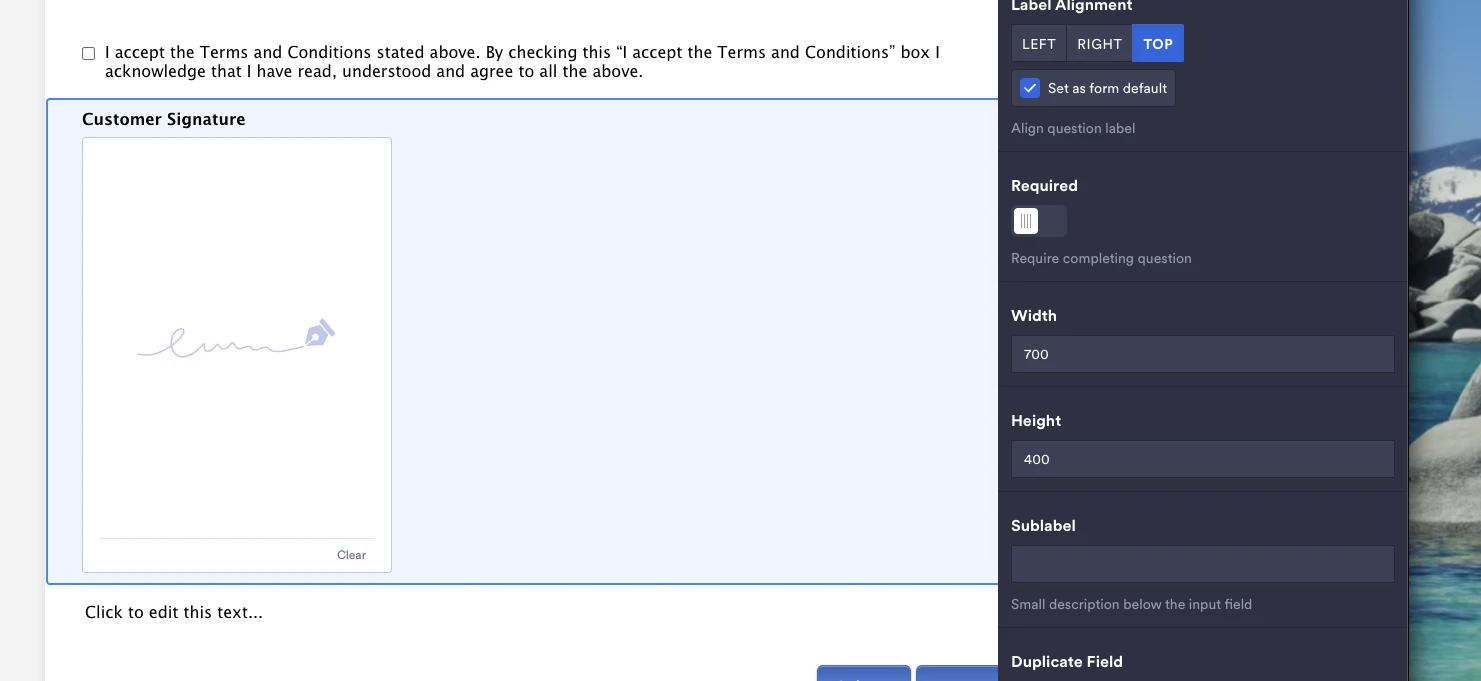
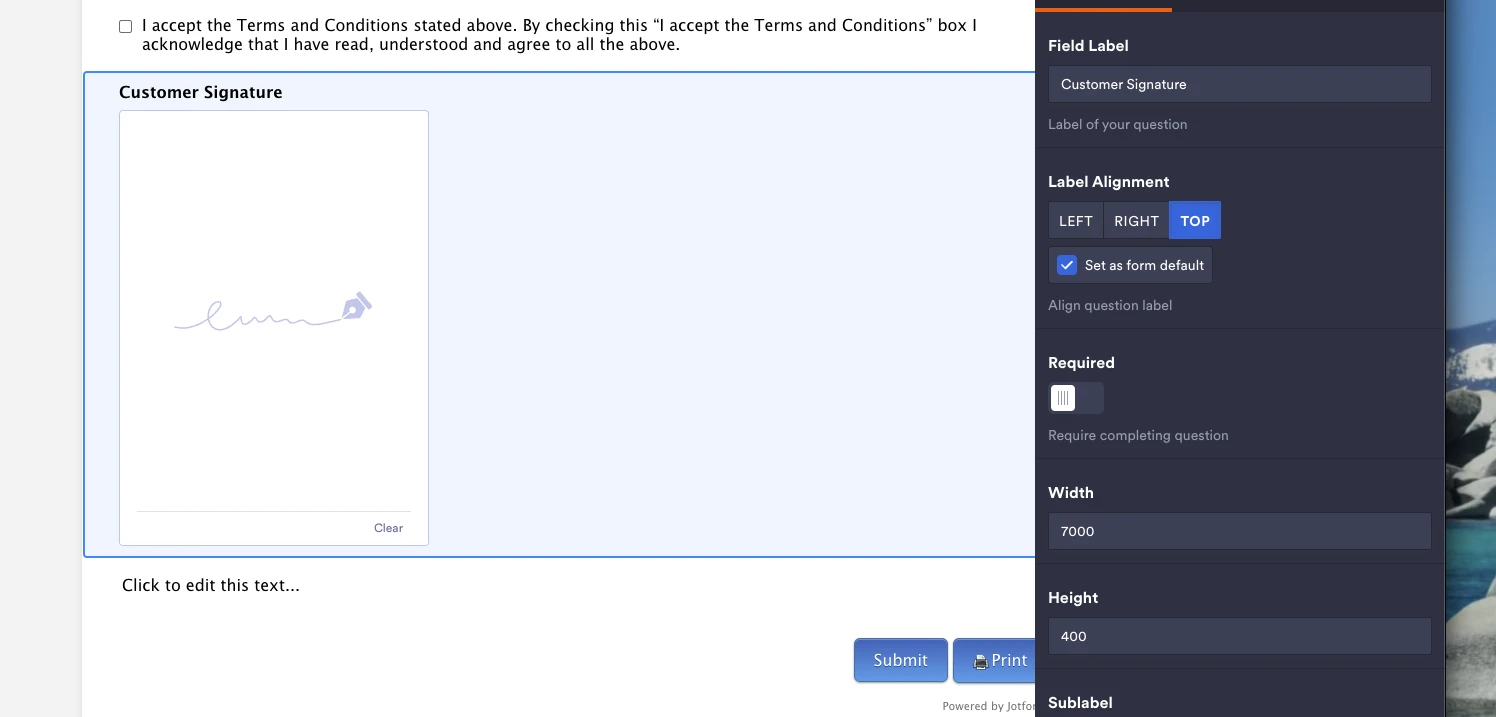
Please find screenshots of the issue below. It is very easy to recreate and is not solved. We also have a ton of assets on our account, over 35 individual forms.
Width 700 x Height 400
[cid:80eb5d47-4ec8-4910-9625-a6474008d7c7]
Even with 10x the width entered, notice how it is the same size.
[cid:5e3d578d-1c32-4bdc-8b39-c2bf036ed055]
Please let me know when this is fixed.
Regards,
Kyle
________________________________
... -
 Gian_D JotForm Support
Hi Kyle,
Looks like the screenshot didn’t come through on my end. Can you send it again? Our guide on How to Post Screenshots to Our Help Center shows you how to do that.
As soon as we hear back from you, we can work on getting you a solution for this.
-
Kyle_Moesch
Please find screenshots of the issue below. It is very easy to recreate and is not solved. We also have a ton of assets on our account, over 35 individual forms.
Even with 10x the width entered, notice how it is the same size.
-
Gian_D JotForm Support
Hi Kyle,
I saw that you can't increase the width of your Sign element by changing its field width size. You can use CSS code instead to make it wider. Let me show you how to do it:
1. Copy the CSS code below:
/*To increase Sign element width*/

.signature-pad-wrapper{

  width: 500px;

}

/*Ends here*/
2. In Form Builder, click on the Paint Roller icon on the upper right side of the page.
3. Then, click on the Styles tab on the upper right side of the page.
4. After that, paste the CSS code that I've provided earlier in Inject Custom CSS on the right side of the page.That's it. Do you need further assistance with your Sign element?
Once we hear back from you, we can help you sort this out.
-
Kyle_MoeschHi,
This is not resolved. When adding the CSS, it only "visually" changes the box size. Customers are still not able to sign their name across the entire empty field, the signature field only accepts "drawing" in a very small box. We need this fixed ASAP as it is an issue on Jotform's end that started roughly 2-3 weeks ago.
________________________________
... -
 Kamal JotForm Developer
Hi Kyle,
As Bojan stated, I do not see any assets associated with your account. Does the account with 35+ assets belong to a different email? Alternatively, If you can send us a short screen recording of the steps you’re taking, it’ll help us pinpoint the issue. Loom, Google Drive, or Dropbox links all work fine.
-
Kyle_MoeschHi,
You'll have to look under our business account, Caldwell Equipment for assets. Bojan found them without any issue.
Here is a link to a few files in google drive. https://drive.google.com/drive/folders/12OEsCTbOfC7Q3IgsahA0sY36mbrSeJq5?usp=drive_link
File 1: Image, showing that in January, your signature field was full size and working properly. Since then, sometime, Jotform made a change and broke the signature field.
File 2: "Jotform Broken Signature field" - This video shows how your broken (tiny) signature box works today. You've made it so small it's almost impossible for customers to use.
File 3: "Jotform Proposed Fix Signature Field" - This video shows the result of the 'fix' offered by Bojan. As you can see, it only visually makes the box parameters appear bigger, but does not in-fact stretch the signature box back to full size. You can see only the first 1/3 of the signature is able to be captured within the boundaries. There is a hard line - very clear to see where it cuts off - same as the "normal" box size.
Please escalate the issue - this is on Jotform's end and we need this to work properly.
Regards,
Kyle
________________________________
... -
Gian_D JotForm Support
Hi Kyle,
I saw that you're using an Old Default Theme on your form, which is incompatible with Signature field size modification. I've cloned your form and changed its theme to the newest Default Theme to see if it's going to work, and it works as expected. Check out the screencast below:
As you can see, it is working properly. I was able to make the Signature field wider. Let me show you how to do it:
1. In Form Builder, click on the Paint Roller icon on the upper right side of the page.
2. Then, click on the Themes tab on the upper right side of the page.
3. After that, click on Default Theme in the list.Once done, can you try to change the size of your Signature field to see if it's going to work?
As soon as we hear back from you, we can work on getting you a solution for this.
-
Kyle_MoeschHi,
Added some more files to the G-Drive link for you to review. Look at most recently added.
Even after changing the theme as you suggested, and adding the CSS code to widen the field, it does nothing. This is not fixed.
________________________________
... -
Kyle_MoeschI see that if I use the signature "width" option, not via CSS, I can adjust now. This should work.
________________________________
...