-
 bradygarner746I am experiencing an issue where my form looks weird even though I didn't make any changes to it. I have not mentioned any specific steps I have tried or any error messages. I want to raise a support ticket to get help with this problem.
 -
 Kris Ann JotForm Support
Hi Sreejan,
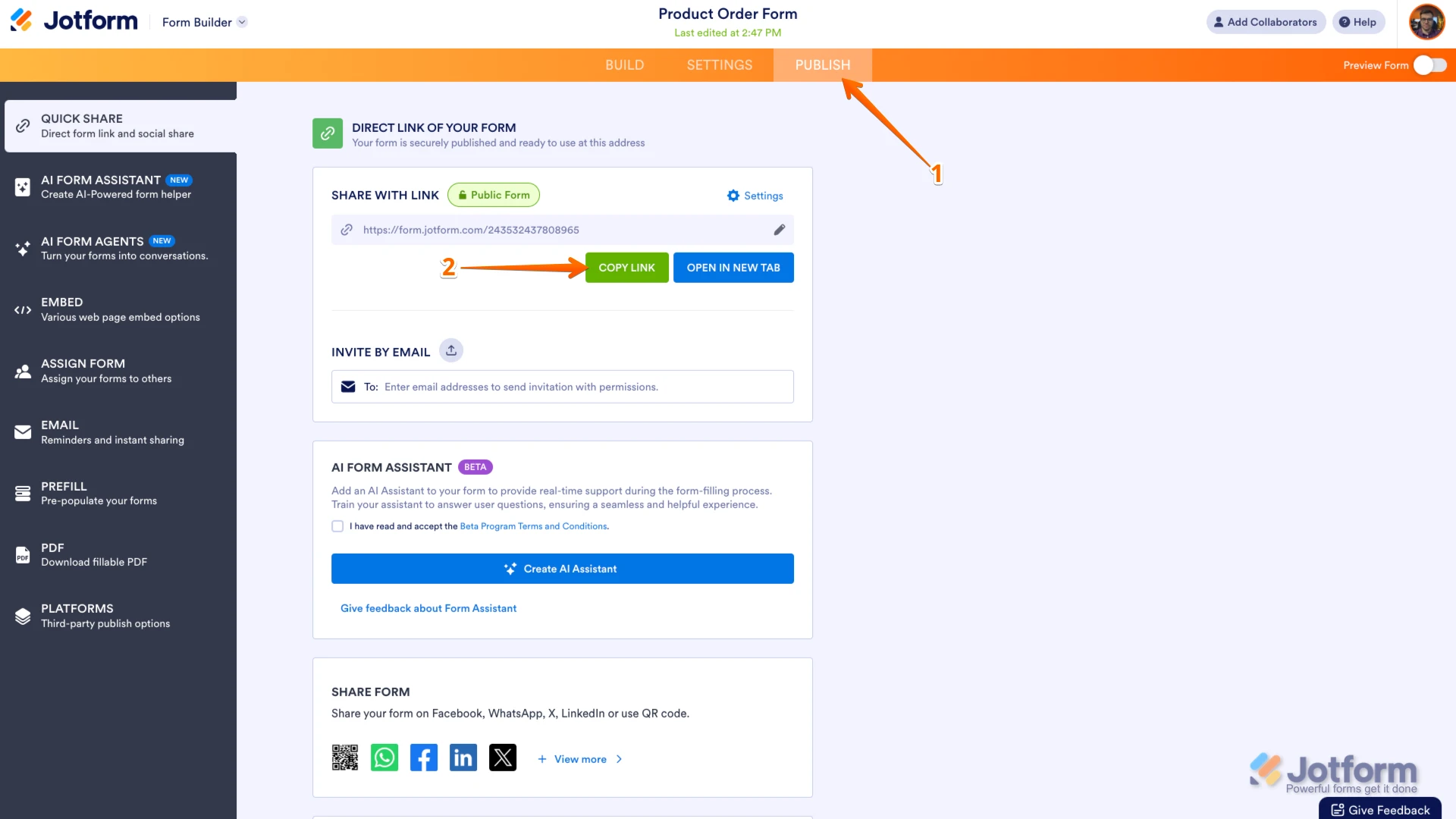
Thanks for reaching out to Jotform Support. Can you explain a bit more about the issue so I can get a clearer idea of what’s happening? Can you send me the link to your form so I can take a look for you. You can easily find your form's URL in Form Builder. Let me show you how:
- In Form Builder, in the orange navigation bar at the top of the page, click on Publish.
- In the Quick Share tab, click on Copy Link in the Share With Link section.
 And if you can take a screenshot of what’s happening, that'll help us to understand better what’s going on. Let me show you how to post a screenshot to our Help Center:
1. On the Help Center page, scroll down to the Your Answer section and click on the Image icon.
2. Drag and drop your image into the Upload box, or click on it and select your file.
3. Then, click on the Add button in the bottom-right corner of the window.
4. To resize it, click on your screenshot and then click on one of the boxes in the corners, and drag it inward.
5. Once you're finished, click on the Post Answer button at the bottom right of the Your Answer section.
-
bradygarner746
Here is how the form looks
In the editor the form looks okay however on the edit page, the form is totally messed up
Form link:Also I see that teh form link previously used to be: https://form.jotform.com/250031883378459
However right now its showing: https://pci.jotform.com/form/250031883378459
Why did the link change and why was no notifications sent regarding this? -
Kris Ann JotForm Support
Hi Sreejan,
What do you mean when you say In the editor the form looks okay however on the edit page it looks messed up? It seems like you're referring to your PDF document, because when I cloned and tested your form, I found out that the PDF document looks like this.
If so, there are three alternative solutions if the PDF file doesn't change when you update the form:The first one is when you make any changes and open the PDF editor:
- After you make changes in Form Builder, click on the Downward Arrow icon on the top-left side of the page and select PDF Editor.
- Click on the Yes, Proceed button in the window that pops up, and the file will update automatically.
- Click on the Add Element menu on the left side of the page.
- Then, click on the Form Fields tab, drag and drop or click on the fields you want to add your PDF document.
- In the blue navigation bar at the top, click on the New PDF button.
- In the windows that opens, choose a layout and that’s it.
Let us know if you need any more help.
 And if you can take a screenshot of what’s happening, that'll help us to understand better what’s going on. Let me show you how to post a screenshot to our Help Center:
 If so, there are three alternative solutions if the PDF file doesn't change when you update the form: