-
 ljoiner
I have created an employee onboarding form. It needs to go from HR, to Payroll, to IT, to data, to curriculum. Each department needs to fill in their section. So far, it only asks for their approval. Your AI help says it can't be done, but when I signed up, I was told it could be done. I'd appreciate help with getting this set up.

-
 Chris_L JotForm Support
Hi Leesa,
Thanks for reaching out to Jotform Support. As mentioned by my colleague in the previous help request that you submitted, you have to add the edit link to the approval emails. Once the approver gets the email, they will need to edit the entry before taking action to the request. Also, to prevent the Workflow from restarting, you have to disable the restart on submission edit option. Let me show you how:
- In Workflow Builder, in the green navigation bar at the top of the screen, click on Settings.
- Click on the Dropdown menu under Restart Workflow on Submission Edit, then select Disabled.
Reach out again if you need any other help.
-
ljoinerI did follow the previous directions - which is why each section has an
'approved' option. I need each department to be able to fill in their
section. They don't need to approve it.
Leesa Joiner, M.Ed
Director of Technology
ljoiner@sanford.org
207-206-1783
Select a time to meet: https://tinyurl.com/joiner-bookme
... -
 Girish Enterprise Support
Hi Leesa,
We can replace the approval element in the workflow with the email element, but then all emails will be triggered together.
Since the flow needs to be in sequence, you can use this approval element, but it will have an Approve button, which the approver will need to click to move to the next step.
You can edit the notification email on each approval element and add an edit link into it so that at each stage, the corresponding department can edit the submission.
Let's walk through the steps to do that.
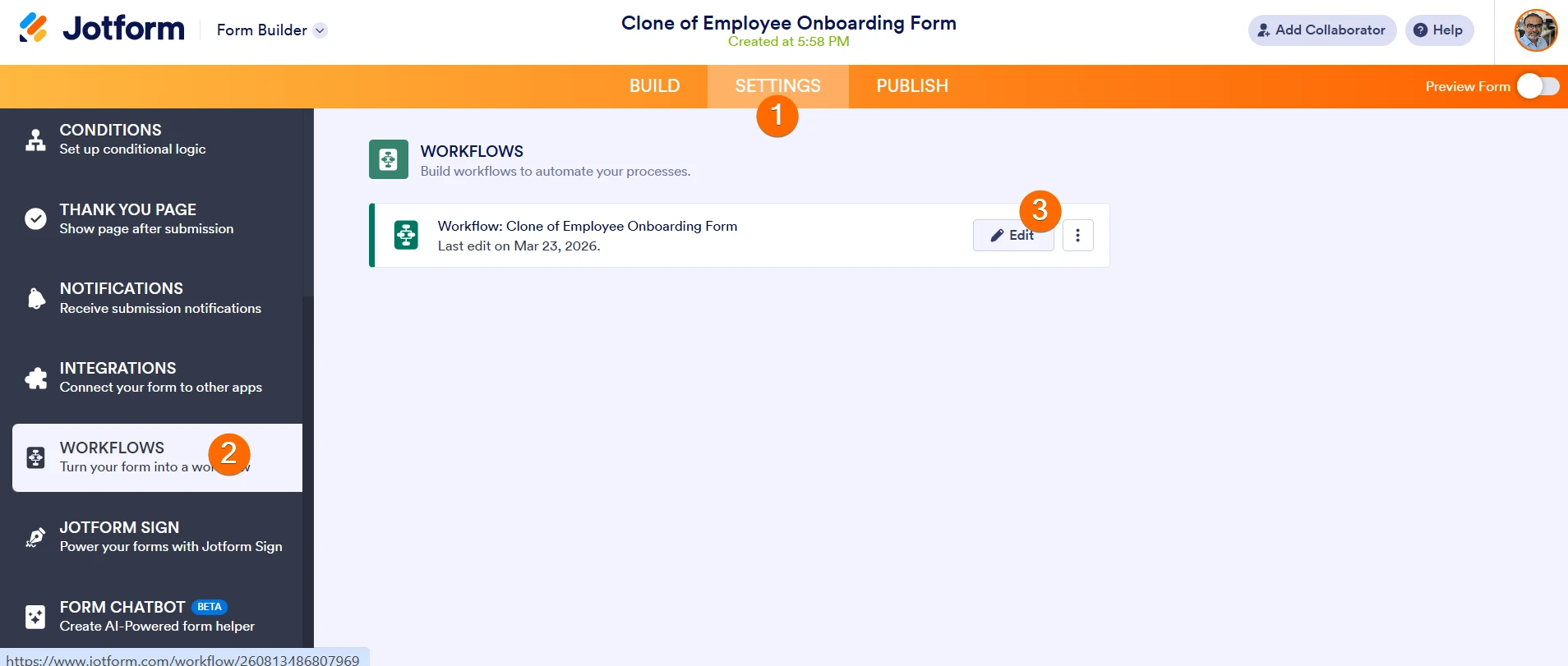
- On the Form Builder, click Settings on the top navigation bar.
- Click Workflows on the left pane.
- Hover over the workflow on the right and click Edit.
- Now, on the Workflow Builder, click the Gear icon on the first approval element.
- Scroll down on the right pane and click Edit email.
- Here, place your cursor in the email content section, click the Form Field button on the toolbar, and click Edit Link. This will add an edit submission link in the email.
- Click Save to save the changes.
Note: You will need to do these same steps on all approval elements in the workflow.
NOTE: Approvers will need to click the Approve button on the email after editing the submission, so that the next section/department gets the email for editing the submission.
Give this a try and let us know how it goes.
-
ljoinerWe are still having the same issue. The first person fills in their
section, then the next person gets the email and their only options are to
click 'Accept' 'Decline' or go to mail. No one else can fill out the
form. I have followed the directions and there is no change.
Leesa Joiner, M.Ed
Director of Technology
ljoiner@sanford.org
207-206-1783
Select a time to meet: https://tinyurl.com/joiner-bookme
... -
 Kyle JotForm Support
Hi Leesa,
As Girish mentioned, the key is to use the Approval elements to control the sequence but customize each email so departments can edit the form instead of just approving. You can check out the guide he shared here.
Each department will then receive an email with the edit link, fill in their section, and click Approve to pass the form to the next team. The Approve button simply moves the workflow forward, and it doesn’t mean they’re approving content.
Try that out and get back to us if you have any issues.
-
ljoinerBut that is not what happens - they do not receive an edit link
Leesa Joiner, M.Ed
Director of Technology
ljoiner@sanford.org
207-206-1783
Select a time to meet: https://tinyurl.com/joiner-bookme
... -
 Lesther Support Team Lead
Hi Leesa,
I see that you're able to follow the instructions in our previous response in adding the edit link to the Approval Email. You need to do the same for the other Approve Element, edit the Approval Email, and insert the Edit Link into the email message. I made another screencast below showing how to add an Edit Link to the approver email content: