-
 esupport.tw
Hi there,
We’ve created a booking form for our museum and would like to check if the following can be done:
- Advance booking requirement
We’d like visitors to book at least 3 days in advance (Hope we can decide it our own). For example, if today is March 1, they should only be able to select dates from March 4 onward. - Language (Traditional Chinese)
Is it possible to display the month and day of the week in Traditional Chinese in the date picker? - Time slots & capacity control
Each day has two sessions: - Morning: 10:00–12:00
Each session can accept up to 50 visitors.
If slots are still available → show normal color (blue)If fully booked → show red color with “(Full)”Fully booked slots should not be selectableWould it possible to do it?
Thanks in advance for your help! - Advance booking requirement
-
 Jerlan JotForm Support
Hi esupport.tw,
Thanks for reaching out to Jotform Support. Let me show you how to allow users to select only dates 3 days after the current date:
- In Form Builder, click on the Appointment field, then select the Gear icon to open its menu.
- Then, in the menu that opens on the right side of the page, click on the Limits tab.
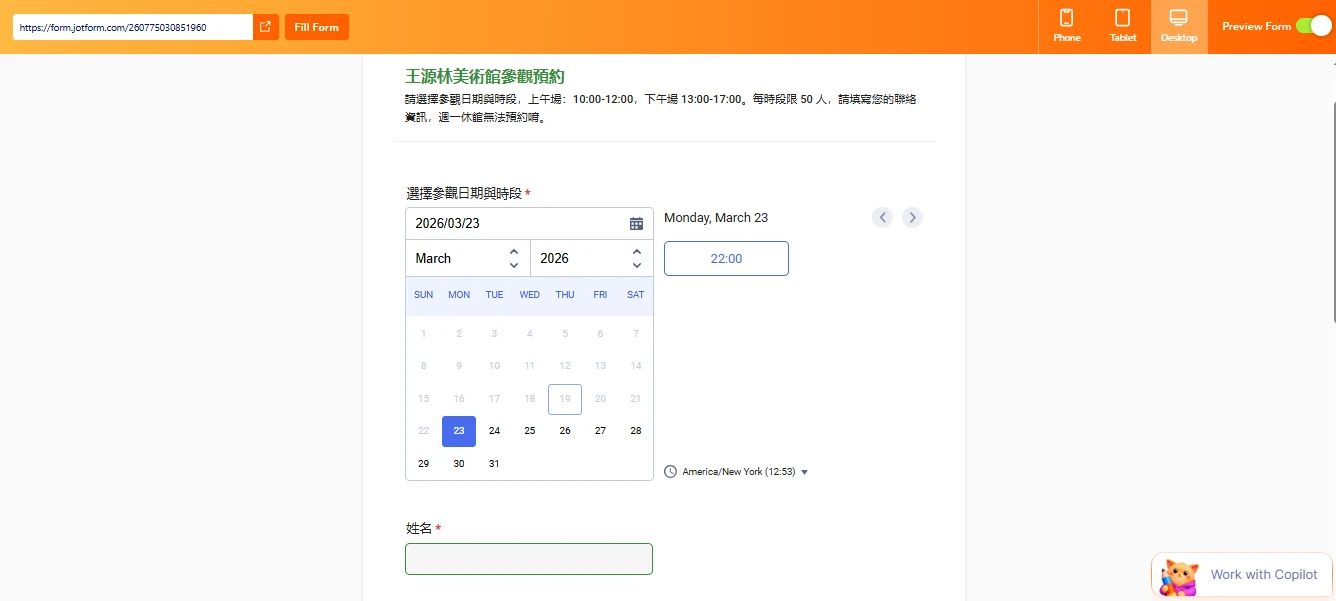
- Under Minimum Scheduling Notice, set it to 72 hours, which is equivalent to 3 days.

The date in the screenshot below is March 19, 2026, and with the Minimum Scheduling Notice, it’s only possible to book starting on March 23. Take a look at the screenshot below:
I’ve gone ahead and moved your other questions to separate threads to keep things tidy, and someone from our Support Team will help you with them here:
- Date picker: How to display month and day of week in traditional Chinese
- Time Slots & Capacity Control: Display Availability and Disable Fully Booked Sessions
Give it a try and let us know how it goes.
-
esupport.tw
Wonderful! Thank you very much!
-
 Podo: Support Specialist
Hi esupport tw,
Your request has been answered and the thread is closed.
If you have another question or need more help, feel free to reply here and we’ll assist you right away.