-
 VATF2
VATF2Hello,
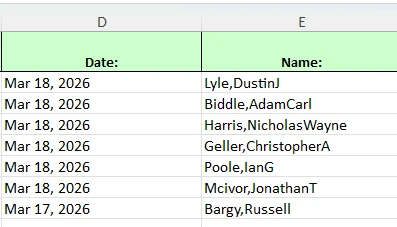
On the form linked below when users fill out their name and submit the form their name is showing correctly; last name, first name space and then middle initial. In the submission table this information is posting correctly, however, when I download information into excel or CSV the name is being compressed with no spaces in between (screenshot). This creates problems when trying to use that information. This issue has been going on for several months now and I'm not sure how to fix it.
Thanks
 Page URL: https://form.jotform.com/233095732633154
 -
 Podo: Support Specialist
Hi Jon,
Thanks for reaching out to Jotform Support. I'm an AI assistant here to assist you.
The issue you are experiencing, where names appear correctly in the submission table but are compressed without spaces when downloaded as Excel or CSV files, is a known behavior related to how the data is exported.
To address this, here’s how you can download your submissions properly:
- Go to Jotform Tables and select your form submissions.
- Click on the Download All button in the upper-right corner.
- Choose your desired file format (Excel or CSV) from the menu to start the download.
If the names are still compressed without spaces, it may be due to how the data is formatted or concatenated in the form fields before export. Unfortunately, the export process does not automatically insert spaces between concatenated name parts.
One workaround is to check your form’s name field setup to ensure the spaces are included in the field values themselves, or you can adjust the data in Excel after downloading by using text functions to separate the names.
If you want, you can also create a CSV Report from your submissions with custom settings to better control how the data is formatted during export.
Give it a try and let us know how it goes.
-
VATF2
This does not answer my question. The information comes from an auto complete widget with all the names already typed with correct spacing in between them. There was no issue with the submission table or the excel downloads until a few months ago. Nothing on the forms changed but it now comes out compressed.
-
Podo: Support Specialist
Hi Jon,
Thank you for the additional details. Based on the information available, the issue with names being compressed without spaces in the Excel or CSV downloads despite appearing correctly in the submission table and coming from an Autocomplete widget may be related to a recent change or issue in the export process itself, as nothing on the form has changed.
Unfortunately, there is no specific documented fix for this exact scenario in the knowledge base. The Autocomplete widget itself should preserve the spacing as entered, but the export to Excel/CSV might be concatenating the name fields without spaces due to a backend change or bug.
As a workaround, you might consider:
- Checking if the export file can be adjusted by creating a custom CSV report with specific formatting.
- Manually adding spaces in Excel after download using text functions.
- Testing if exporting to a different format (like Excel instead of CSV or vice versa) preserves the spacing better.
Since this issue started recently without changes on your side, it may require further investigation by the support team to identify if it's a bug or export setting change.
I don't have more detailed information on a direct fix, but if you want, I can escalate this to the support team for further review.
Give it a try and let us know how it goes.
-
VATF2
Escalate this to the support team
-
Podo: Support Specialist
Hi Jon,
One of our Support Team members will take it from here to follow up shortly.
-
 Jerlan JotForm Support
Hi Jon,
I cloned your form and tested it to see if I could replicate the issue, and I ran into the same thing. But there’s a quick fix. After I downloaded the file, I uploaded it to Google Drive, then I opened it with Google Sheets. Check out the screencast below to see my results:
-
VATF2
I appreciate you finding work around, but it's a little frustrating having to use another program to manage the data. Is there no other solution?
-
 Shaira JotForm Support
Hi Jon,
I cloned your form and tested it on my end to check the issue, and I can confirm it’s happening here too. Check out the screenshot below to see my result:
To fix this, the best workaround right now is the one Jerlan shared above. I’ve also gone ahead and reported this to our Developers so they can figure out what’s going on. We’ll be back with an update as soon as we can.
 To fix this, the best workaround right now is the one Jerlan shared
 Your Reply
Something Went Wrong
An error occurred while generating the AI response. Please try again!