-
 Masalamedia
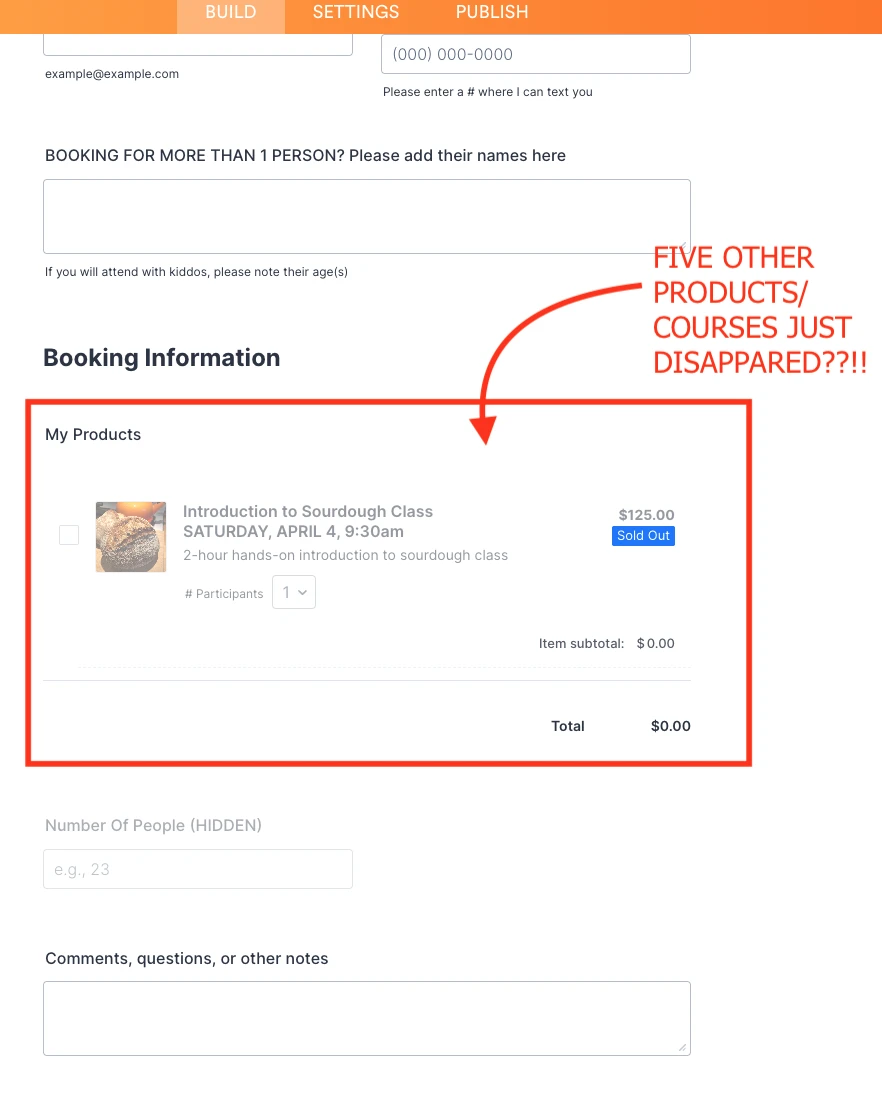
While editing the price on one of the products in MY PRODUCTS, I got an error message from Jotform that prompted me to reload the page. When I did, all but one of my products had disappeared.
 Page URL: https://form.jotform.com/251395193921966
 -
 Podo: Support Specialist
Hi Michael,
Thanks for reaching out to Jotform Support. I'm an AI assistant here to assist you.
Regarding your issue where all but one product disappeared after editing the price and reloading the page, there is no specific documented solution in the knowledge base for this exact scenario.
However, here are some general suggestions that might help:
- Try checking if the products are still present but hidden or filtered out in your product list or form builder.
- Reload the form editor again or clear your browser cache and try accessing your products once more.
- If you accidentally deleted products, note that deleted submissions or entries can sometimes be restored in Jotform Tables under the "Trashed Entries" section, but this applies to submissions rather than product list items.
If the problem persists, please provide more details or screenshots to help further diagnose the issue.
Give it a try and let us know how it goes.
-
Masalamedia
I already gave you a specific description of what happened and a screenshot
-
Podo: Support Specialist
Hi Michael,
Thank you for providing the description and screenshot. Since there is no specific canned response or documented solution for this issue, I recommend trying the following steps to troubleshoot:
- Clear your browser cache and cookies, then reload the form editor to see if the missing products reappear.
- Try accessing your form and products from a different browser or device to rule out any browser-specific issues.
- Check if the products are accidentally hidden or filtered out in the product list or form builder interface.
- Review any recent changes or actions you took before the issue occurred to see if they might have caused the disappearance.
If these steps do not resolve the issue, please share any additional details or error messages you received, and we will continue to assist you.
Give it a try and let us know how it goes.
-
Masalamedia
These troubleshooting steps are either irrelevant or have already been done. I need a support agent to investigate why my form lost a large part of its content.
-
Podo: Support Specialist
Hi Michael,
One of our Support Team members will take it from here to follow up shortly.
-
 Kris JotForm Support
Hi Michael,
You can use the Revision History feature that lets you revert your form back to an older version you select. Let me show you how to use it:
- In Form Builder, click on the Circular Arrow icon at the top middle of the page to open the Revision History menu.
- In the menu on the right side of the page, select the version you want to restore the form to.
- Now, just click on Revert next to the version you select, and then close the Revision History menu in the top right corner.
About the error message, is it the one showing on the right side with the Reload Page link? This is usually resolved through clearing the form's cache. You can do this in the Jotform account settings. Although Clearing Your Form Caches isn't done automatically, it's easy to do it manually. Let me show you how:
1. On your Workspace page, click on your Avatar/Profile Image icon.
2. In the dropdown menu, click on Settings.
3. In the Settings menu, click on Clear Cache. And that's it, you're done.
Give it a try and let us know if you need any other help.