-
 mumangalagangothri
I have a dataset with two columns: Registration Number and Prize Name. In my form, the respondent should enter their Registration Number in a text field. If the entered Registration Number matches one in the dataset, the form should automatically display the corresponding Prize Name. If the number is not found in the dataset, the form should display “Backstage”. However, the form should still allow submission regardless of whether the Registration Number exists in the dataset.
-
 Sheena JotForm Support
Hi mumangalagangothri,
Thanks for using Jotform. We have a Spreadsheet to Form Widget that you can use to import your data that can pouplate the form based on the entered matches. Let me show you how to use it:
- Create a spreadsheet with your data structured like you see below. Make sure that the column names in the spreadsheet match the field names on the form, and include a unique column, like an ID, so the data can be distinguished.

- In Form Builder, click on the Add Element menu on the left side of the page.
- Click on the Widgets tab, search for the Spreadsheet to Form widget and add it to your form.
- In the menu on the right side of the page, upload your data file. (You can simply drag & drop your excel file to the Upload File area.)
- Then, click on the Downward Arrow icon in the Access Code Column option and select the unique column.
- You can also customize texts used in the widget. After you complete everything, click on the Update Widget button at the bottom right of the menu.
Now, when people fill out your form and enter the unique code from the spreadsheet, the corresponding fields will automatically populate when they click Auto Complete Fields. Check out my screencast below to see how it works:
Another option is to create a condition that inserts a value based on the user's answer. I added a Short Text element for the prize name since I didn’t see one in your form. Let me show you how:
- In Form Builder, in the orange navigation bar at the top of the page, click on Settings.
- In the menu on the left side of the page, click on Conditions, and then select Update/Calculate Field. (If you already have a condition set, first click on Add Condition, then select Update/Calculate Field.)
- Set the condition like you see below, and click on Save.
Result:
You can also set the default value to Backyard in the Short text field so it will only be changed once it matches the condition above. Here's how:
- In Form Builder, click on the Short Text field, and then select the Gear icon to open Short Text Properties.
- Next, in the menu that opens on the right side of the page, click on the Advanced tab.
- Enter Backyard under Default Value and you're done.
Give it a try and let us know if you have any other questions.
- Create a spreadsheet with your data structured like you see below. Make sure that the column names in the spreadsheet match the field names on the form, and include a unique column, like an ID, so the data can be distinguished.
-
mumangalagangothri
Hey, it seems like you did not get my question.
I have a data sheet with Reg No. and Award in two columns (say 100 rows). I want to have a question in Jotform of this form: When an respondent enters Reg No. in a text field, if he has award, the respective award to be displyed, otherwise it should dispaly that `You will receive the certificate backstage'. But it should accept the entry.
Is it possible to get this in Jotform?
-
 Kris Ann JotForm Support
Hi mumangalagangothri,
Based on how I understand your requirements, I believe that you can do it using the Spreadsheet to Form widget and setting conditions. So, can you take a screenshot of your spreadsheet so we can see the data composition and we can use it to provide our customized solution? Let me show you how to post a screenshot to our Help Center:
1. On the Help Center page, scroll down to the Your Answer section and click on the Image icon.
2. Drag and drop your image into the Upload box, or click on it and select your file.
3. Then, click on the Add button in the bottom-right corner of the window.
4. To resize it, click on your screenshot and then click on one of the boxes in the corners, and drag it inward.
5. Once you're finished, click on the Post Answer button at the bottom right of the Your Answer section.
-
MMohana K SHi, I have attached an image of the data sheet. Suppose a responder types his registration number. If that number is in the data, he sould get the msg(near to the entry) menting the nature of award. otherwise (if the number is not in the data, he should get the msg like `You may receive the certificate in the backstage` How to ahieve it?
-
 Reymae JotForm Support
Hi mumangalagangothri,
You can easily achieve this with the Spreadsheet to Form Widget. You can follow the first option that Sheena shared on this post to learn more on how to configure it. For this demo, I used the spreadsheet below:
I will be using the widget in the background so the form will record the submission even when the code is invalid. You need to enable the Autofill By Condition and Run in the Background option in the Widget Settings like this:It's important to note that the Column header and Field Label should exactly match for the system to prepopulate it. Check out the demo form setup I have:Then you can add a Paragraph field to show the message you like if the Registration number is not listed. Let me show you how:- In Form Builder, click on Add Element on the left side of the page.
- Then, in the Form Elements menu, under the Basic tab, scroll down the list and choose the Paragraph field.
- Now, just drag and drop it to your form.
- Click the Pencil icon to edit your text and select the Encircled Check icon to save the changes.
1. In Form Builder, in the orange navigation bar at the top of the page, click on Settings.
2. Next, click on Conditions on the left of the page.
3. Now, click on Show/Hide Field to create your condition (if you already have a condition, first click on Add Condition and then click on Show/Hide Field).
4. Set the conditions like you see below and click on Save:
You also need another condition, but an Update/Calculation condition this time, to pass the data from the Short Text field to the Spreadsheet to Form widget:
You can clone and test my demo form here. Check out the screencast below to see how it works after:
Give it a try and let us know if you have any other questions. -
mumangalagangothri
I tried in the same way you said!
Widget calculation is not happening, I guess!
I am sharin the link here: https://form.jotform.com/mumangalagangothri/44th-annual-convocation-muKindly help me, where I am going wrong?
-
mumangalagangothri
Sorry. Its working. I had hidden the widget!
-
 Mary JotForm Support
Hi mumangalagangothri,
I checked and it seems that the second condition was not yet created. You can refer to the Update/Calculate condition provided by my colleague Reymae earlier.
Give it a try and let us know how it goes.
-
mumangalagangothri
-
 Rose Enterprise Support
Hi mumangalagangothri,
I moved your last question to another ticket. We'll provide our response here shortly.
Let us know if there’s anything else we can help you with.
-
mumangalagangothri
I have one more query regarding this. If I enter a registration number in the uploaded sheet, it will show correct entry on the fireld `Prize. But if I slightlychange the entry after enering, and if the the number is not in the list uploaded, the 'Prize' field does not become blank!
Kindly help.
-
 Eliza Enterprise Support
Hi mumangalagangothri,
I’m not sure I understand. Do you mean if they enter an invalid registration number, you want to still capture whatever number they entered, so that it will still be included in their submission data? If that’s not quite what you’re looking for, can you share a bit more info so I can help you better?
After we hear back from you, we’ll know what’s going on and how to help.
-
mumangalagangothri
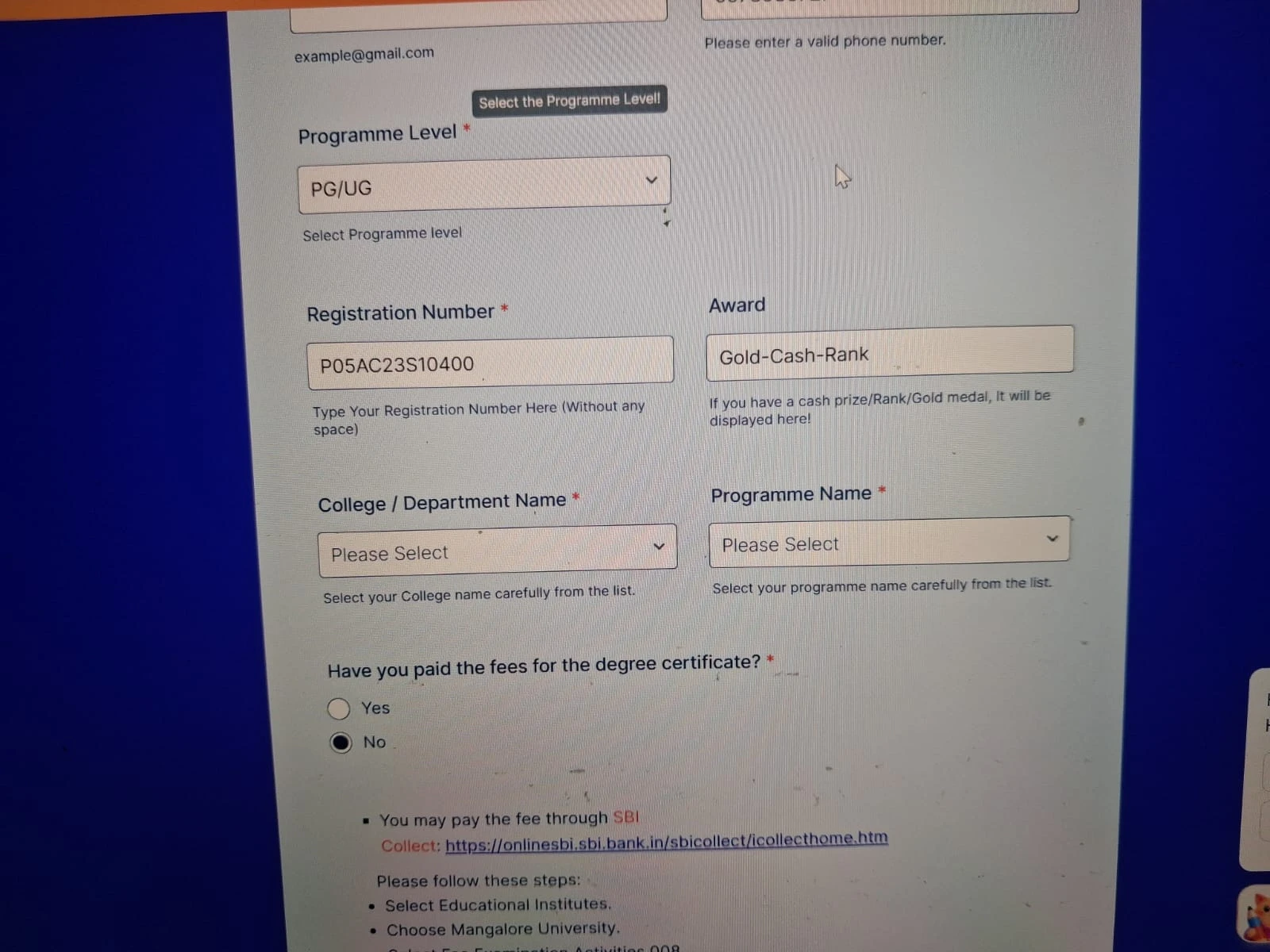
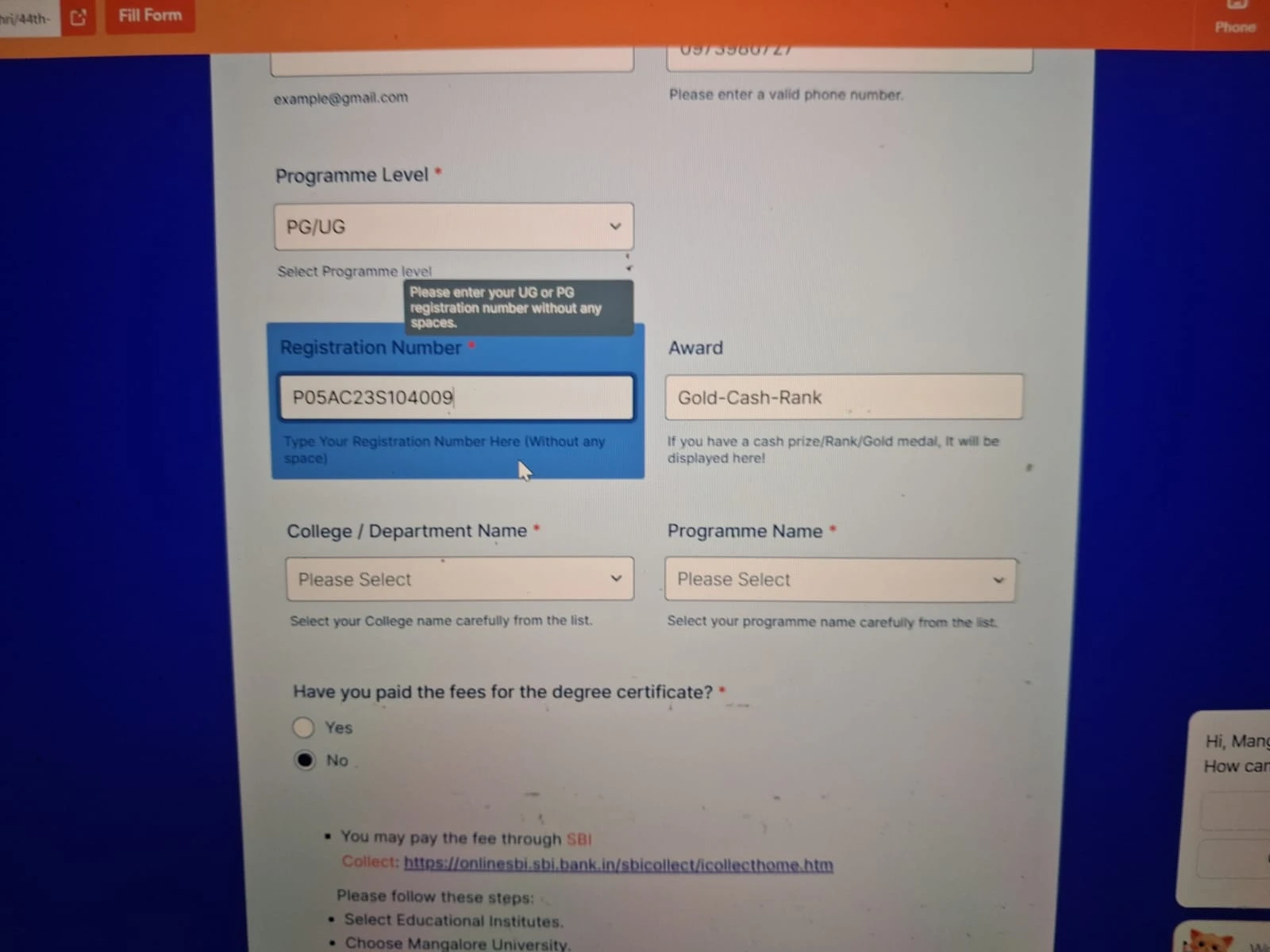
image 1 corresponds to correct data in the fireld, autofill works(look at the award field). In image 2 I changed the number, but the field `Award' not changed
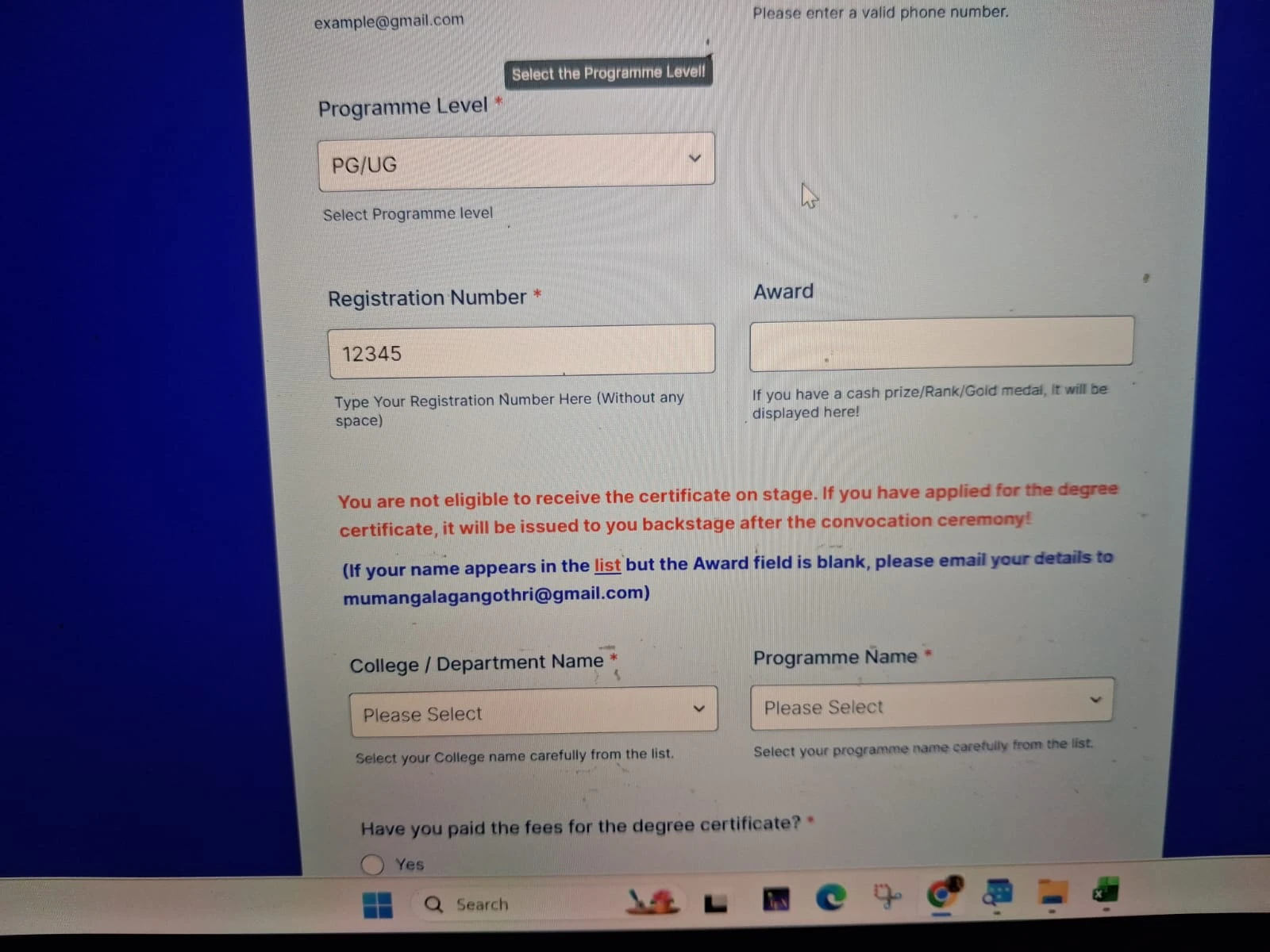
In image 3, entered an entry not in the list showing correctly.
Thus, if we enter an entery in the sheet it displys correctly, if we change, it doe not changes!
-
 Myla_T
Hi mumangalagangothri,
If I understood it correctly, the award is not cleared when you change the existing code, but when the entire code is changed, it is deleted? If so, can you try to change your Clear Hidden Field Values to Clear when Hidden? Here's how:
- In Form Builder, in the orange navigation bar at the top of the page, click on Settings.
- Next, click on Show More Options.
- Now, scroll down to the Clear Hidden Field Values and select the Clear when Hidden from the dropdown.
After that, try to test it again and see if it makes any difference. If not, can you allow us to test your form so we can check if we will be able to replicate the issue?
Give it a try and let us know how it goes.
-
mumangalagangothri
no. it is not getting cleared.
https://form.jotform.com/mumangalagangothri/44th-annual-convocation-mu
-
Eliza Enterprise Support
Hi mumangalagangothri,
I cloned and tested your form, and I ran into the same issue. The good news is, there’s a quick fix. Here’s how:
- In Form Builder, click on the Spreadsheet to Form widget and select the Wand icon to its right.
- On the Widget Settings menu, scroll down to see Reset fields when Invalid, then toggle it to On position.
- Then, click on Update at the bottom.
Give it a go and let us know if anything else comes up.
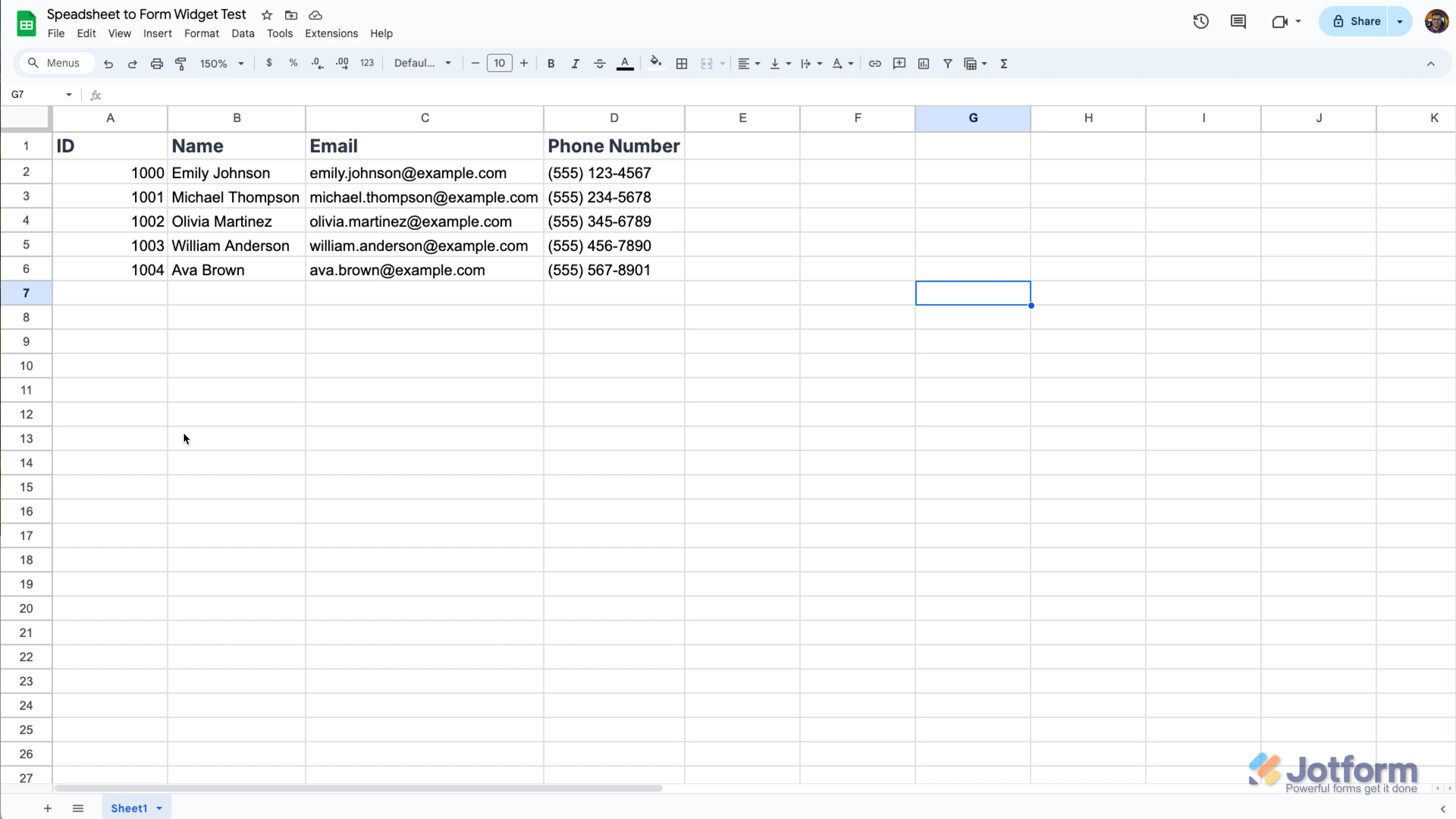

 Hi, I have attached an image of the data sheet. Suppose a responder types his registration number. If that number is in the data, he sould get the msg(near to the entry) menting the nature of award. otherwise (if the number is not in the data, he should get the msg like `You may receive the certificate in the backstage` How to ahieve it?
 I will be using the widget in the background so the form will record the submission even when the code is invalid. You need to enable the Autofill By Condition and Run in the Background option in the Widget Settings like this:
 It's important to note that the Column header and Field Label should exactly match for the system to prepopulate it. Check out the demo form setup I have:
 Then you can add a Paragraph field to show the message you like if the Registration number is not listed. Let me show you how:

 Give it a try and let us know if you have any other questions.