-
 DrBalcombe
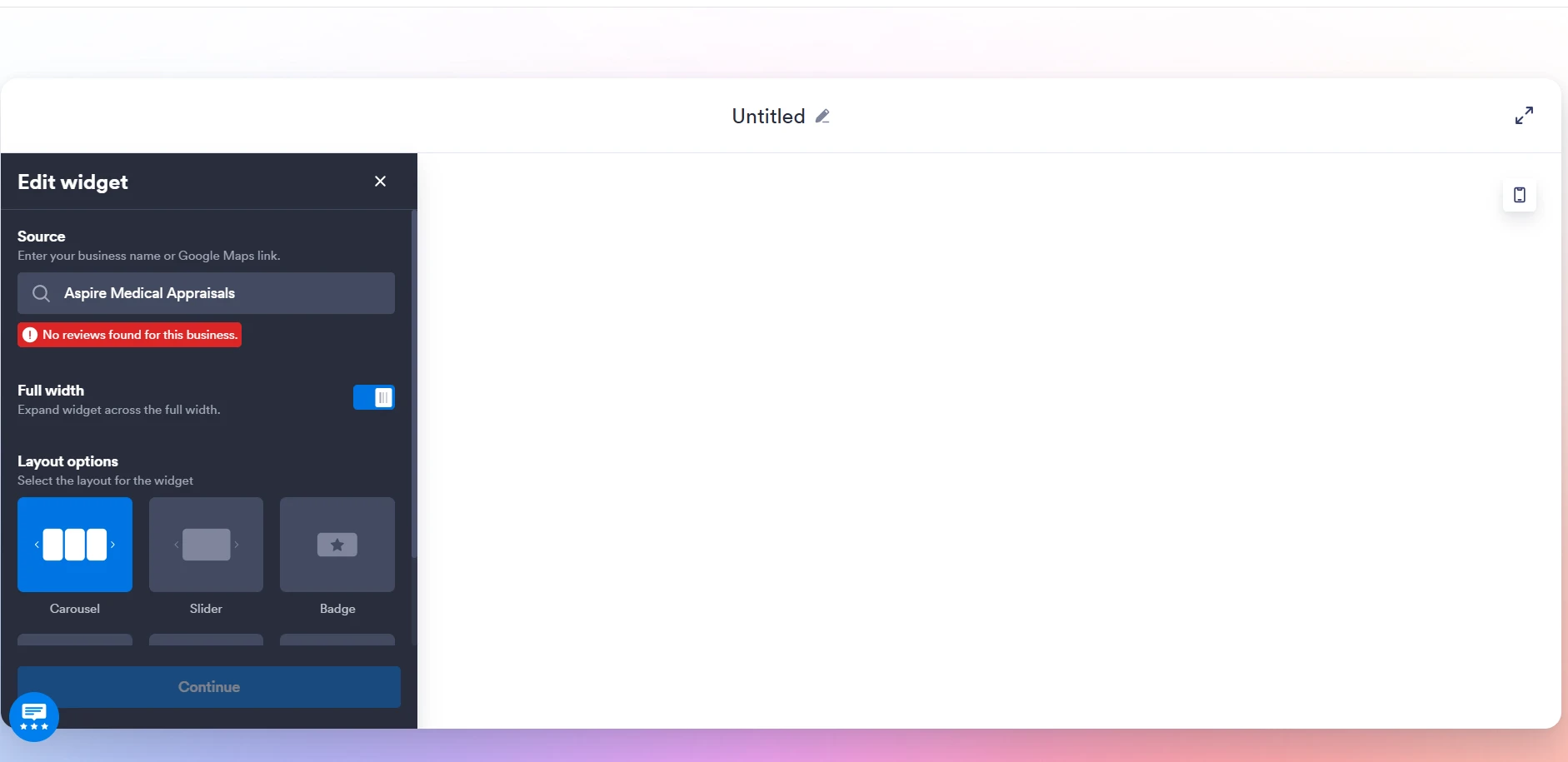
no longer pulling through my google reviews into widget
-
 Podo: Support Specialist
Hi Dr,
Thanks for reaching out to Jotform Support. I'm an AI assistant here to assist you.
Regarding your issue with the Google Reviews widget no longer pulling through your Google reviews, this can sometimes happen due to changes in the connection between the widget and Google Reviews API or authorization issues.
Here’s how to troubleshoot and potentially fix this:
- Check the widget settings: Ensure that the Google Reviews widget is still properly configured with the correct Google Place ID or API key.
- Reauthorize the connection: Sometimes, the authorization token or API access expires or is revoked. Try disconnecting and reconnecting the widget to your Google account.
- Verify Google API status: Check if there are any changes or restrictions on the Google Places API or if your API quota has been exceeded.
- Update or reinstall the widget: Remove the widget from your form or site and add it again to refresh the connection.
- Check for any recent updates or changes: Sometimes platform updates or changes in Google’s API policies may affect the widget’s functionality.
If after these steps the issue persists, it might be necessary to review the specific widget documentation or settings in your Jotform account for any additional troubleshooting steps.
Give it a try and let us know how it goes.
-
DrBalcombe
didnt work
-
Podo: Support Specialist
Hi Dr,
One of our Support Team members will take it from here to follow up shortly.
-
DrBalcombe
i am waiting
-
 Mikhail JotForm Support
Hi DrBalcombe,
I checked both forms under your account and didn't see any form fields. Can you send either a screenshot or a quick recording of what’s going on? Loom works well for recording, or you can upload to Google Drive or Dropbox and send us the link. Or you can use this guide for taking a screenshot.
Once we hear back from you, we can get moving on a solution.
-
DrBalcombe
please help
-
DrBalcombe

-
DrBalcombe
when i first created the google review widget, it pulled the reviews through no problem. But now when trying to update the widget because I have had further reviews, it says there are no reviews. But the reviews are there on mu business profile?
-
 Christian Ice JotForm Support
Hi DrBalcombe,
Can you try using your business Google Maps link instead? You can visit this link on how to get it. You can also explore our guide on How to Add Google Reviews to Your Website to dive in deeper.
Give it a try and let us know how it goes.
-
DrBalcombe
Same result I am afraid
-
DrBalcombe
I don't understand why it worked before but now does not. I have also tried with other providers of google widgets - same result
-
 Joseph Christian JotForm Support
Hi Dr. Nicholas,
I tried it here and got the same results, so I’ve passed the details to our Developers to dig into. We’ll get back to you with an update as soon as we can.
-
DrBalcombe
OK. thank you so much. I will await further reply and hopefully a solution
-
 carterally
Was there ever a solution, as mine is doing the same thing?
-
 Jerlan JotForm Support
Hi Dr. Nicholas,
Thanks for bearing with us. Our Developers are still working on this, and we’ll keep you posted on any progress.