-
 bwwbwebmaster
Good morning,
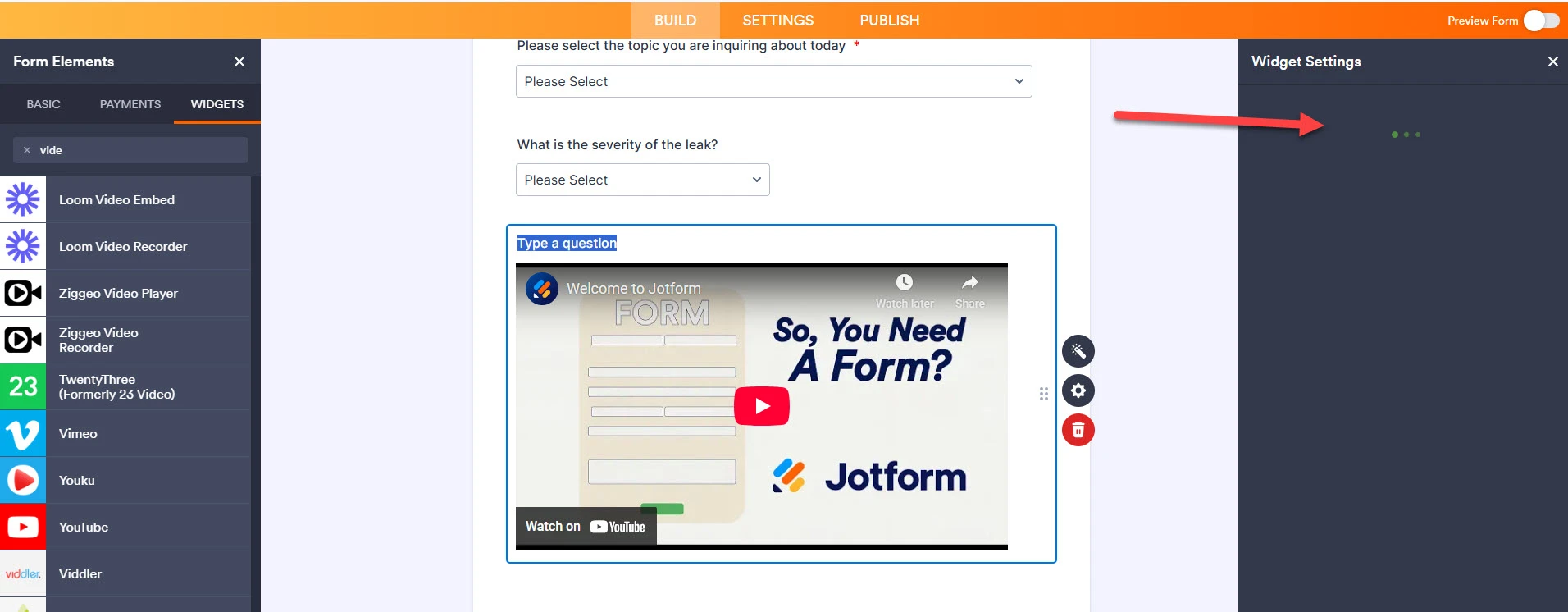
I am working on building a form and I will need 3 short videos on the form. I have tried multiple options and finally found that perhaps the YouTube widget would work best. However, the YouTube Widget Settings are just clocking and never comes up. I have cleared cache, I have deleted it and added it back multiple times and it still will not come up so that I can change it from what you automatically have to what I need it to be.
Please advise.
New form - CAW Report a Problem

-
 Podo: Support Specialist
Hi BWWB,
Thanks for reaching out to Jotform Support. I'm an AI assistant here to assist you.
Regarding the issue with the YouTube widget settings not loading or getting stuck on loading, here’s how you typically add and set up the YouTube Video widget in your form:
- In Form Builder, click on Add Element on the left side of the page.
- Under the Widgets tab in the Form Elements menu, search for YouTube and click on it or drag and drop it into your form.
- In the Widget Settings window that opens on the right side, enter the YouTube Video URL in the URL input box.
- Click Update to save your changes.
Make sure you are using a Public or Unlisted YouTube URL as private videos are not supported. Also, the widget settings panel should appear on the right side after adding the widget. If it keeps loading indefinitely, it might be a temporary issue with the builder or a browser-related problem despite clearing cache.
As you have already tried clearing cache and re-adding the widget multiple times, you might want to try using a different browser or disabling browser extensions that could interfere with the widget loading.
If the problem persists, it could be a specific issue with the form or the widget that may require further investigation.
Give it a try and let us know how it goes.
-
bwwbwebmaster
I have tried all that. Please send to support.
-
Podo: Support Specialist
Hi BWWB,
One of our Support Team members will take it from here to follow up shortly.
-
 Kris JotForm Support
Hi BWWB,
I've cloned your form and added the YouTube widget, and the YouTube Settings show on the right side. Here's a screenshot below that you can look at:
Your forms' caches have been cleared on our end. Can you give it another try? I also suggest clearing the cache and cookies of the browser you use most of the time before trying to add the widget.
Let us know if you have any other questions.
-
bwwbwebmaster
Thank you, it is working now!
-
bwwbwebmaster
Good morning! I am now working on the YouTube widget again and the same issue is happening. Why when I access at different times does this continue to happen? I have cleared cache in Jot Forms and cache/cookies in my Chrome browser and the widget continues to just clock. Please advise how we can resolve this issue? Thank you!
-
 Keenly JotForm Support
Hi Jennifer,
When I accessed your form, everything worked the way it was supposed to. The YouTube Widget plays the video as expected. Take a look at the screenshot below to see my results:
I’ve gone ahead and cleared your form caches to rule out any temporary loading issues. Could you confirm whether it’s now working again as expected? If the issue persists, you can share a screenshot of the console logs while the YouTube widget is not working as expected, so we can take a closer look.Keep us updated and let us know if you need any more help.
-
bwwbwebmaster
That is not the correct video, I am trying to change it and it just clocks and does nothing as I mentioned.
I just went back in, when you messaged and now it is no longer clocking and it allowed me to change it however now it says "no healthy upstream".
Thanks!
-
bwwbwebmaster
I will try it again in a minute and see if it clears up.
-
 Joeni JotForm Support
Hi Jennifer,
I checked your form and can see that the Youtube widgets are working properly both in form builder and preview mode. Take a look at the screencast of the result below:
Give it a try and let us know how it goes.
-
bwwbwebmaster
It seems to be working right now. But it seems to happen on occasion; we just don't want this to be a regular issue.
-
 Ronald JotForm Support
Hi Jennifer,
I checked your form and tested it to see if I could replicate the issue, but everything was working properly. Check out the screenshot below to see my results:
I went ahead and cleared your form cache, as this typically fixes minor form issues. Can you go ahead and try it again and let us know how it goes? If you’re still having the same issue, we’ll look into it more to see if we can figure out what’s going on.Reach out again if there’s anything else we can help you with.

 I’ve gone ahead and cleared your form caches to rule out any temporary loading issues. Could you confirm whether it’s now working again as expected? If the issue persists, you can share a screenshot of the
 I went ahead and