-
 hrDoskocil
I'm having the same issue as OP and I think you may have misunderstood the problem.
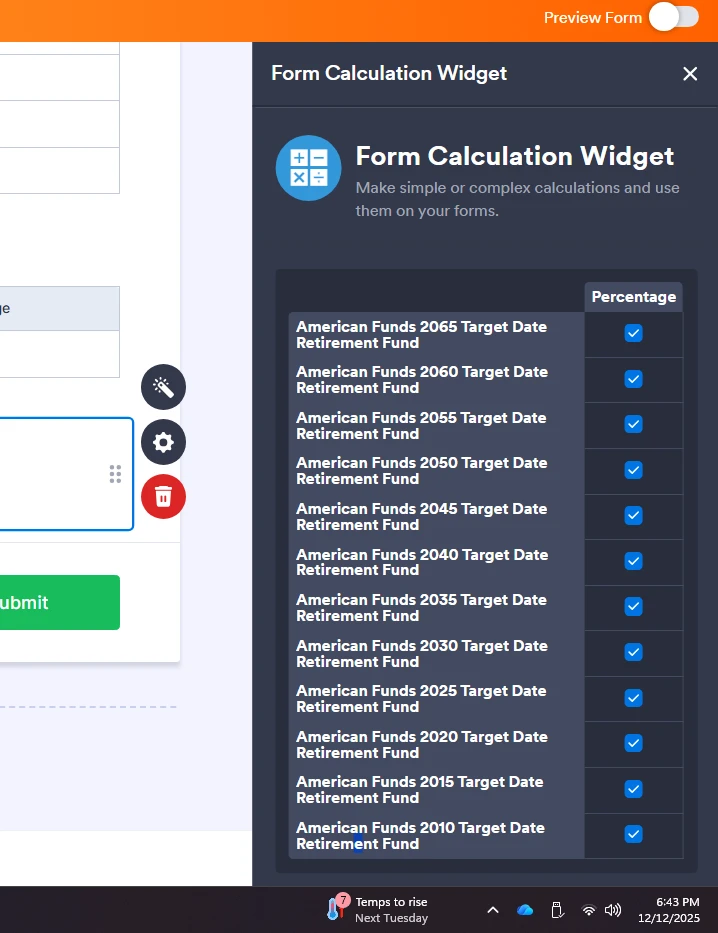
Adding more rows is easy, but when you have a lot of rows, the FORM CALCULATION widget does not show the save button and you can't make it scroll down.
My workaround was zooming out on my browser to reveal the save button. I attached a picture of the problem I'm talking about.

-
 Rose Enterprise Support
Hi hrDoskocil,
Thanks for reaching out to Jotform Support. Adding a huge number of fields in the formula of the Form Calculation widget may not fit on the screen. You can zoom out the page to access the Save button if the formula is quite long. I'm sharing a screencast below:
Let us know if there’s anything else I can help you with.