-
FFRANCISCO MANRUBIA TORRA
Hi everyone,
I’m using the Reusable Dropdown widget and I can successfully select my table and configure it. I’ve also set the widget to Public.
However, when I go to the form and try to test it, the widget appears blocked/disabled when I hover over it and I can’t interact with it.
Has anyone experienced this issue or knows what could be causing it? Any help would be appreciated.
-
 Girish Enterprise Support
Hi Francisco,
Thanks for contacting Jotform Support. Can you confirm if you are referring to this form https://form.jotform.com/241522570950049?
When I tested the form I can replicate the difficulty.

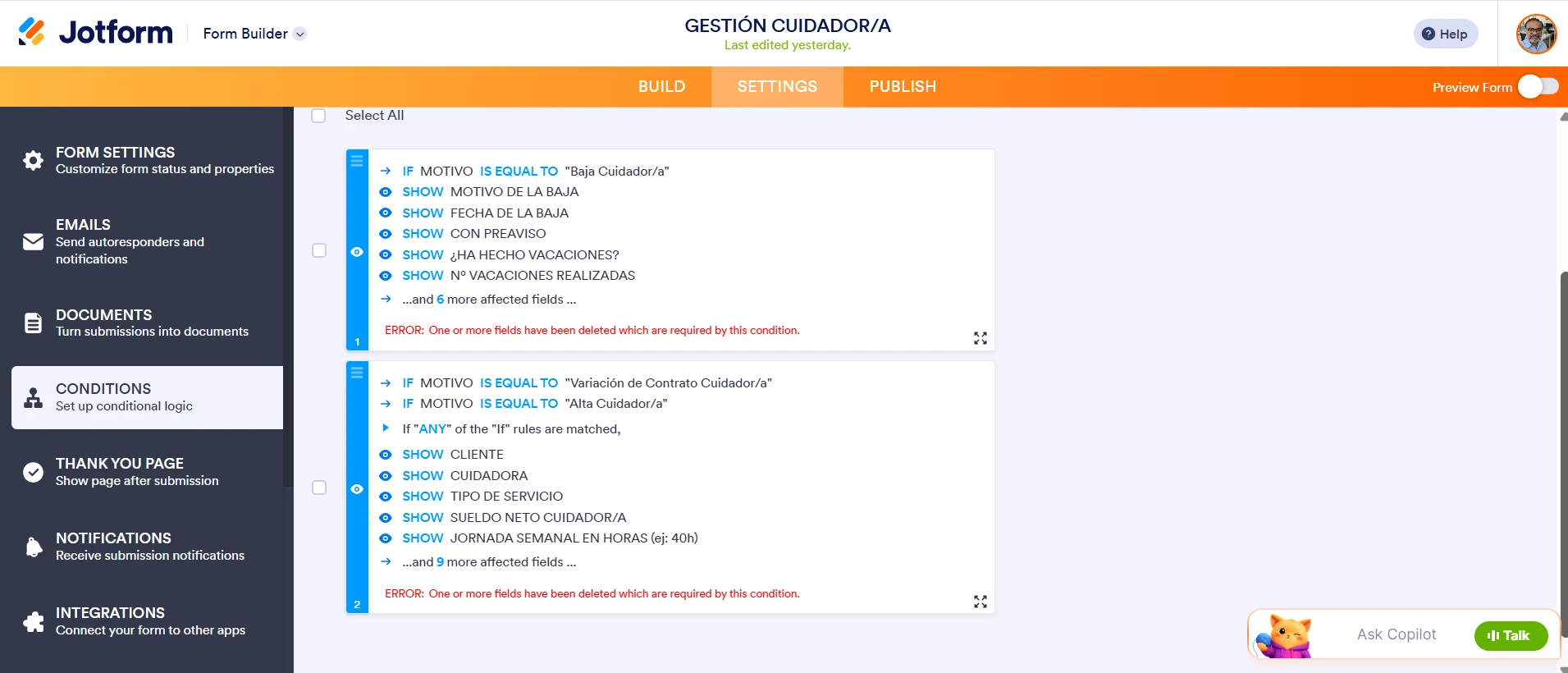
I checked the form and there are couple of conditions linked to this field and there are errors on those conditions.
When any form field linked to the conditions have been removed, you will see this error. You will need to edit the conditions, link the correct fields to remove the error.
- On the Conditions page, hover over the conditions and click the pencil icon to edit it.
- Now, re-do the fields on the Field section of the condition i.e. remove the fields and link them again in the Field section. This will remove the errors on the conditions.
- Click Save on the conditions to save the changes.
Give this a try and let us know how it goes.
-
 fmanrubia
Hello!
Yes is this the form, and i remove the conditions and still didn't work... -
 Kyle JotForm Support
Hi Francisco,
I checked your form and noticed that the Reusable Dropdown widget doesn’t have a connected table. Without a linked table, the widget will appear disabled and unclickable even if it’s set to Public. Check out my screenshot below to see the result:
To fix this, you need to re‑select the table you want to connect and ensure the correct column is mapped. Once the table is properly linked, the widget should become interactive on your form. Let me show you how:
1. In Form Builder, click on the Reusable Dropdown widget and select the Trash icon.
2. Now, click on the Add Element menu on the left side of the page.
3. Click on the Widgets tab, search and select the Reusable Dropdown.
4. Then, in the Widget Settings on the right side of the page, select Table, in the window that opens, choose your table and select Add.
5. Choose the column on the Dropdown Column and click on Update.
Give it a go and let us know if anything else comes up.
-
fmanrubia
Hello, Thanks for the fast answer!
I removed the widget and tried again. I connect the table but still didn't work.
-
 Norwyn Enterprise Support
Hello Francisco,
Thanks for getting back to us and for the additional details. I'm sorry to hear that the Reusable Dropdown fails to be configured. Before we escalate this, can you send us a screenshot of the Console logs?
Let's walk through the steps on how to load the Console logs together.
- On the Form Builder page, right-click on the Properties of the Reusable Dropdown widget.
- Select Inspect from the options.
- Go to the Console tab and take a screenshot of the logs.
Once we hear back from you, we'll be able to move forward with a solution.
-
fmanrubia
Hello,
Here you have! -
 Shirized JotForm Support
Hi Francisco,
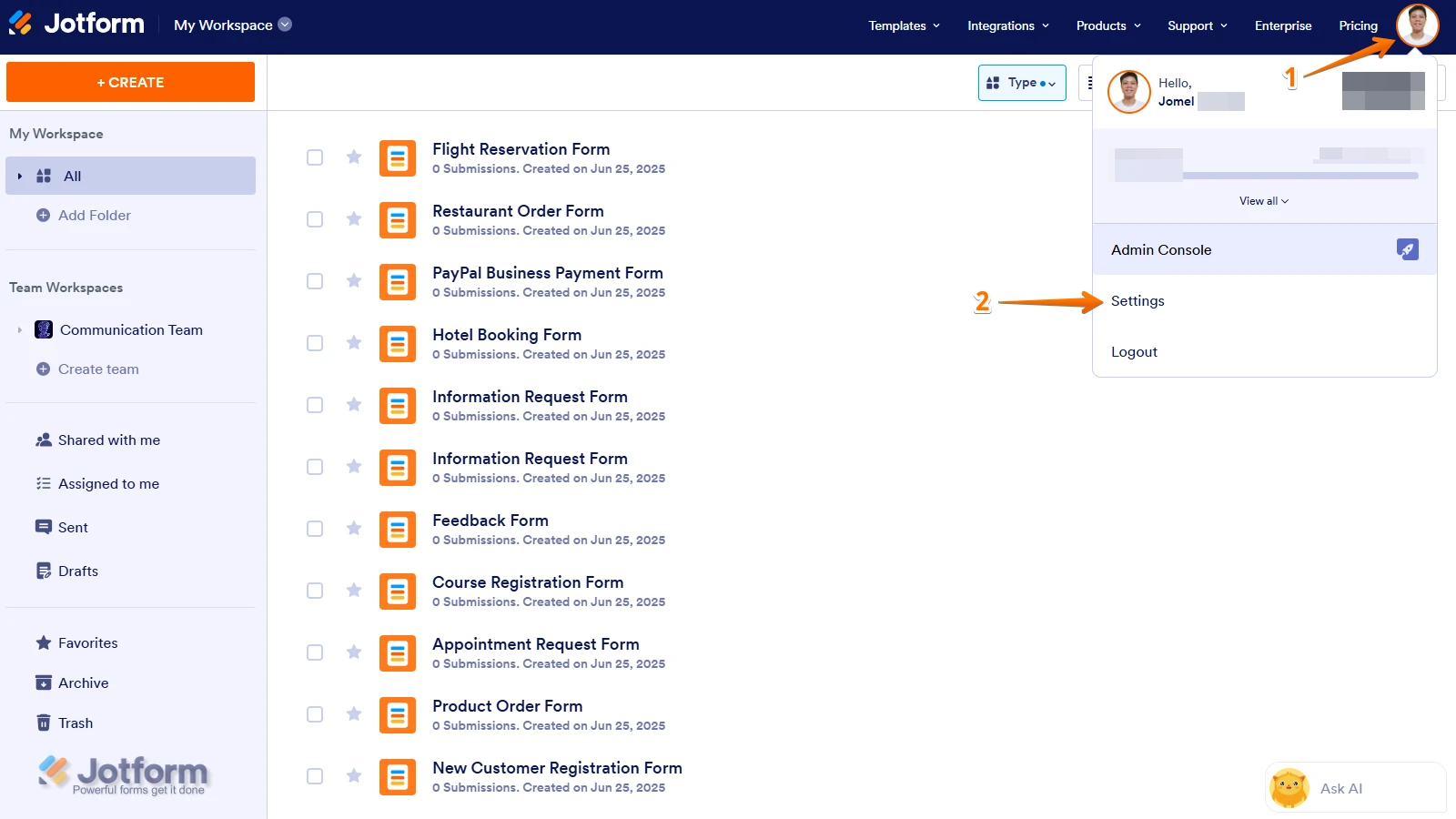
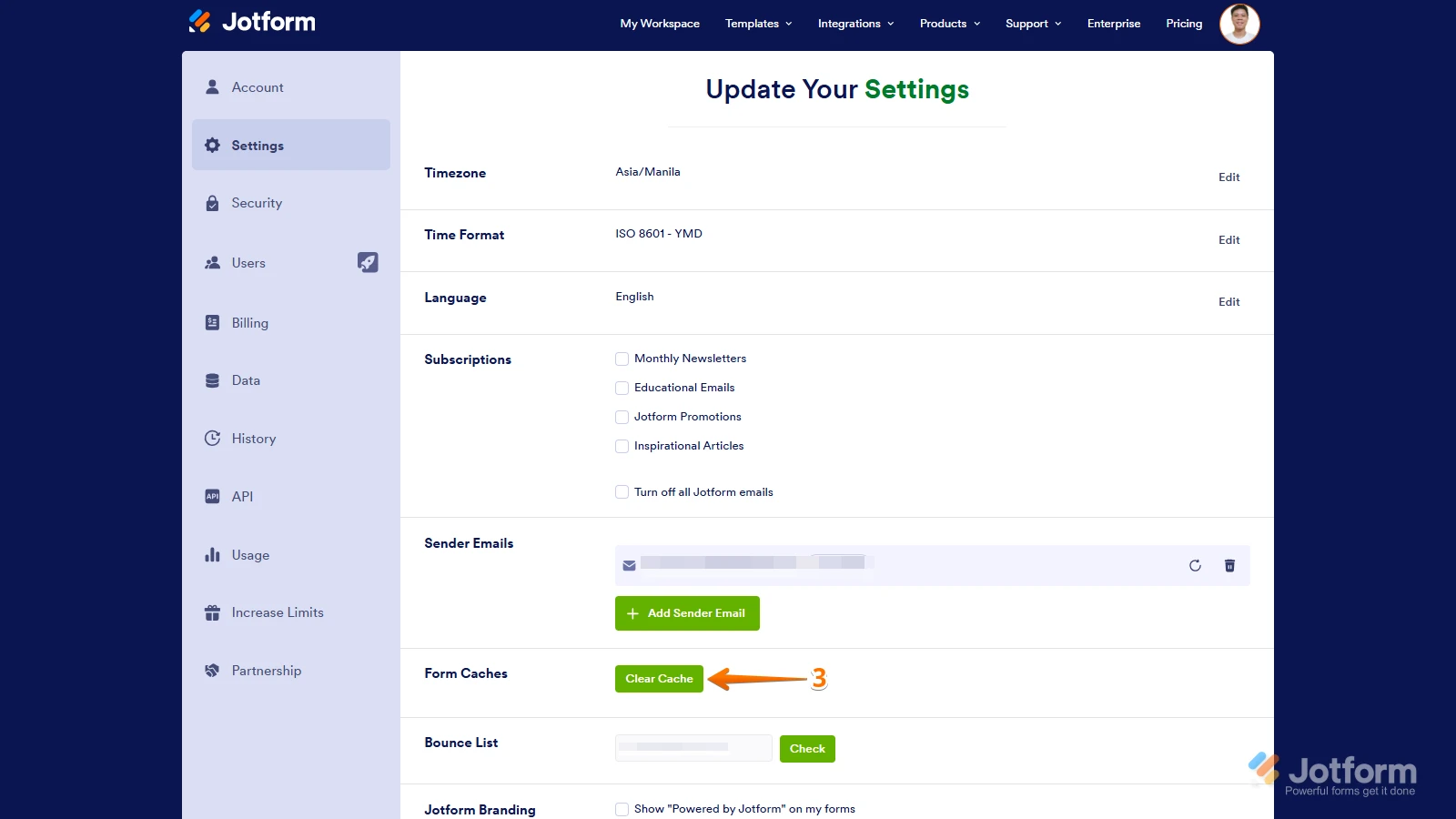
I checked the form, and I noticed that the Reusable Dropdown is not connected to a Table. Can you try connecting it again? But before doing so, can you try clearing your browser's cache and your form caches to see if the issue persists? Although Clearing Your Form Caches isn't done automatically, it's easy to do it manually. Let me show you how:
1. On your Workspace page, click on your Avatar/Profile Image icon.
2. In the Dropdown menu, click on Settings.
3. In the Settings menu, click on Clear Cache. And that's it, you're done.
If you’re still having the same issue, we’ll escalate this to our Developer Team to see what’s going on.Give it a try and let us know how it goes.
-
fmanrubia
Hello,
I clear the caché as you said, and still didn't work.
-
 Rehan Support Team Lead
Hi Francisco,
I tested it and had the same issue, so I created a ticket and escalated this to our Developers. We’ll follow up as soon as we have any news.
-
fmanrubia
Thanks! I wait for your news
-
fmanrubia
Hello! There are any news?
-
Kyle JotForm Support
Hi Francisco,
Our Developers are focused on getting this resolved for you. Thanks for your patience while they work on it. We’ll keep you posted about any updates we get.
-
 Grupo_Verlio
Hello! There are any new about the problem with the reusable dropdown?
-
 Royce JotForm Support
Hi Francisco,
Thanks for bearing with us. Our Developers are still working on this, and we’ll keep you posted on any progress.
-
 cob_efranco
 -
Rehan Support Team Lead
Hi cob_efranco,
To keep the conversation organized, I moved your question to its own thread, and someone from our Support Team will help you with it here.
-
fmanrubia
Hello, the reusable dropdown still didn't work in my Form. How can i solve that?
-
 Jenette JotForm Support
Hi Francisco,
I know you’ve been waiting a while, and we really appreciate your patience. Our Developers are still making progress behind the scenes. We’ll be back in touch as soon as we have an update.


 If you’re still having the same issue, we’ll escalate this to our Developer Team to see what’s going on.
Your Reply
Something Went Wrong
An error occurred while generating the AI response. Please try again!