-
 khrisafenyo
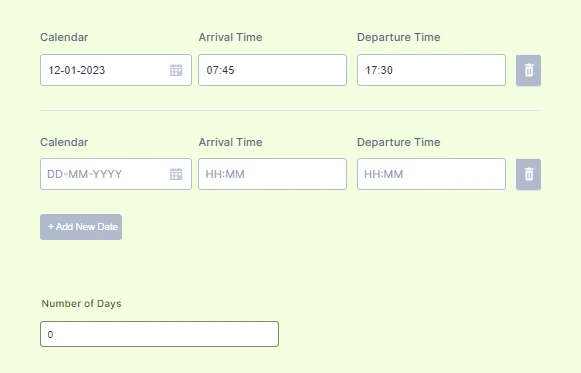
As seen on this document, i want the number of days to automatically add up when:
- a new row (+add new date) is added to the form
- or if possible when the row is filled up.
Please NOTE : This is in terms of adding the rows not any values in the rows.
I tried using the form calculation "count()" to calculate the rows but it didnt work.
Please can you show me.
Thank you.

-
 Christian JotForm Support
Hello Khrisafenyo,
Thanks for reaching out to Jotform Support. Unfortunately, the Configurable List widget does not yet fully support calculations so most of the calculations aren't going to work. But I found a workaround that you can follow to count the number of rows in a Configurable List widget; let me show you how to set it up:
- Add an Asterisk at the beginning of each field to make them Required.
- Add another row in the Fields Configuration, then type Day: static: 1:1.
- Go to the Custom CSS tab and then paste the CSS code below to hide the Static field.
- Simply add the Configurable List widget in the Form Calculation/Number of Days field.
Make sure that the Configurable List widget in the Form Calculation/Number of Days field is in Number(0-9) and not in String(A-Z). Below is the CSS code that you need to inject into the Configurable List widget. Check out my Demo Form or the screencast below to see what it's going to look like afterward:
#listContainer .staticText, .configurable-list-field-wrapper.col4{

display: none;

}
Give it a try, and let us know if you need any more help.
- Add an Asterisk at the beginning of each field to make them Required.
-
khrisafenyoHello Team,
Great it works perfectly for now.
Thank you.
Regards
...