-
 Expressform
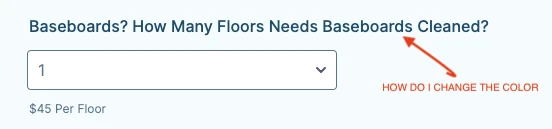
Hi, How do I change the color of the letters.
THANK YOU,
ARMANDO

-
 Kyle JotForm Support
Hi Expressform,
Thanks for using Jotform. If you want to change the font color of a specific field label, you can inject custom CSS code into your form. Let me help you do that:
1. In the code below, replace the color with a supported color name or its HEX code, then copy it.
#label_186 {

  color: #DC143C!important;

}
2. Then, in Form Builder, click on the Paint Roller icon on the right side of the page to open Form Designer.
3. Now, in the Form Designer menu, click on the Styles tab, scroll down and paste the code into the Inject CSS Code box. That’s it. The code is automatically saved.
You can also check out our guide about How to Inject Custom CSS Codes for more information.
Give it a try and let us know how it goes.
-
ExpressformHi Kyle,
Thank you very much for your help with the CSS code and the instructions on
how to change the font color. I appreciate the assistance.
Best regards,
Armando
Express Cleaning Team
*Express Cleaning Team Corp*
*Tel 201 870-8808*
*www.expresscleaningteam.com <http:>*
The information contained on this e-mail message is intended only for the
use of the individual or entity named above. If the reader of this message
is not the intended recipient, or the employee or agent responsible to
deliver it to the intended recipient, you are hereby notified that any
dissemination, distribution, or copying of this communication is strictly
prohibited. If you have received this communication in error, please
immediately notify us by email expresscleaningteam@gmail.com and destroy
</http:>...
Your Reply
Something Went Wrong
An error occurred while generating the AI response. Please try again!