-
 AiArthritis_Team
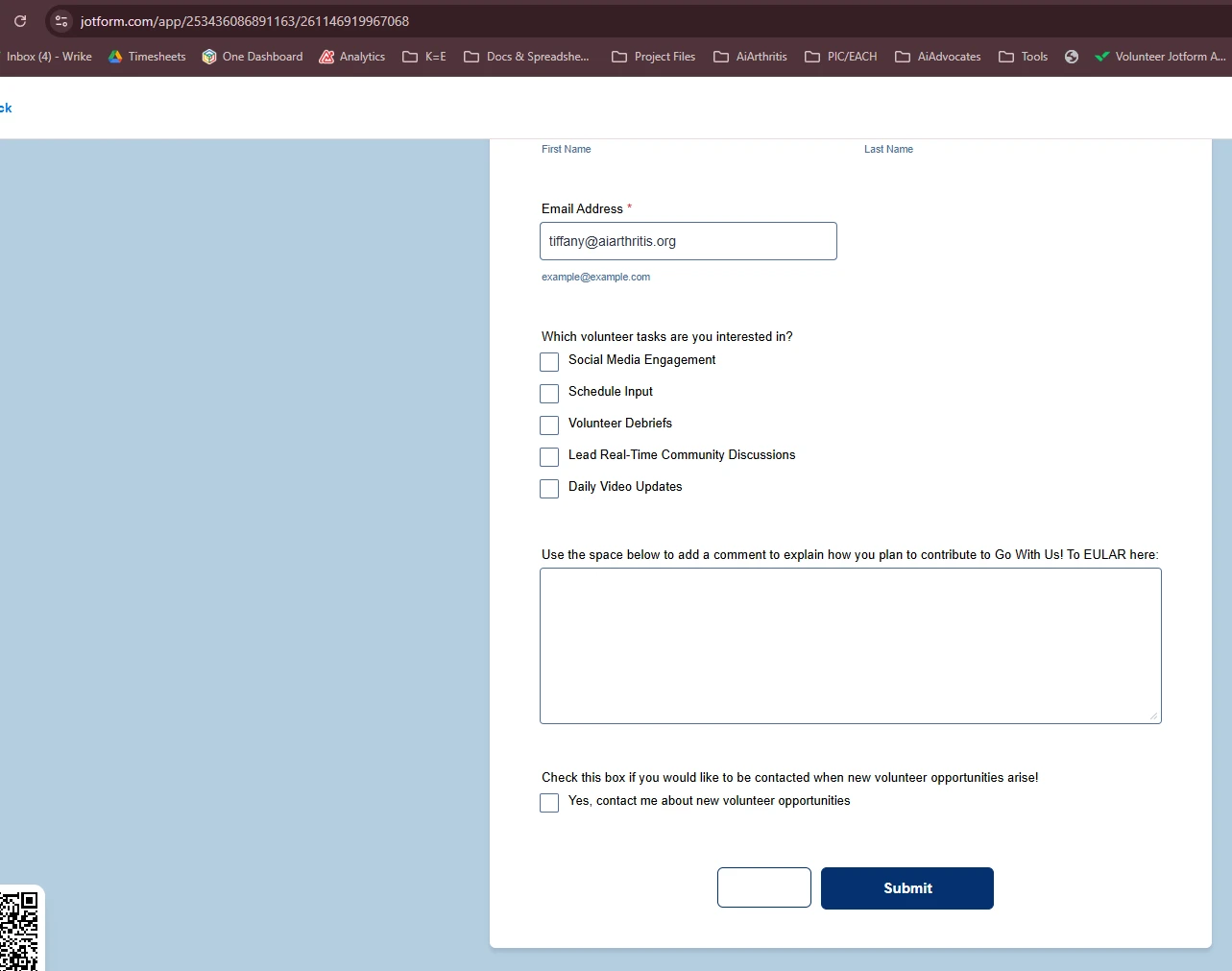
We are seeing an empty button to the left of the Submit button on this form - when I hover over it, it shows “Save.”
I would like to remove this button completely so only the Submit button appears.
It only appears when following the link (https://www.jotform.com/app/253436086891163/261146919967068) - it is not visible in builder or publish.
I even tried to ask co-pilot ai to remove it - the reply was 'I don’t see a separate save button in your form—only the required Submit button is present.'

-
 Podo: Support Specialist
Hi AiArthritis_Team,
Thanks for reaching out to Jotform Support. I'm an AI assistant here to assist you.
From what you described, the extra Save button appears only when the form is opened through your Jotform App link, and not when you open the form directly or in Form Builder. In Jotform Apps, logged-in users can see additional options like accessing their submissions and drafts, which can introduce extra UI elements such as save/draft behavior that are not visible in the standalone form builder preview.
There is a setting in your app that controls whether users can access their submissions and drafts through the app. Turning this off removes the login-related features and associated UI elements from the app, which should also remove that unwanted Save behavior when the form is accessed via the app.
Let me walk you through how to adjust that setting in your app:
- Go to your app in App Builder.
- Click on Publish at the top.
- Under Quick Share, click on Settings.
- In the Settings dialog, turn off the option Allow users to access their submissions through the app under the Options section.
- Save your changes, then open the app link again and test the form to confirm that only the Submit button is now shown.
Disabling that option removes the login/branding layer from the app and should prevent the extra Save control from appearing when users access the form through the app link.
Give it a try and let us know how it goes.
-
 Mary JotForm Support
Hi AiArthritis_Team,
What you can do is to disable the Continue Forms Later option in your App. Let me show you how to do that:
- In App Builder, in the purple navigation bar at the top of the page, click on Settings.
- Next, in the App Settings window, toggle off Continue Forms Later. That’s it.



Your Reply
Something Went Wrong
An error occurred while generating the AI response. Please try again!