-
 amber.b
Files that people upload as form attachments are sometimes being sent separately and sometimes only sent in a link. I have the forms set to send as attachments. This is a recent occurrence as they had always been sending as attachments before.
-
 Podo: Support Specialist
Hi Amber,
Thanks for reaching out to Jotform Support. I'm an AI assistant here to assist you.
Let me help you with that:
- Open your form in Form Builder.
- Click on Settings, then open Emails.
- Edit the email notification or autoresponder that is sending the files.
- Go to the Advanced tab and make sure Send File Uploads as Attachments is turned on.
- Remove the file upload attachment setting and add it again, then save the email.
- Send a test submission to check whether the uploaded files arrive as attachments again.
If the uploaded files are larger than 5 MB, some email clients may send them as a link instead of attaching them. In that case, using a custom SMTP can help when your email provider is the sender.
Give it a try and let us know how it goes.
-
amber.b
it did not work
-
Podo: Support Specialist
Hi Amber,
One of our Support Team members will take it from here to follow up shortly.
Let us know if you have any other questions.
-
 Brandon
Hi Amber,
I tried testing on a cloned form and got the submitted pictures as attachments expected. Does this happen on one of the forms in your account in particular, or is both of them? Also, you mentioned that this only happens sometimes. Does this happen for particular users repeatedly, or does this happen intermittently among anyone who submits a form?
Once we hear back from you, we can get moving on a solution.
-
AAmber Bright
Hi, it’s happening intermittently on both forms for any users. It doesn’t not seem to matter what the file type is. PDF, jpg, etc. It also sometimes attaches the form as a pdf and sometimes does not. This suddenly started happening with both forms a couple weeks ago. Thanks for your help!
-
 Kris JotForm Support
Hi Amber,
You can try the suggestion of our AI Assistant to add SMTP to your Jotform account and set it as the default Sender Email of the form emails. As mentioned, if the uploaded files are larger than 5 MB, instead of attachments, they will show as links.
In that case, using a custom SMTP can help when your email provider is the sender. You can easily set up a custom SMTP to use your email sender as provider. Let me walk you through it:
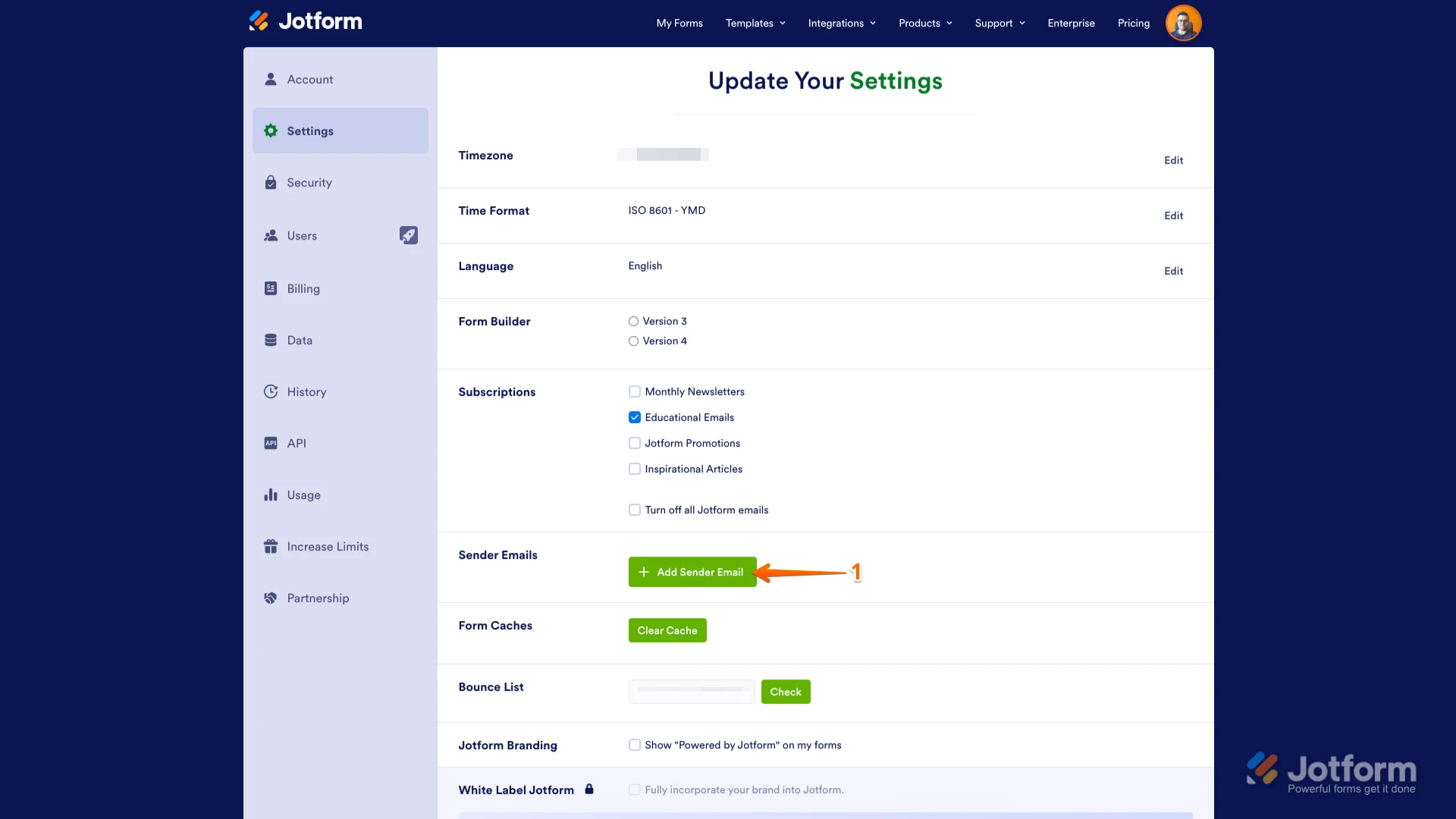
1. Go to the Settings page while logged in to your Jotform account and click on Add Sender Email in the Sender Emails section.

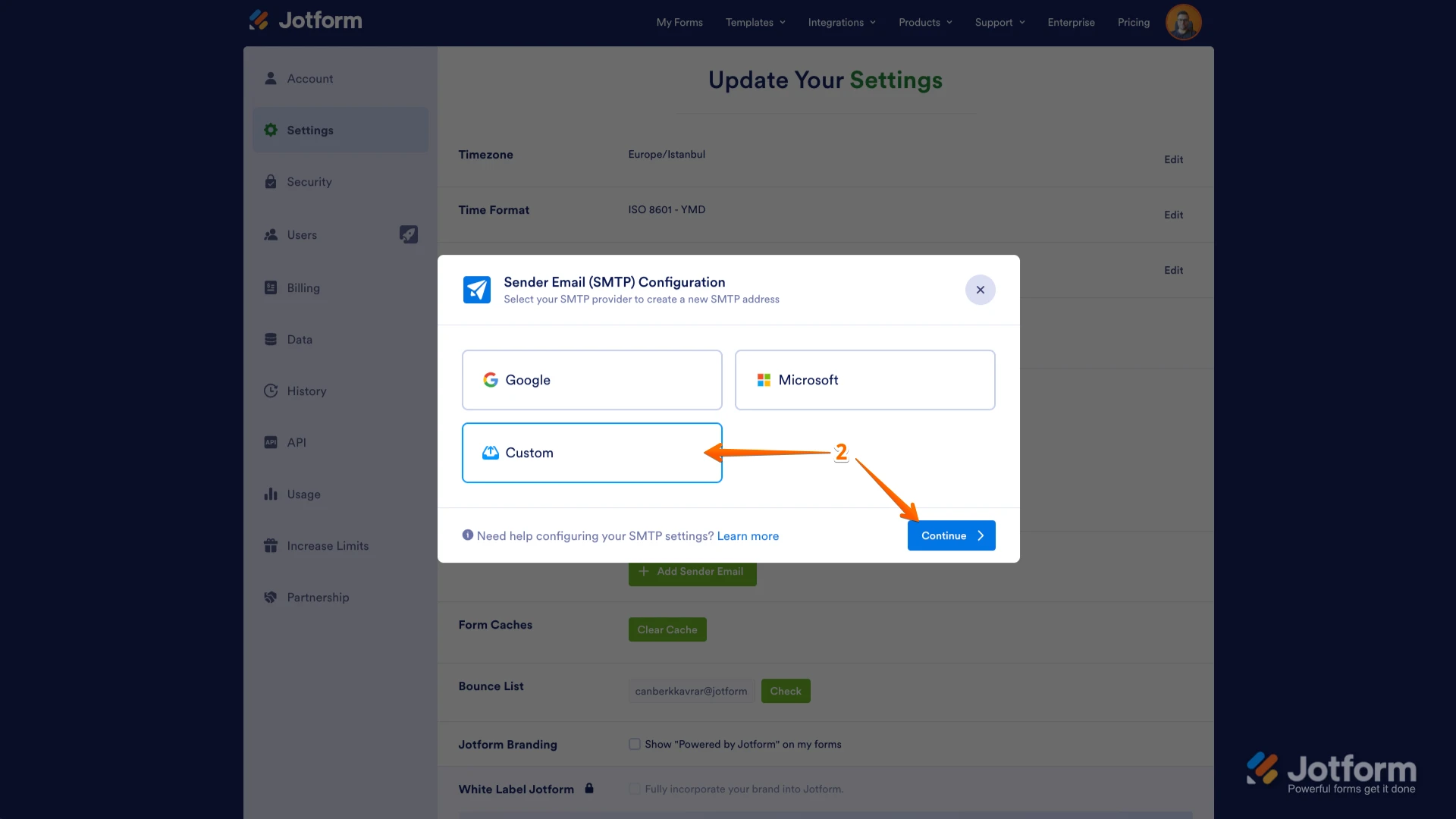
2. In the window that opens, select Custom and click on the Continue button.
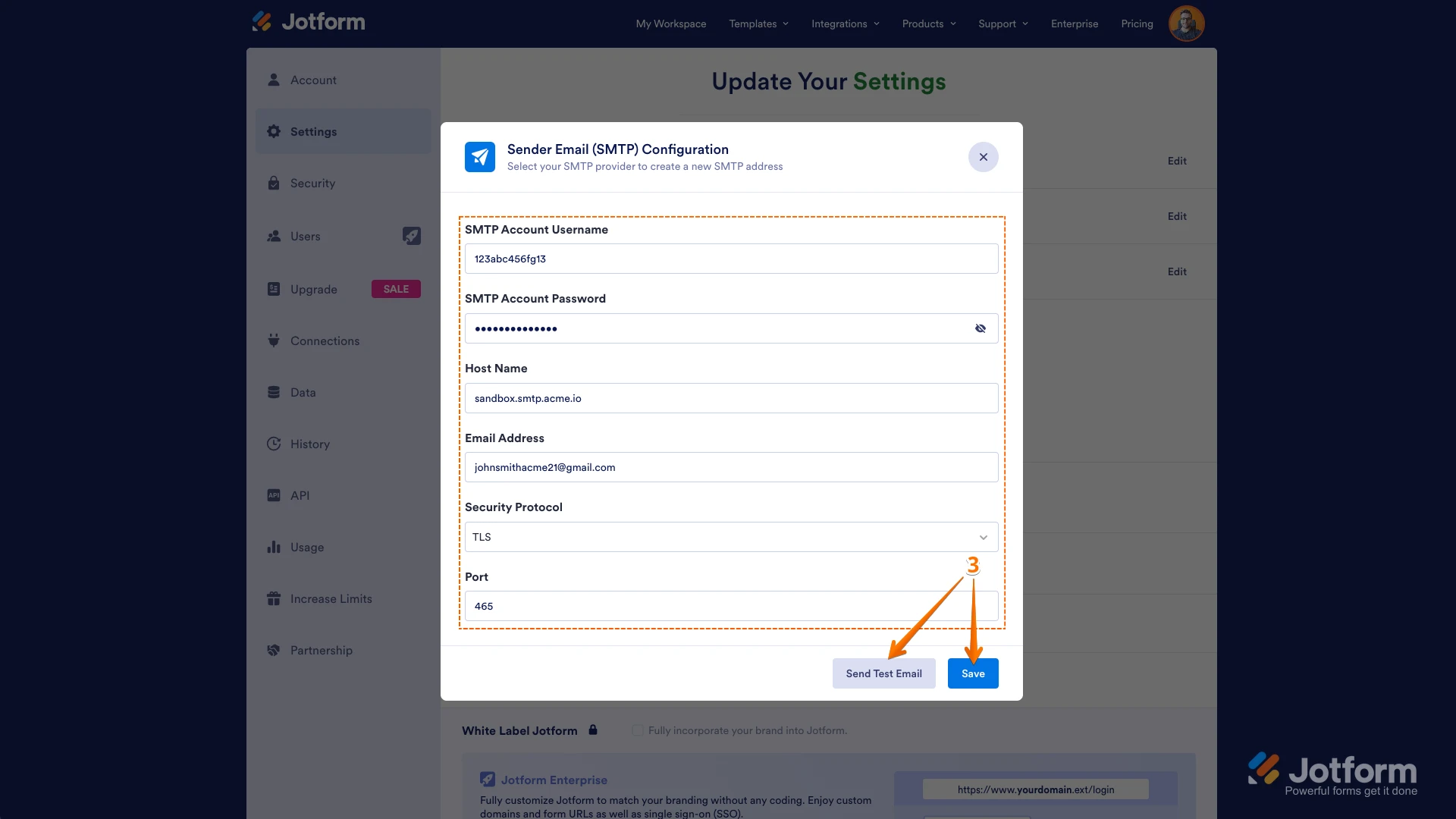
3. Enter your email provider's details, click on Send Test Email to check if it’s set up correctly, and then click on Save.
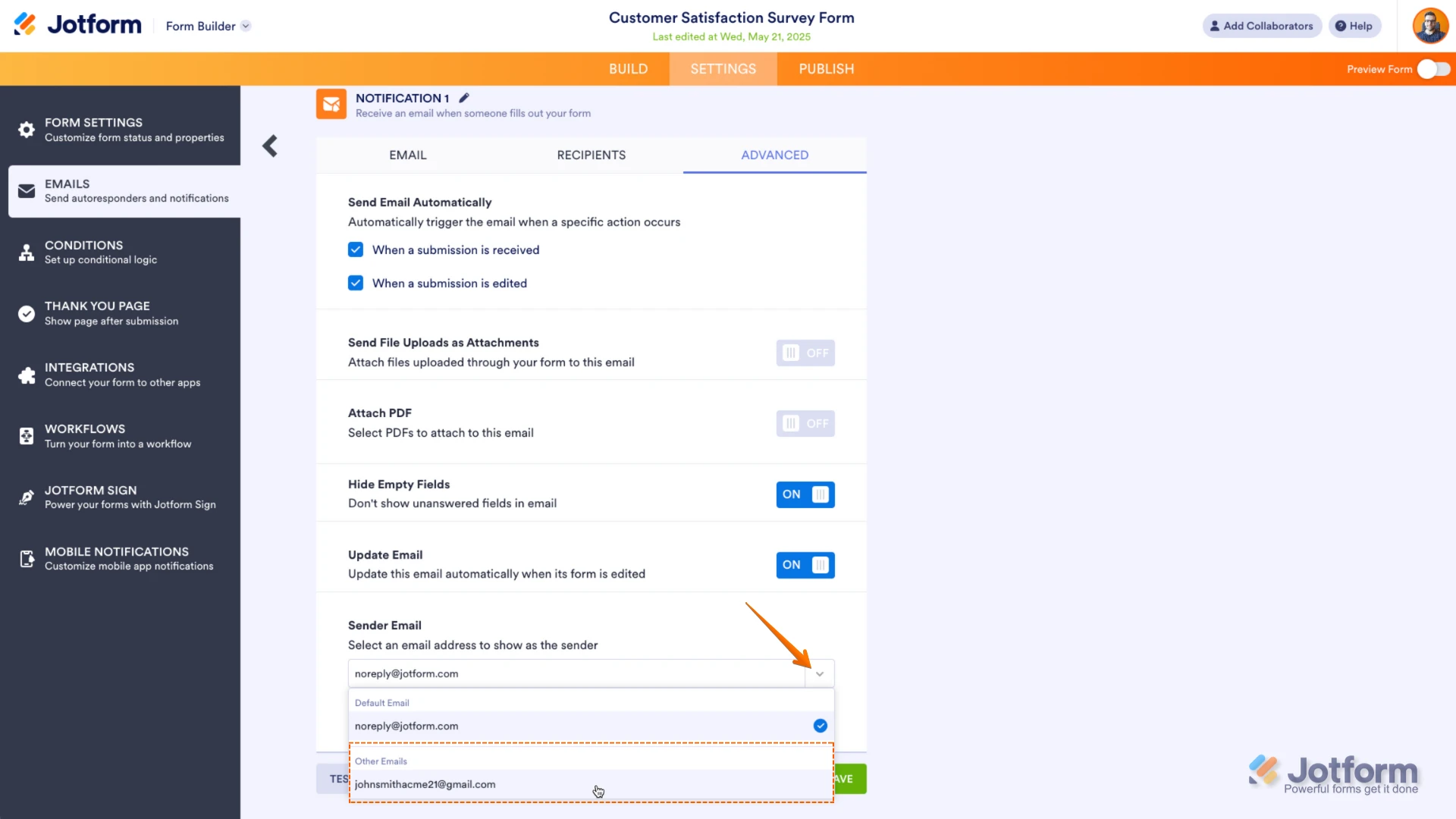
Now you should select your custom SMTP in your email properties under email settings in Form Builder, and if you’re using Workflow Builder, do the same there. Check below to see how it looks in Form Builder:And here’s how it looks in Workflow Builder:Give it a try and let us know if you need any help. -
AAmber
It was working fine for years and has suddenly stopped. It’s not just with large attachments. I can’t see how it’s a setting on my end when it’s so inconsistent. A setting would always work or never work. And also a larger attachment size causing an issue would not cause the form to only attach as a pdf part of the time.
-
 Raymond JotForm Support
Hi Amber,
File attachments can be sent as a download link if they're more than 5 MB in size or if our email server is experiencing some load. This limit set by our email provider to ensure the timely delivery of emails from our forms. Unfortunately, there's no workaround to this but to set up your custom SMTP and use your email server for your form emails.
Reach out again if you need any help.
 Now you should select your custom SMTP in your email properties under email settings in Form Builder, and if you’re using Workflow Builder, do the same there. Check below to see how it looks in Form Builder:
 And here’s how it looks in Workflow Builder:
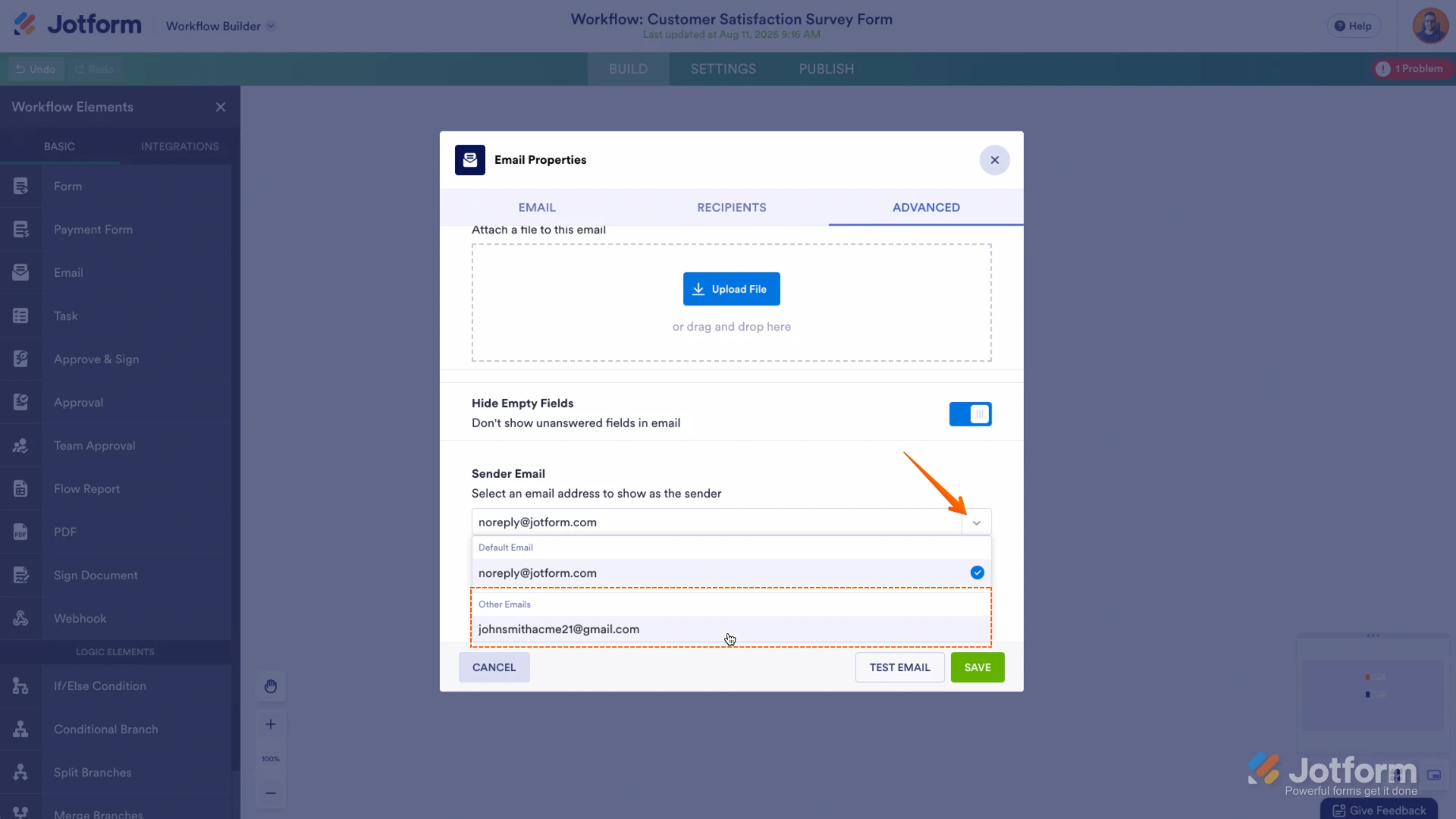 Give it a try and let us know if you need any help.
Your Reply
Something Went Wrong
An error occurred while generating the AI response. Please try again!