-
 sfnotify
The Prefill isn't showing any fields.
It is pulling the list of objects.
It was working yesterday on a different form but that form isn't working anymore either.
I have updated the Policies to try and make sure nothing is preventing access.

-
 Podo: Support Specialist
Hi Foundation,
Thanks for reaching out to Jotform Support. I'm an AI assistant here to assist you.
Let me help you with that:
Prefill only supports certain form fields, so if the form is using unsupported elements, those fields will not appear in Prefill. For Form Prefill, the supported fields are:
- Full Name
- Address
- Short Text
- Long Text
- Fill in the Blank
- Phone
- Number
- Date Picker
- Time
- Dropdown
- Single Choice
- Multiple Choice
- Scale Rating
- Spinner
Unsupported fields include Appointment, Input Table, Payments, Product List, Star Rating, and Widgets.
If the form is pulling the object list but not showing fields, the form may contain only unsupported elements for Prefill, or the fields you want to map may not be among the supported ones above.
For a quick check, review the form fields and confirm whether the fields you want to prefill are supported by Prefill. If they are supported and still not appearing, please share which Prefill type you are using so I can narrow it down further.
Give it a try and let us know how it goes.
-
sfnotify
I am using supported fields but they don't show to even select.
-
Podo: Support Specialist
Hi Foundation,
Let me help you with that:
If the fields are supported but still do not appear in Prefill, try these checks:
- Open the form in Form Builder and go to Publish, then Prefill.
- Confirm you are using the correct Prefill type for your source, since Form Prefill, Tables Prefill, and other Prefill types support different field sets.
- Check whether the fields are in the main form fields and not inside unsupported elements or widgets, since Prefill does not support every form element.
- Save the Prefill settings again and reopen the Prefill setup to see whether the fields load for mapping.
For Form Prefill, supported fields include Full Name, Email, Address, Short Text, Long Text, Fill in the Blank, Phone, Number, Date Picker, Time, Dropdown, Single Choice, Multiple Choice, Scale Rating, and Spinner.
If the same form is still not showing fields after that, I don't know this information and our support team will handle your request.
Give it a try and let us know how it goes.
-
sfnotify
I can't even access the prefill settings to map the fields.
See the original screen shot.
-
Podo: Support Specialist
Hi Foundation,
Let me help you with that:
Prefill is accessed from the Publish tab in Form Builder, then Prefill on the left. From there, you can choose the Prefill source and continue to the mapping step.
- Open the form in Form Builder.
- Go to Publish and select Prefill on the left.
- Choose the Prefill type you need, then continue to the setup and mapping screen.
If you are not seeing the Prefill settings at all, the issue may be related to the form view or the specific Prefill type you selected. The available Prefill sources include Manual, Form, Tables, SSO, Airtable, Pipedrive, monday.com, Salesforce, and HubSpot.
If you want, send a screenshot of what you see after opening Publish, and I can help narrow down where it is stopping.
Give it a try and let us know how it goes.
-
sfnotify
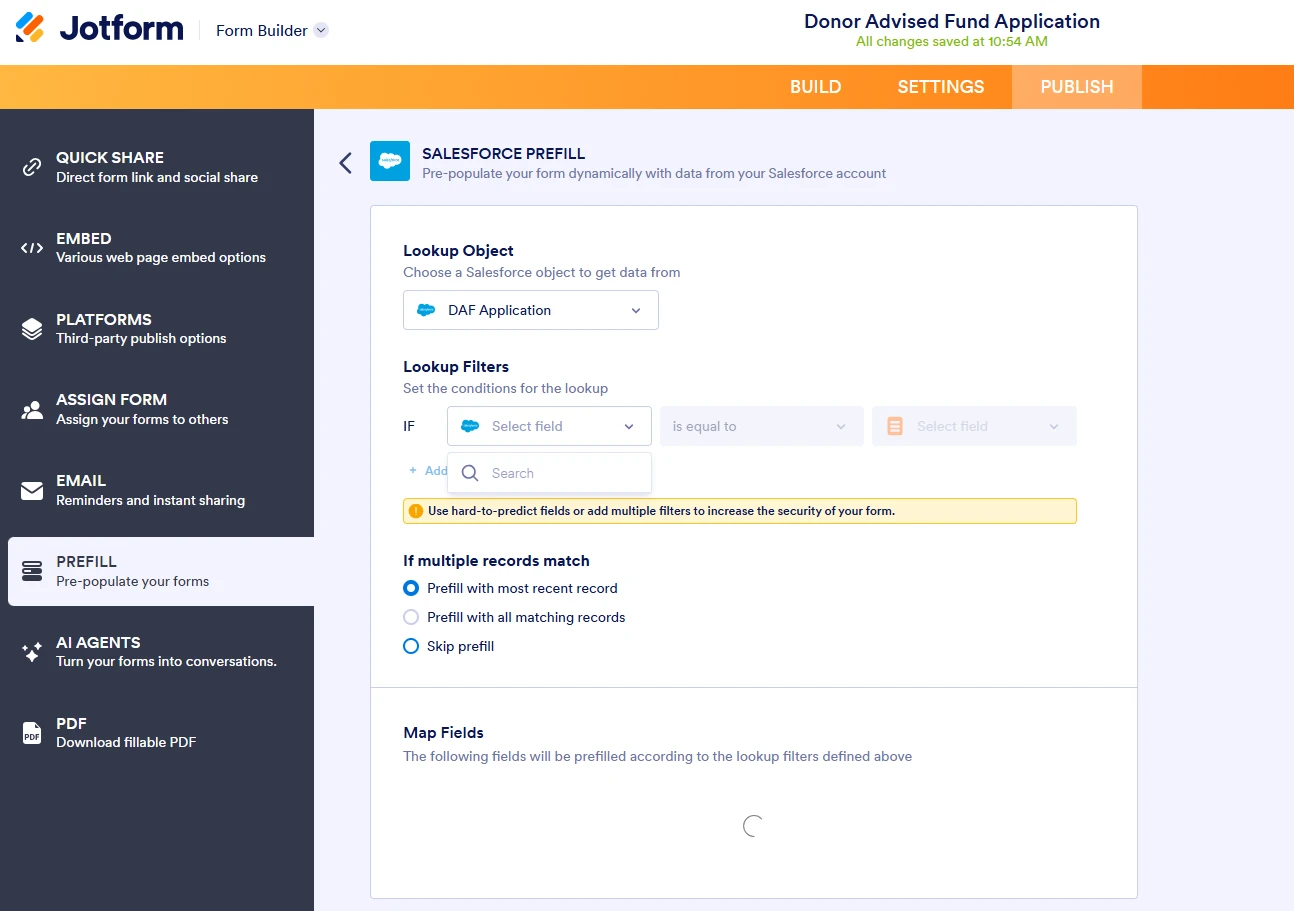
Here is a screenshot. I have selected Salesforce and the object but no fields show.
-
Podo: Support Specialist
Hi Foundation,
Let me help you with that:
For Salesforce Prefill, after you select the object, the next step is to configure your lookup filters. Once that is set, you can map your Salesforce fields to your form fields and save the configuration.
- Choose an object and configure your lookup filters.
- Set the criteria that will find the matching Salesforce record.
- Continue to the mapping step and assign the Salesforce fields to your form fields.
- Save the configuration and copy the prefill link from the overview page.
If the field-mapping step is not appearing after the object selection, the issue may be stopping at the lookup setup stage. In that case, the form may not be reaching the mapping screen yet.
For Salesforce Prefill, supported form elements include Full Name, Email, Address, Phone, Short Text Entry, Long Text Entry, Dropdown, Multiple Choice, Scale Rating, Single Choice, and Spinner.
Give it a try and let us know how it goes.
-
sfnotify
I'm unable to select any lookup filters or fields to map.
-
Podo: Support Specialist
Hi Foundation,
Let me help you with that:
For Salesforce Prefill, after you select the object, you should be able to configure your lookup filters and then map your Salesforce fields to your form fields.
- Choose the object again and wait for the next step to load fully.
- Check whether the form fields you want to map are supported by Salesforce Prefill, since only supported fields can appear in the mapping step.
- Confirm that the fields are in the main form and not inside unsupported elements or widgets.
- Save the setup and reopen the Prefill flow to see whether the lookup and mapping options appear.
For Salesforce Prefill, supported form elements include Full Name, Email, Address, Phone, Short Text Entry, Long Text Entry, Dropdown, Multiple Choice, Scale Rating, Single Choice, and Spinner.
If you still cannot select any lookup filters or fields to map, I don't know this information and our support team will handle your request.
Give it a try and let us know how it goes.
-
sfnotify
Can I schedule a call? I've waited and no fields ever show up.
-
Podo: Support Specialist
Hi Foundation,
One of our Support Team members will take it from here to follow up shortly.
Reach out again if you need any other help.
-
 Royce JotForm Support
Hi sfnotify,
I cloned your form and tested it to see if I could replicate the issue, but everything was working properly. Check out the screencast below to see my results:
I've cleared your form caches just to make sure it isn't causing any issues. You can also clear your browser caches and cookies, log out of your Jotform account and log in again, use incognito mode or private browsing, use different devices or browsers, disable your VPN or proxy server, or temporarily disable your firewall to see if it'll resolve the issue.
If the same thing happens, you can take a screenshot of the Fields & Relationships section on the DAF Application object in your Salesforce. That'll help us to understand better what’s going on. Also, you can blur the sensitive data, as we only want to check the existing fields in your Salesforce. Let me show you how to post a screenshot to our Help Center:
1. On the Help Center page, scroll down to the Your Answer section and click on the Image icon.
2. Drag and drop your image into the Upload box, or click on it and select your file.
3. Then, click on the Add button in the bottom-right corner of the window.
4. To resize it, click on your screenshot and then click on one of the boxes in the corners, and drag it inward.
5. Once you're finished, click on the Post Answer button at the bottom right of the Your Answer section.
That's it. Once we hear back from you, we'll be able to help you with this.
-
sfnotify
This spinner at the bottom never stops spinning and no fields are available to select in the Lookup filter.
-
sfnotify
Even if I create a brand new form using the Contact object it still doesn't allow prefill filter or show any fields from the Contact Object in the Map Fields.
-
 Kevin JotForm Support
Hi sfnotify,
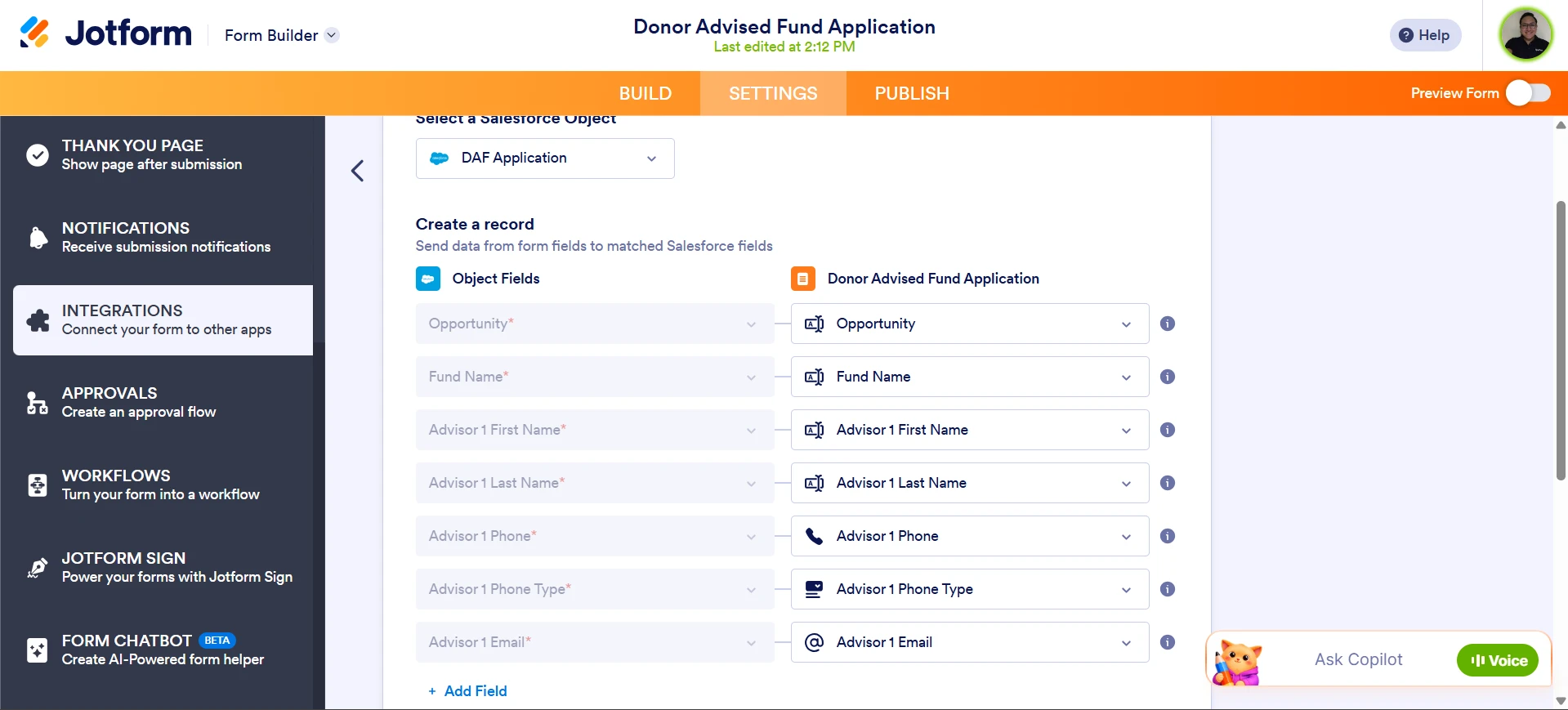
I have been testing the integration on my end trying to replicate the issue; however, everything seems to be working as expected and I'm able to connect the integration without any issues. I also had a look at your form, and noticed that you were able to integrate your form with Salesforce, here is a screenshot of what I could see:
Can you confirm if everything is working as expected now? If you are still unable to connect the integration and the fields are not mapping, you can provide us the browser details you are using to test this out, we will proceed to escalate the issue to our corresponding team for further inspection.
Once you get back to us, we can take the next step toward solving this.
-
sfnotify
You are correct that the Integration tab works correctly and that is why the Prefill not working is so confusing.
The Prefill is still not working.
I have tried this with Chrome, and Microsoft Edge. I have tried Incognito.
I have also tried using 2 different computers.
Thanks,
Steve
-
 Rahul JotForm Support
Hi Steve,
Thanks for sharing those details. I noticed that you're using a URL that includes /platform/salesforce/, like this:
https://www.jotform.com/platform/salesforce/build/261166573378062/publish/prefill
Can you let us know where you obtained this URL? Typically, the correct format should look like this:
https://www.jotform.com/build/261166573378062/publish/prefill
Can you try using the standard URL above and set up the Salesforce Prefill again to see if that resolves the issue? Additionally, you may want to try using a different internet connection to check if that makes any difference. If the issue persists, it would be very helpful if you could share a screen recording of the exact steps you're taking to set up Salesforce Prefill in your form.
When we hear back from you, we’ll be ready to move forward.



Your Reply
Something Went Wrong
An error occurred while generating the AI response. Please try again!