-
YYost Smith
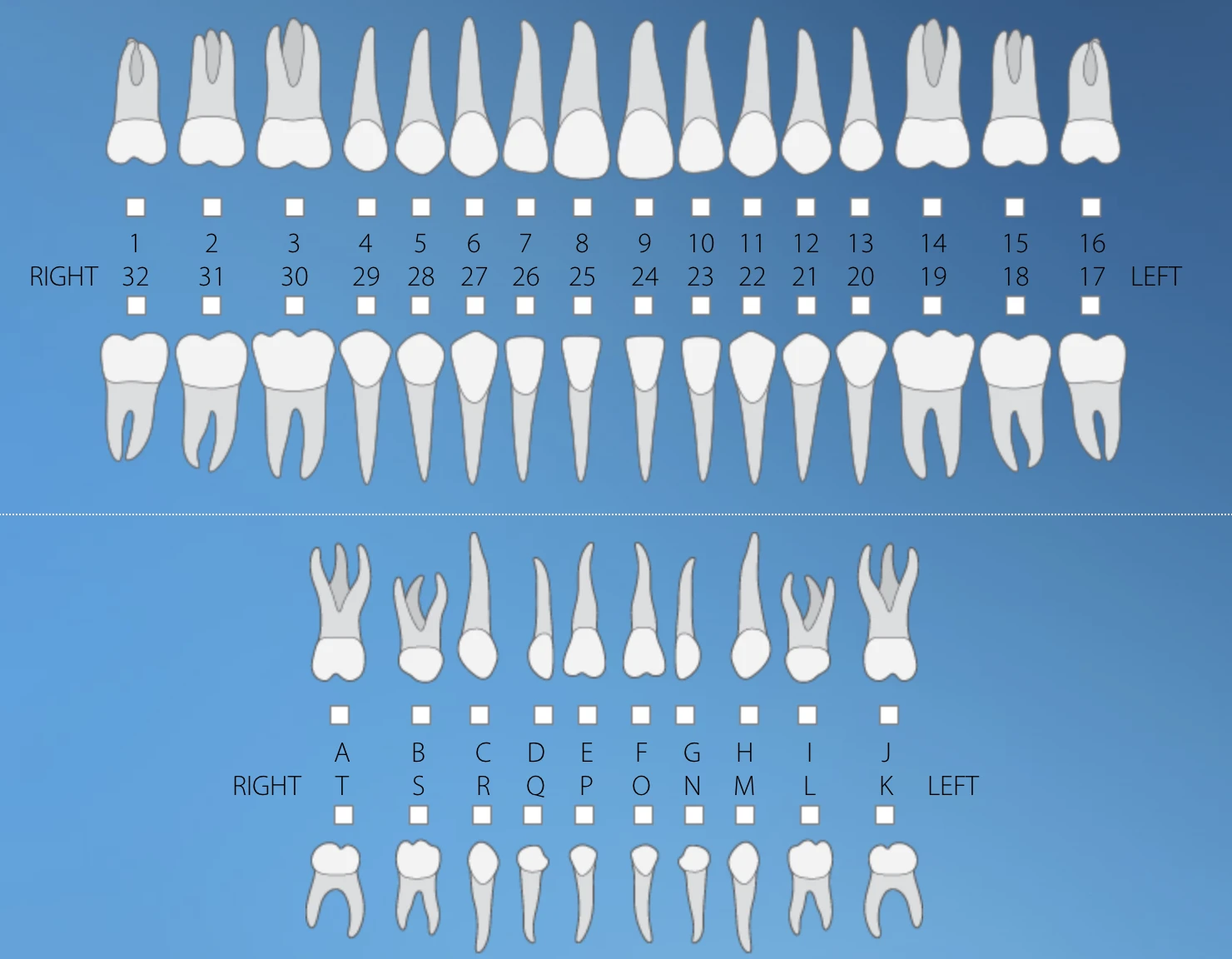
We are building out a patient referral form for an oral surgery practice but need an "odontogram" which is a picture of all of the teeth. Something like the attached png, which is from another online referral form with PBHS. The teeth and the checkboxes are both "clickable/tappable" as a toggle for selecting any given tooth. If you build this feature out it would be able to be widely used for the entire dental community for their forms.

-
 Podo: Support Specialist
Hi Yost,
Thanks for reaching out to Jotform Support. I'm an AI assistant here to assist you.
I don’t have any information in the current knowledge base about creating or using an odontogram (clickable tooth chart) field in Jotform forms, or about a built-in widget that works like the PBHS example you described. Because of that, I’m not able to confirm whether this is currently possible or provide a supported way to reproduce it inside Jotform.
Based on the available information, I also don’t have details about roadmap items or whether such a feature might be added in the future, so I can’t make any promises or give guidance on that aspect either.
If you’d like, you can share more details about how you’d want it to behave inside your form (for example, how you’d like the selected teeth to be stored in submissions), and after we hear back from you, we’ll have a better idea of what’s going on and how to help.
Let us know if you have any other questions.
-
YYost Smith
Please escalate this to a human representative from Jotform for consideration for a feature request.
-
Podo: Support Specialist
Hi Yost,
One of our Support Team members will take it from here to follow up shortly.
Let us know if you have any other questions.
-
 Omryn JotForm Support
Hi Yost,
Thanks for using Jotform. While the feature you're looking for isn't available at Jotform right now, we've gone ahead and escalated your request to our developers. Exactly when or if it's developed depends on their workload, how viable it is, and how many other users also request it. If there are any updates, we’ll circle back to this thread and let you know.
Thanks for your patience and understanding, we appreciate it.
-
YYost Smith
Hey Omryn - thanks for the quick response! I think the other thing to think about is not so much "if other users also request it" but moreso "how many users will use this once it is done?" I think it's much more of an "if you build it, they will come" scenario.
For an example of an active form with this feature, see here:
mysecurepractice.com/Truform/72713b98-bbe6-478d-b982-c249b4e64196/Submission/Create.
Let me know if I can be of any assistance!
Yost
-
 Reymae JotForm Support
Hi Yost,
Your feedback about the odontogram use case is helpful, and the request remains escalated for review. Sharing a real-world example like the one you provided helps give the team more context around the workflow and the potential demand.
In the meantime, you can explore the Image Checkboxes widget as a workaround while the feature is not yet supported. The Image Checkboxes widget allows you to upload your images and customize the image size and label. It's really easy to use. Let me show you how:
- In Form Builder, click on the Add Element menu on the left side of the page.
- Under the Widgets tab, search for the Image Checkboxes widget, and click on it or drag and drop it to your form.
- Enter your Image Links, Image Titles, and Image Sizes on the right side of the page.
- Now, click the Update button.
Reach out again if there’s anything else we can help you with.
-
This video you just showed with teeth 1-5 is exactly what I need but for the entire odontogram. Please let me know if and when you are able to build it out, thank you!
-
Reymae JotForm Support
Hi Yost,
We don't provide custom form creation or designing services, but you're welcome to work with a third party who may be able to help you. You can check out our Jotform Solutions Partner Directory for a list of consultants who've asked to be included.
You can get in touch with the right Solutions Partner for you by sorting them by location, type of service, industry, language support, or partner tier. Just fill out the contact form for the Jotform partner you'd like to work with, so they can make the necessary preparations to help you.
Keep in mind, though, that these parties operate independently of Jotform, so we assume no responsibility or liability for their work or their actions.
Let us know if you have any other questions.
-
YYost Smith
Hey Rey - thanks. For my reference, if the URL that the image checkboxes pulls its images from disappears in the future, are the images already saved on your server once the image checkbox form is created? Or will the images break if that form/URL disappears and is there some way to upload them directly to your servers so they don't disappear?
Best,
Yost
-
Reymae JotForm Support
Hi Yost,
That's a good question, and the short answer is no, the images aren’t stored on the server when using Image Checkboxes widget.
Those images are pulled directly from the URL you provided each time the form loads. So if that source link is removed, changed, or becomes inaccessible, the images will break or disappear from the form. If you want to avoid that, the safest approach is to host the images somewhere stable and permanent. A couple of solid options are to use a reliable hosting service like Amazon S3 or Google Drive with properly shared/public links or host them on your own website/server if you control it.
Let us know if there’s anything else we can help you with.


Your Reply
Something Went Wrong
An error occurred while generating the AI response. Please try again!