-
 stevenszaboinfotermek
Hello Jotform Support Team,
I’m planning to build a single-page perfume selection form and would really appreciate your guidance on a couple of technical and UX-related points.
1. Staying Within the Free Plan Field Limit
I will have around 107 fragrances, each with a quantity selector, and I want users to submit all their selections in one single submission.
From what I understand, instead of creating one field per fragrance (which would exceed the 100-field limit), I could:
Use something like a Product List or Input Table
Include many fragrances as rows inside a single field
Potentially group them into a few sections (e.g., Women / Men / Unisex), each using one table field
My question is:
Can I safely structure the form this way so that all 107 fragrances (with quantity selectors) live inside just a few fields, and still remain within the free plan’s field limit?
Also, if I import the fragrance list (e.g., via Excel), will those rows still count as part of one field rather than multiple fields?
2. Best Mobile UX: Table vs Card Layout
I want the selection area to look like an Excel-style grid, with columns such as:
Inspired by (brand)
Fragrance name
Our version ID
Quantity selector (+ / –)
So each fragrance would ideally appear as one row in a grid, with the quantity selector at the end.
However, I’m concerned about mobile usability.
My questions are:
Will this type of multi-column grid remain easily readable and usable on mobile (without excessive horizontal scrolling or cramped text)?
Or would you recommend a different layout for better mobile UX, such as a card-style layout, where each fragrance is stacked vertically like:
Brand
Fragrance name
Version ID
Quantity selector
My goal is to keep it:
Easy to scan quickly
Easy to tap/select quantities
Clean and readable on mobile devices
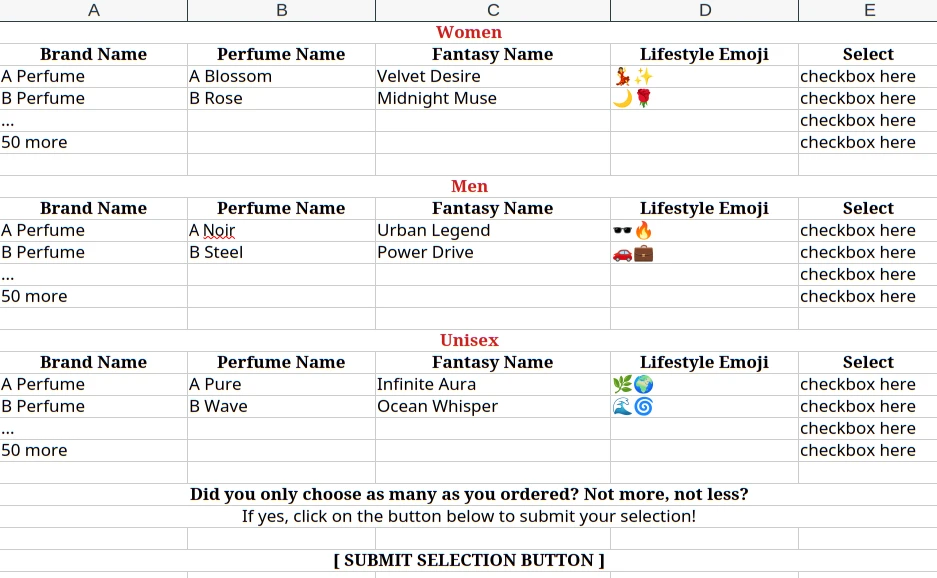
Mockup Reference
I’ve included a image below where I’ll attach or paste a mockup of the layout I have in mind:
Embed Form with ClickFunnels Image 1 Screenshot 20
Thanks in advance for your help. I want to make sure I build this in the most efficient way technically, while also keeping the experience smooth and intuitive for users on mobile.
Best regards,
Steven

-
 Brandon
Hi Steven,
Thank you for reaching out to Jotform Support. When it comes to staying within the free plan limit, creating one product list field with 107 options will only count as one field. Your idea of creating a few fields for male, female, and unisex fragrances would work as well. As long as there are not over 100 individual fields within the form, you will be able to create the form.
As for your second question, I’ve gone ahead and moved your other question to a separate thread to keep things tidy, and someone from our Support Team will help you out with it here.Let us know if you have any questions.
Your Reply
Something Went Wrong
An error occurred while generating the AI response. Please try again!