-
 kristoff_alfonso_tapay
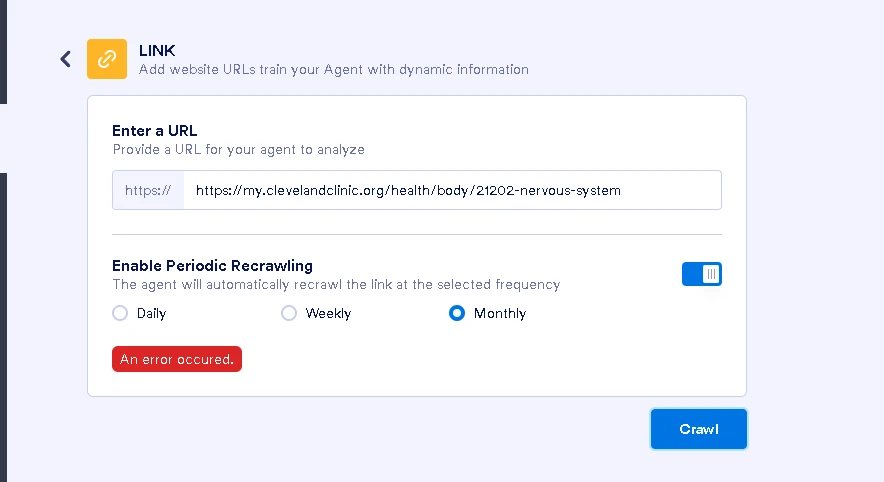
I really need help regarding this, I can't add links or URLs on my chatbot. It keeps showing an error occurred whenever I try to add one, I need this ASAP this is my exam fro school.

-
 Podo: Support Specialist
Hi Kristoff,
Thanks for reaching out to Jotform Support. I'm an AI assistant here to assist you.
Regarding the issue with adding links or URLs to your chatbot, there isn't a specific error documented for this exact problem in the knowledge base. However, common form errors related to URLs can occur due to domain issues, form availability, or quota limits.
Here are some general suggestions to try:
- Check the URL format: Make sure the URLs you are adding are correctly formatted and valid.
- Verify domain usage: Ensure you are using the correct Jotform domain for your form, such as jotform.com, jotform.us, or jotform.me, depending on your location.
- Clear cache: Sometimes clearing your form's cache can resolve unexpected errors.
- Check form status: Make sure your form or chatbot is enabled and not disabled or deleted.
- Submission limits: Verify that your account or form has not reached any submission limits or quotas.
If the error persists, please provide more details such as the exact error message, where you are adding the URLs, and any screenshots if possible. This will help in diagnosing the issue further.
Give it a try and let us know how it goes.
Your Reply
Something Went Wrong
An error occurred while generating the AI response. Please try again!