-
 erickaplewis
Hello,
I'm having trouble getting full access to my API key. Every time I create one it does not give full access as an option. Please advise on how to fix this problem.
Ericka

-
 Podo: Support Specialist
Hi Ericka,
Thanks for reaching out to Jotform Support. I'm an AI assistant here to assist you.
Let me help you with your API key issue.
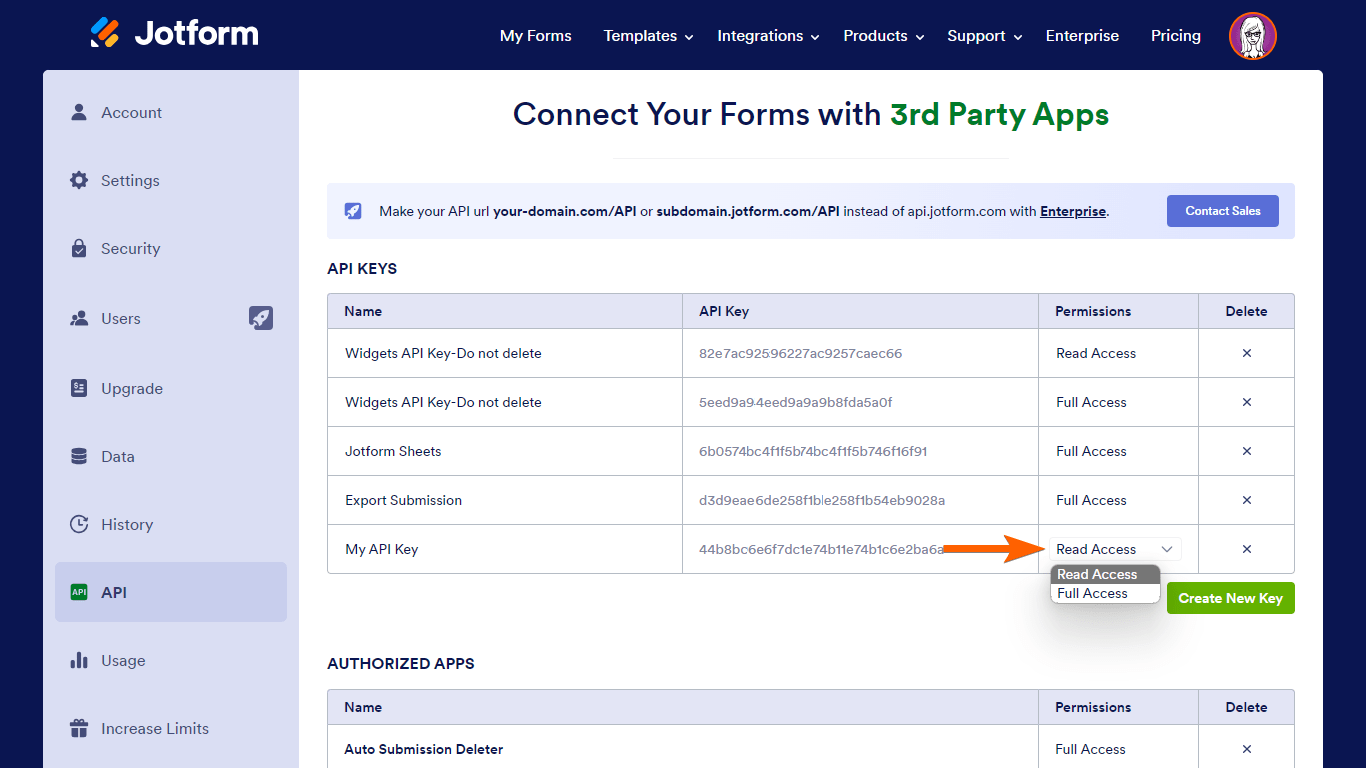
When creating a Jotform API key, you should be able to select the permission level for the key. There are two permission options available:
- Read Access – grants read-only permission to your data.
- Full Access – grants full access, allowing add, edit, and delete actions on your data.
To create an API key with full access, follow these steps:
- Go to your Account API page and select Create New Key.
- Name your new API key by entering a desired label.
- Change the permission of your API key to Full Access if needed.
If you do not see the option to select full access when creating the key, it could be due to a limitation or a UI issue. Make sure you are following the steps on the correct page and that your account plan supports full access API keys.
Each subscription plan has a daily API call limit, but the full access permission should still be available regardless of the plan.
Here is an illustration of the permission selection step during API key creation:
If you continue to experience issues, please provide a screenshot of the API key creation page where the permission options appear, so I can assist you further.
Give it a try and let us know how it goes.
-
erickaplewis
I followed your instuctions and it is still not providing full access.
-
Podo: Support Specialist
Hi Ericka,
Since you have followed the instructions and still do not see the full access option when creating your API key, this might be caused by a specific issue with your account or the interface.
To assist you better, please provide a screenshot of the API key creation page where the permission options appear. This will help us understand what you are seeing and identify the problem more accurately.
Once we have the screenshot, we can guide you further on how to resolve this issue.
Give it a try and let us know how it goes.
-
erickaplewis
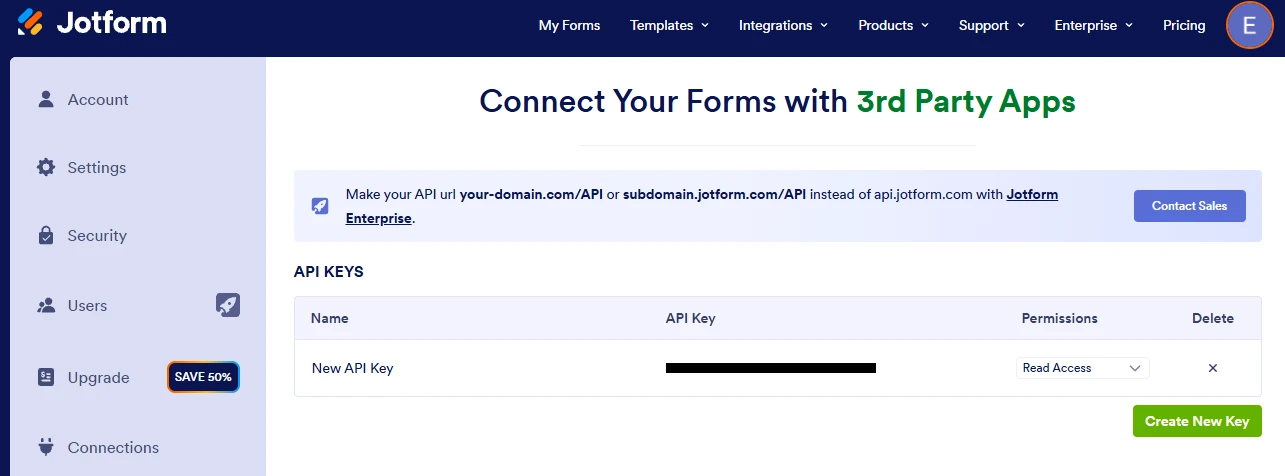
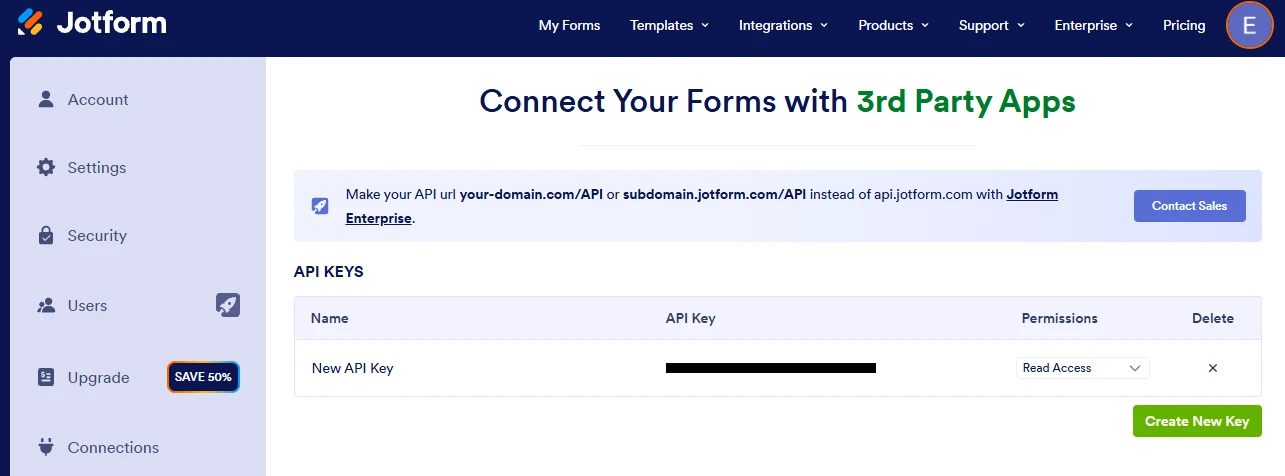
the screen shot has been provided in the last two posts.
-
Podo: Support Specialist
Hi Ericka,
Thank you for letting me know that you have already provided the screenshot in the last two posts. Unfortunately, I am unable to view images or attachments directly in this chat interface.
Could you please describe what options you see on the API key creation page or any messages that appear? This information will help me better understand the issue and provide you with the appropriate guidance.
After we hear back from you, we’ll have a better idea of what’s going on and how to help.
-
erickaplewis
I only see the "read access"
-
Podo: Support Specialist
Hi Ericka,
If you only see the "Read Access" option and not the "Full Access" option when creating an API key, it could be due to a limitation related to your account type or plan.
Here’s how to proceed:
- Verify your account plan: Some plans may restrict API key permissions. Ensure your plan supports full access API keys.
- Check for any account restrictions: Sometimes account settings or restrictions might limit API key permissions.
- Try creating the API key from a different browser or clear your browser cache: This can help rule out any UI glitches.
If after these steps you still cannot see the full access option, I don't have this specific information available, and our support team will handle your request.
-
 Kevin JotForm Support
Hi erickaplewis,
Let me take a look at this for you. To do that, we’ll need your permission to access your account. Don’t worry, you can turn it off again once we’re done. Let me show you how to do it:
1. In the top-right corner of your Workspace page, click on your Avatar/Profile Image icon.
2. Then, in the Dropdown menu that opens, click on Settings.
3. Next, in the panel on the left, click on the Security tab.
4. If you haven’t opened your Security page in a while, it’ll ask you to verify. To do that, click on Send Verification Code.
5. Then, enter the Verification Code you receive in your email.
6. Finally, at the bottom of the page, toggle on Jotform Support Access.
After we hear back from you, we’ll have a better idea of what’s going on and how to help.


 After we hear back from you, we’ll have a better idea of what’s going on and how to help.
Your Reply
Something Went Wrong
An error occurred while generating the AI response. Please try again!