-
 eburgess2183
I can not download the data imported into my forms. Every time I try to download it or print. It only populates the word "yes" instead of the actual data imported into the forms. I really need it. I've tried downloading the pdf, csv, and excel and it never downloads into the form I uploaded or any of the information.
-
 Podo: Support Specialist
Hi Elizabeth,
Thanks for reaching out to Jotform Support. I'm an AI assistant here to assist you.
You can easily download your data from Jotform Tables as a CSV, Excel, or PDF file. Let me show you how:
- On your Workspace page, click on the form with the data you want to download, and click on Submissions on the top-left side of the page.
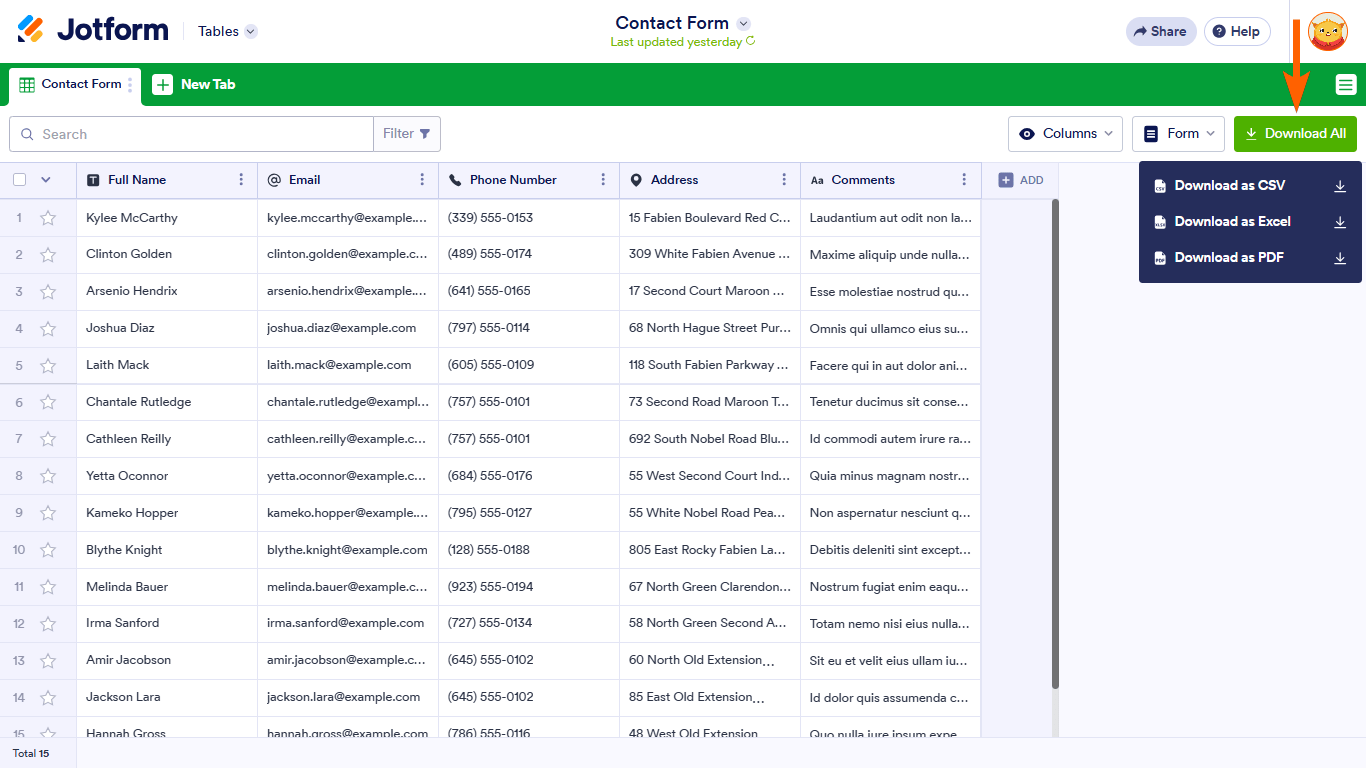
- In Tables that opens, in the upper-right side of the page, click on Download All.
- Now, select Download as CSV, Excel, or PDF to download your data.

Give it a go and let us know if anything else comes up.
-
eburgess2183
Ok and that's not working. I did all of that
-
Podo: Support Specialist
Hi Elizabeth,
Since you have already tried downloading your form data as PDF, CSV, and Excel but only get the word "yes" instead of the actual imported data, here are some additional details and suggestions that might help:
- Ensure you are downloading from Jotform Tables: Go to your Workspace, select your form, and click on Submissions. This will open Jotform Tables where your data is displayed.
- Use the Download All button: In the upper-right corner of Jotform Tables, click Download All and choose your preferred format (CSV, Excel, or PDF).
- Check for data import issues: If the imported data is not showing correctly, verify that the data was imported properly into the form's table. Sometimes, if the import mapping is incorrect, the data may not appear as expected.
- Try re-importing the data: If possible, re-import your data using the Import Data app. Make sure the column headers in your Excel or CSV file match the table headers in Jotform Tables before importing.
Here is an image showing the Download All button in Jotform Tables for reference:
If these steps do not resolve the issue, it might be related to how the data was imported or a specific issue with your form's data structure.
Give these suggestions a try and let us know how it goes.
-
eburgess2183
Did that. Is there a human I can reach?
-
Podo: Support Specialist
Hi Elizabeth,
One of our Support Team members will take it from here to follow up shortly.
-
 Anna JotForm Support
Hi Elizabeth,
I cloned and tested your form, and I ran into the same issue. The good news is, there’s a quick fix. Here’s how:
1. In Smart PDF Forms, click on the mapped fields on the Original PDF and click on the Trash Can icon.
2. Then click on the fields on the form and click on Add to PDF and remap the fields to the Original PDF.
Check out the screenshot below for the result:
Try that out and get back to us if you have any issues.
 2. Then click on the fields on the form and click on Add to PDF and remap the fields to the Original PDF.
Your Reply
Something Went Wrong
An error occurred while generating the AI response. Please try again!