-
 Dreiman_Rich
I am taking over the development of a form and one of the current requirements involves an odd edge case IMO.
The goal of the form:
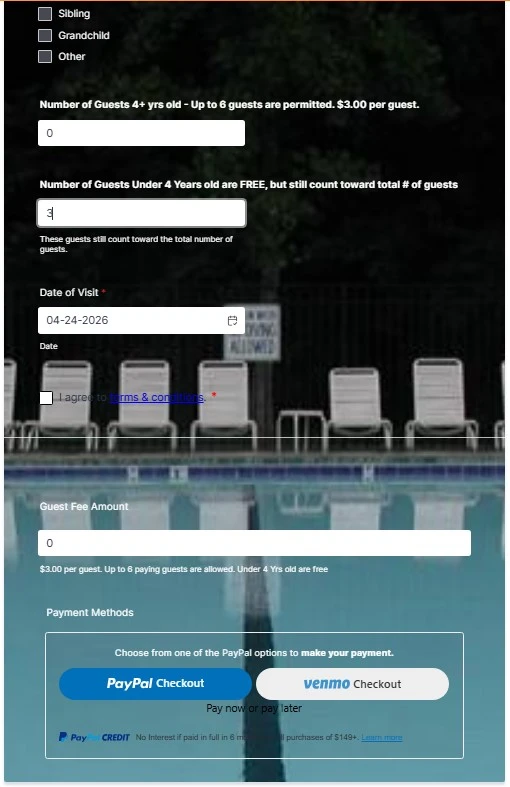
- Capture the number of guests that a member brings into our pool.
- If the guests are 4 and under, they a free, $0.
- If the guests are over 4 years old, they are $3 each.
- Example scenarios:
- (A) Member brings 3 kid's under 4 = $0
- (B) Member brings 3 kid's over 4 = $9
- (C) Member brings 3 kid's under 4 and 3 kid's over 4 = $9
- No-Issues encountered:
- If the member correctly enters the information there is no issue.
- In scenario (A) the Submit form button is visible and the Paypal/Venmo option is not visible
- In scenario (B) & (C) the Submit form button is not visible and the Paypal/Venmo option is visible
- Issue encountered:
- If the member incorrectly enters information, specifically a headcount number in the "guests are over 4 years old", which then calculates a guest fee amount > $0 then tries to correct it there is an issue.
- Initially the guest fee amount > $0, the Submit form button is not visible and the Paypal/Venmo option is visible
- Expected behavior
- The member realizes they made a mistake and either deletes the "guests are over 4 years old" headcount number (null/blank) or enters a value of 0, setting the calculated guest fee amount = $0.
- Unexpected behavior - While this should set the Submit form button is visible and the Paypal/Venmo option is not visible, it does not. Both Submit form button is not visible and the Paypal/Venmo option is not visible
I have already tried adding form conditions that show and hide the Submit form button and Paypal/Venmo options, based on whether a calculated guest fee amount = $0, <> $0 or > $0, but the Submit form button never becomes visible. I do believe that I will eventually need to add the condition(s) again to hide the Paypal/Venmo options when the calculated guest fee amount = $0 and show when it's not, so as to ensure a member doesn't try to click on them when the guest fee amount = $0.
Please advise on how to address?
Thanks,
Rich Dreiman

-
 Podo: Support Specialist
Hi Rich,
Thanks for reaching out to Jotform Support. I'm an AI assistant here to assist you.
Let me help you with the issue regarding the visibility of the Submit button and PayPal/Venmo options based on the calculated guest fee amount in your form.
In Jotform, to control the visibility of elements like the Submit button and payment options based on calculated field values, you need to use Show/Hide Field conditions effectively. Here’s how you can address your scenario:
- Use a Form Calculation Widget to calculate the guest fee amount based on the number of guests over 4 years old. This widget should update dynamically as the user changes the input.
- Create Show/Hide Conditions under the Settings > Conditions > Show/Hide Field:
- Set a condition to show the Submit button if the calculated guest fee amount is equal to 0.
- Set a condition to hide the PayPal/Venmo payment options if the calculated guest fee amount is equal to 0.
- Set a condition to hide the Submit button if the calculated guest fee amount is greater than 0.
- Set a condition to show the PayPal/Venmo payment options if the calculated guest fee amount is greater than 0.
Additionally, make sure that the payment field is set to User Defined Amount and linked to the calculation widget so that the payment amount updates correctly.
If you want, you can also consider using a single choice field to let users select payment options and then show/hide fields based on that selection, but your current approach with conditions on the calculation field is valid.
For more detailed guidance, you can refer to Jotform's help articles on Show or Hide Fields Based on User's Answer and How to Pass a Calculation to a Payment Field.
Give it a try and let us know how it goes.
-
Dreiman_Rich
That is working. I had tried other variations of similar conditions yesterday, but they didn't produce the same results as why you prescribed. Thanks!

Your Reply
Something Went Wrong
An error occurred while generating the AI response. Please try again!