-
DDanielle Merry
Good morning, all of our users are having issues with attaching photos to their assigned forms from their camera roll. We have tried updates, deleting the app and reinstalling, refreshing etc. Can you please help with addressing this issue?
Thank you.
Danielle Merry
-
 Podo: Support Specialist
Hi Danielle,
Thanks for reaching out to Jotform Support. I'm an AI assistant here to assist you.
It seems your users are having trouble attaching photos from their camera roll to assigned forms. One efficient way to handle photo attachments in Jotform Mobile Forms is by using the Take Photo widget. This widget allows users to take and upload photos directly within the form without leaving the app, which can help avoid issues related to accessing the camera roll.
Here’s how to add and set up the Take Photo widget:
- Open the Jotform Mobile Forms builder and tap the Add (+) icon on the lower left.
- Search for the Take Photo widget under the Widget tab and add it to your form by tapping or dragging it.
- Configure the widget settings, such as selecting the camera facing (front or rear) and customizing button texts.
- Save the changes by clicking the Update Widget button.
When users fill out the form, they can tap the Take Photo button to capture a photo directly, which is then automatically uploaded to the form.
This method avoids the need for users to attach photos from their camera roll manually, which might be causing the issue you described.
If you prefer to allow users to upload photos from their camera roll, ensure that the File Upload field is properly set up in your form and that the app has the necessary permissions to access the device's photos.
For more detailed guidance, you can visit the Jotform help article on How to Take a Photo and Upload It to Jotform Mobile Forms.
Give it a try and let us know how it goes.
-
 Eliza Enterprise Support
Hi Daniel,
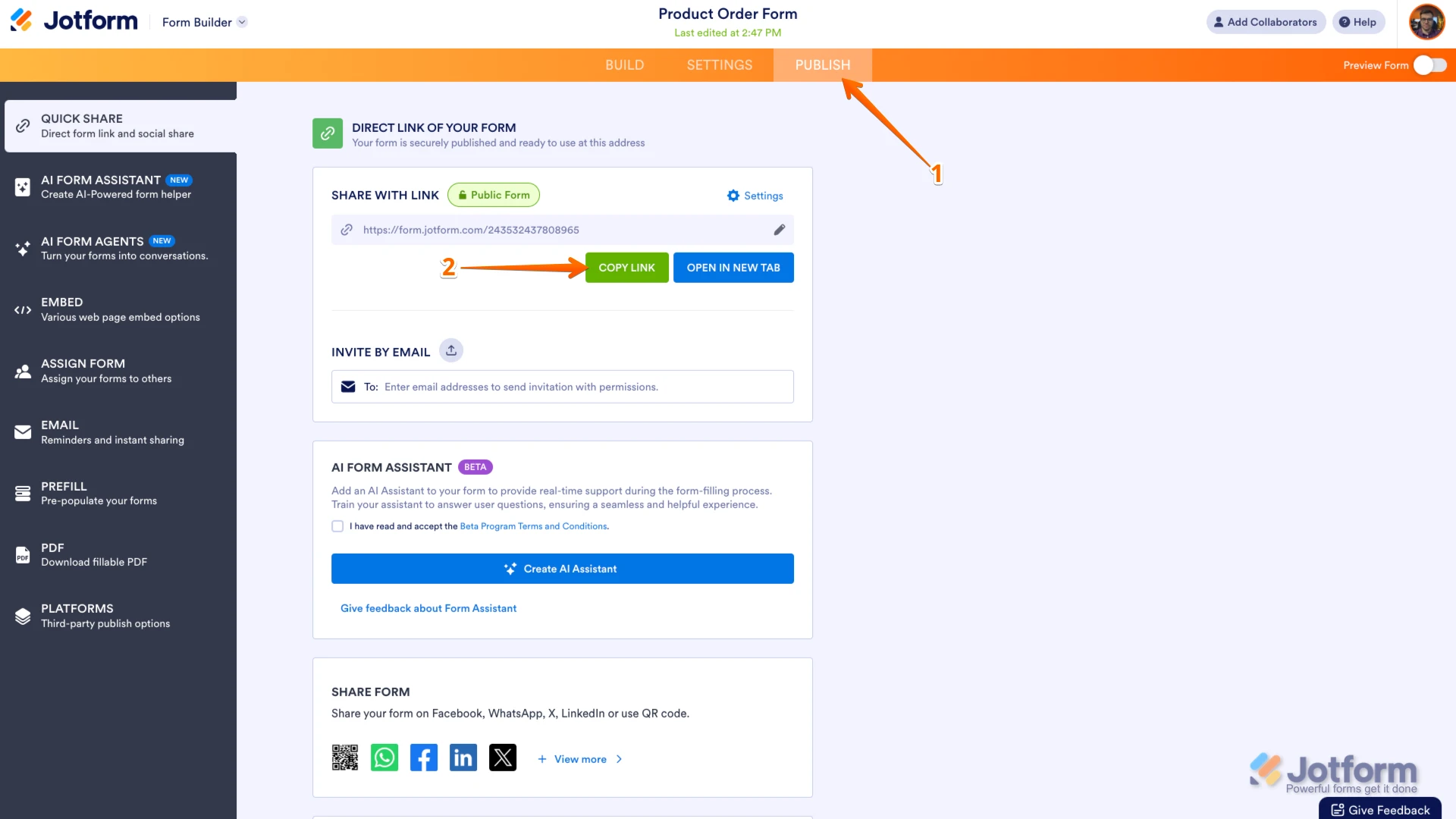
Jotform allows a maximum individual file upload size of 1 GB (1048576 KB) per file. Can you confirm if they’re trying to upload less than the file size limit? Can you share with us the URL of the form that’s having the issue? You can easily find your form's URL in Form Builder. Let me show you how:
- In Form Builder, in the orange navigation bar at the top of the page, click on Publish.
- In the Quick Share tab, click on Copy Link in the Share With Link section.
 Once you share the form URL with us, we’ll be able to help you better with this.
 -
DDanielle Merry
Hi Eliza,
We have never had any issues before with file size.
The issue seems to be that the option to extract from camera role is not showing as available to even try.
Before - https://arbaccess.jotform.com/form/231922410557048
Durings - https://arbaccess.jotform.com/form/231922015973051
-
 Rose Enterprise Support
Hi Daniel,
To further test the forms' behavior, please answer the following:
- Can we do a test submission on your form?
- May we know the browser and make and model of the device being used by the affected users?
- When you say camera roll, are you testing it on a mobile device? If so, is the issue replicated on a desktop device?
- A screen recording would help us see exactly what’s happening. You can use Loom or upload to Google Drive or Dropbox, then send us the link.
Let us know if there’s anything else we can help you with.
-
DDanielle Merry
Good morning,
As you can see in the attachment, the option to extract from camera roll is not available to do.
-
 Nikola JotForm Support
Hi Danielle,
Thanks for reaching out to Jotform Support. I see that you have an Enterprise account, which means that we have a dedicated Enterprise Support Team to help you. We have a guide that explains how to create a ticket for Enterprise Support here. Just create a ticket there and someone from the Enterprise Support Team will get in touch with you shortly.
Thanks for your patience and understanding, we appreciate it.
-
DDanielle Merry
I have already lodged a ticket, I am responding to a previous message in this thread?
-
 Sheena JotForm Support
Hi Danielle,
The Enterprise team will handle your concern from there. They have the appropriate access and resources to assist you further.
Thanks for your understanding, we appreciate it.
 Once you share the form URL with us, we’ll be able to help you better with this.

Your Reply
Something Went Wrong
An error occurred while generating the AI response. Please try again!