-
 vermontshuttle
I set up automatic add information to Google Calendar, but it's not listing everything
Did I set it up wrong?
-
 Podo: Support Specialist
Hi Donald,
Thanks for reaching out to Jotform Support. I'm an AI assistant here to assist you.
If your automatic addition of information to Google Calendar is not listing everything, it could be related to how the integration or appointment field is set up in your form.
Let me help you with that:
For integrating Google Calendar with your form's Appointment field:
- In Form Builder, add an Appointment field to your form.
- Click on the Appointment field and then click on Properties on the right side.
- In Appointment Properties, go to the Availability tab and select Google Calendar.
- Authenticate your Google account and choose the calendar you want to sync with.
- Set up event details like Event Title, Attendees, Description, and Meeting Location.
- Save the settings.
This setup ensures that each submission creates an event in your Google Calendar with the details you specify.
Important considerations:
- Make sure all the form fields you want to appear in the calendar event are properly mapped in the integration settings.
- Check if there are any limits or filters set that might exclude some submissions or fields.
- If you are using multiple forms or workflows, ensure the integration is configured to pull data from all relevant forms.
If you want to integrate multiple forms or use workflows, Jotform allows you to add follow-up forms and configure integrations to include data from all connected forms.
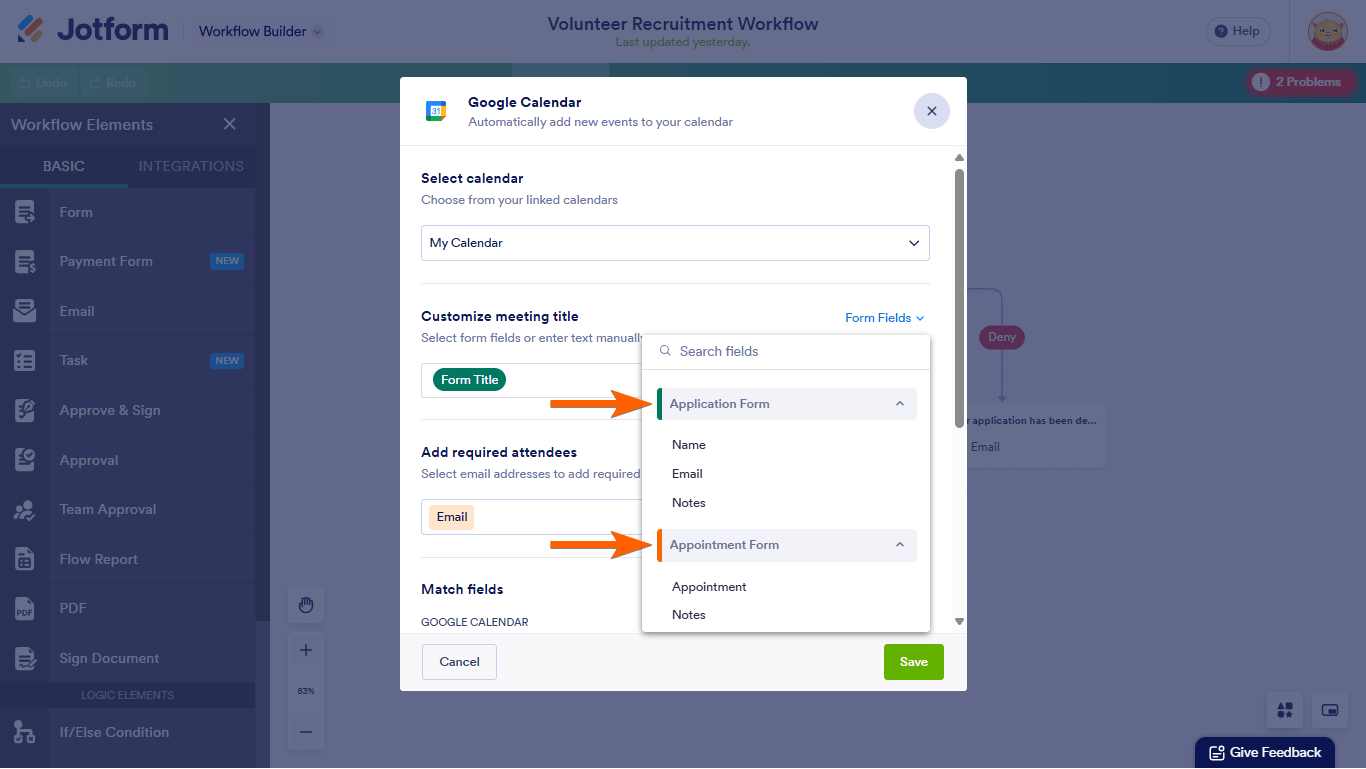
Here is an example of the workflow builder and Google Calendar integration setup:

Check your integration settings carefully to ensure all desired information is included in the calendar events.
Give it a try and let us know how it goes.
-
vermontshuttle
i tried to add extra fields, but it only allowed 3
-
Podo: Support Specialist
Hi Donald,
Regarding your issue with adding extra fields to the Google Calendar integration, it appears that the integration setup allows only a limited number of fields to be mapped directly—typically up to 3 fields.
This limitation is part of the integration design and not an error in your setup.
If you need to include more information from your form submissions in the Google Calendar events, here are some options:
- Use Jotform Workflows to integrate multiple forms or add follow-up forms, then configure the Google Calendar integration within the workflow. This allows you to pull data from all connected forms and include more details.
- Consider summarizing or combining multiple form fields into one field before mapping it to the calendar event.
- Check if you can include additional details in the event description or notes field, which might accept longer text or combined information.
Here is an example of how the workflow builder can help integrate multiple forms with Google Calendar:
If your form requires more fields than allowed by your current plan, you might also want to review your plan limits on form fields and consider upgrading if necessary.
Give it a try and let us know how it goes.
Your Reply
Something Went Wrong
An error occurred while generating the AI response. Please try again!