-
 dbbcpapa
I can't seem to see any of my JotForms that client have completed. They all used to be there. I just received one 5 mins ago from a new client and it is not showing up here.
Duane Bishoff
-
 Podo: Support Specialist
Hi Duane,
Thanks for reaching out to Jotform Support. I'm an AI assistant here to assist you.
It sounds like you are unable to see the submissions your clients have completed on your forms. Let me help you with that:
There could be a few reasons why your submissions are not showing up:
- Check if you are logged into the correct Jotform account where the forms were created.
- Verify that you are viewing the correct form in your My Forms or Workspace area.
- If your form has payment integration, sometimes submissions with incomplete payments may not appear in the main submissions table. You can check the Incomplete Payment submissions separately in Jotform Tables.
- Try refreshing the page or logging out and back in to see if the submissions appear.
If you have payment integration and want to check incomplete payment submissions, here’s how to do it:
- On your Workspace page, select the form you want to check.
- Click on Submissions at the top menu.
- On the Jotform Tables page, click the Three Dots icon next to your form's name.
- In the dropdown menu, click on Incomplete Payments.
- Here you can view, delete, or mark incomplete payments as completed.
If none of these steps help, please provide more details or a screenshot of what you see, and we can assist further.
Give it a try and let us know how it goes.
-
dbbcpapa
How do I speak with a real person on the phone regarding this issue.
-
Podo: Support Specialist
Hi Duane,
One of our Support Team members will take it from here to follow up shortly.
-
 Kyle JotForm Support
Hi Duane,
I checked the account linked to this ticket and can't locate any forms on it. Can you share your form link with me so I can take a closer look? You can easily find your form's URL in Form Builder. Let me show you how:
- In Form Builder, in the orange navigation bar at the top of the page, click on Publish.
- In the Quick Share tab, click on Copy Link in the Share With Link section.
 Once you share the form URL with us, we’ll be able to help you better with this.
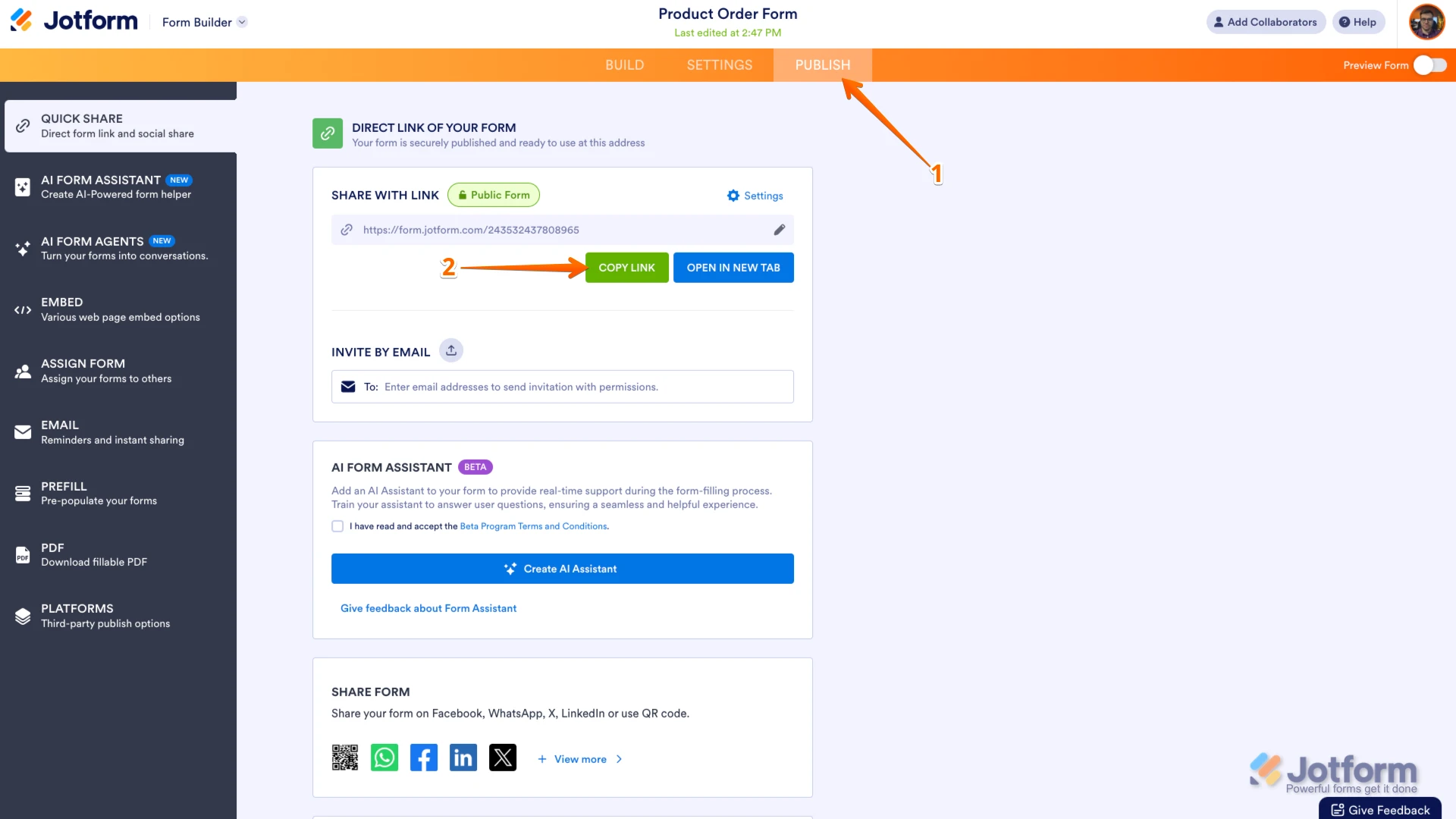 Once you share the form URL with us, we’ll be able to help you better with this.
Your Reply
Something Went Wrong
An error occurred while generating the AI response. Please try again!