-
AAlan HealyI am experiencing an issue where some of my forms on the app are not scrolling down to the end of the page where the payment is made. The forms were working fine until this problem started occurring. I have not mentioned any specific steps I tried to fix this or any error messages. I need urgent assistance with this issue as it is affecting the payment process on my forms. My email is dsupreme.healy@gmail.com and my name is Alan Healy.
-
AAlan Healy

-
 Jenette JotForm Support
Hi Alan,
Thanks for reaching out to Jotform Support. To clarify, are you referring to your form named, WLDF Annual Dancer Renewal and WLDF New Dancer or Replacement Card Registration?
If that's correct, I cloned and tested both of your forms using the Jotform Mobile App on an iOS device, but I couldn’t replicate the issue. Check out my results in the screencast below for WLDF New Dancer or Replacement Card Registration:
Here's another screencast below to see my results for WLDF Annual Dancer Renewal:
When I checked your account, I couldn't see any Jotform App. Can you confirm if you are using the Jotform Mobile App? If yes, can you make sure that it is updated on our latest version? Then, make sure that the data is properly sync. You can easily sync your data in the Jotform Mobile App. To get going, here’s what you’ll do:
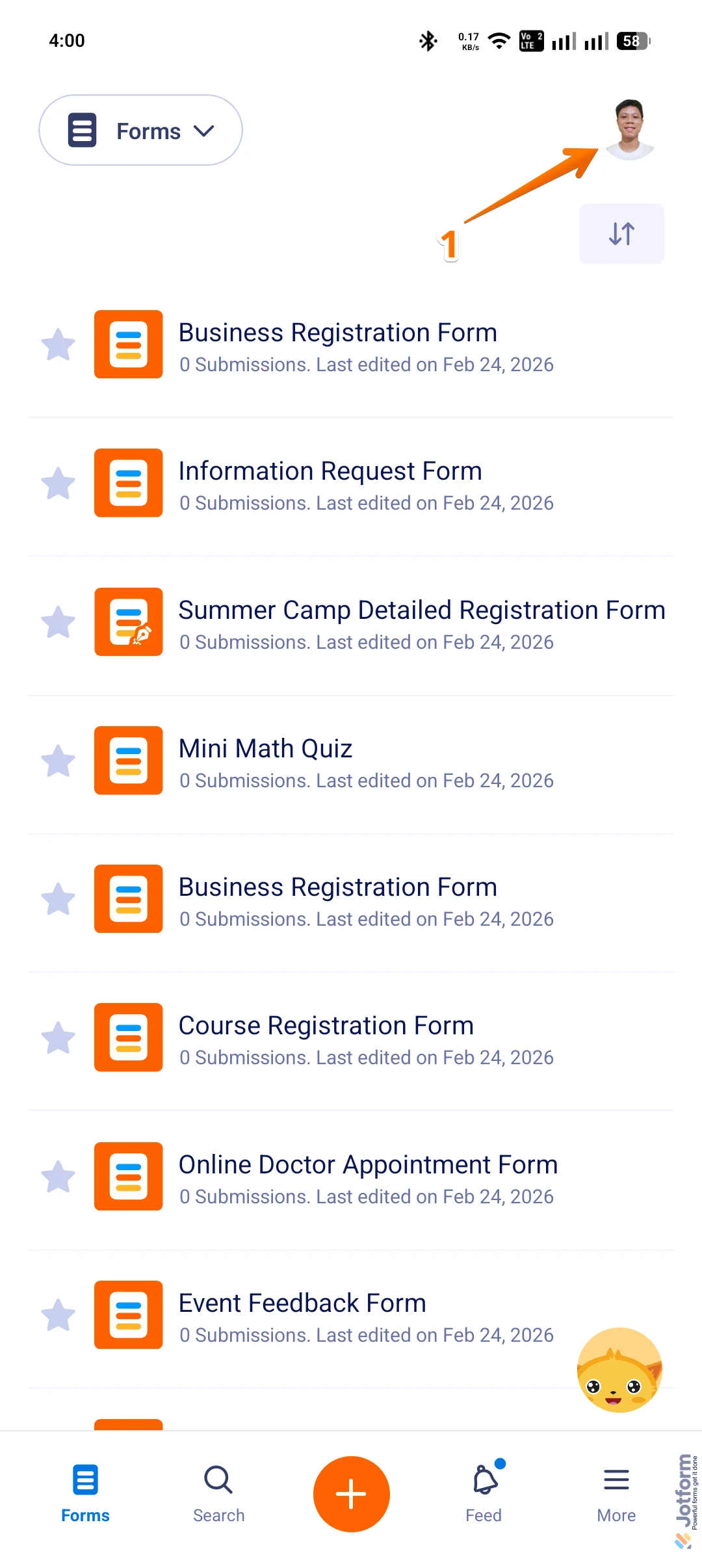
1. On the Jotform Mobile App, tap on the Profile Picture/Avatar in the top right corner of the screen to open Settings.
2. Now, while in Settings, tap on the Refresh icon in the Sync Your Data section.
If you want the app to refresh and get the latest data without issues, enable the Background App Refresh feature for the Jotform Mobile App in your phone settings.
In the meantime, I've also gone ahead and cleared your form cache to render your form properly. Although Clearing Your Form Caches isn't done automatically, it's easy to do it manually. Let me show you how:
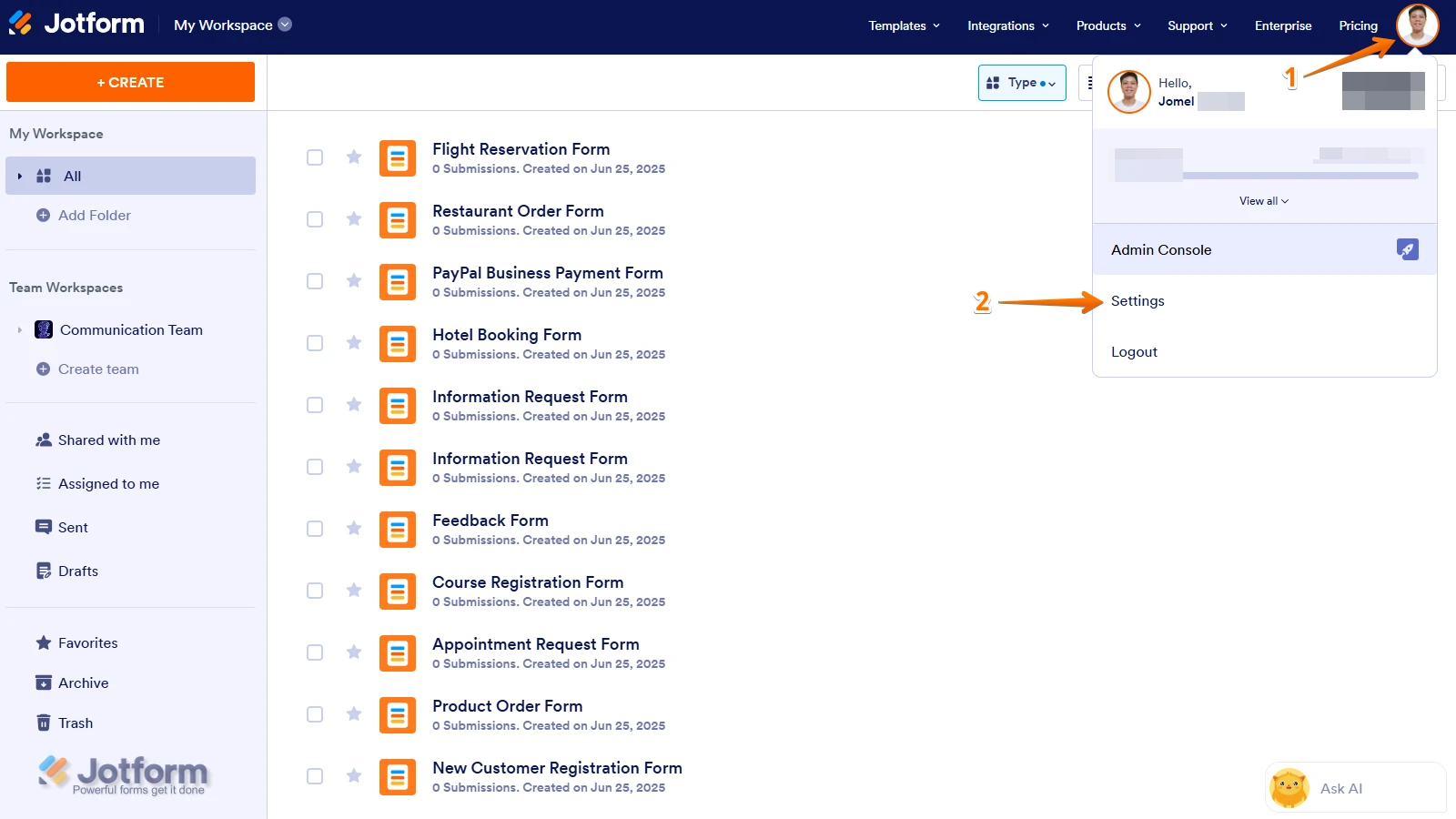
1. On your Workspace page, click on your Avatar/Profile Image icon.
2. In the Dropdown menu, click on Settings.
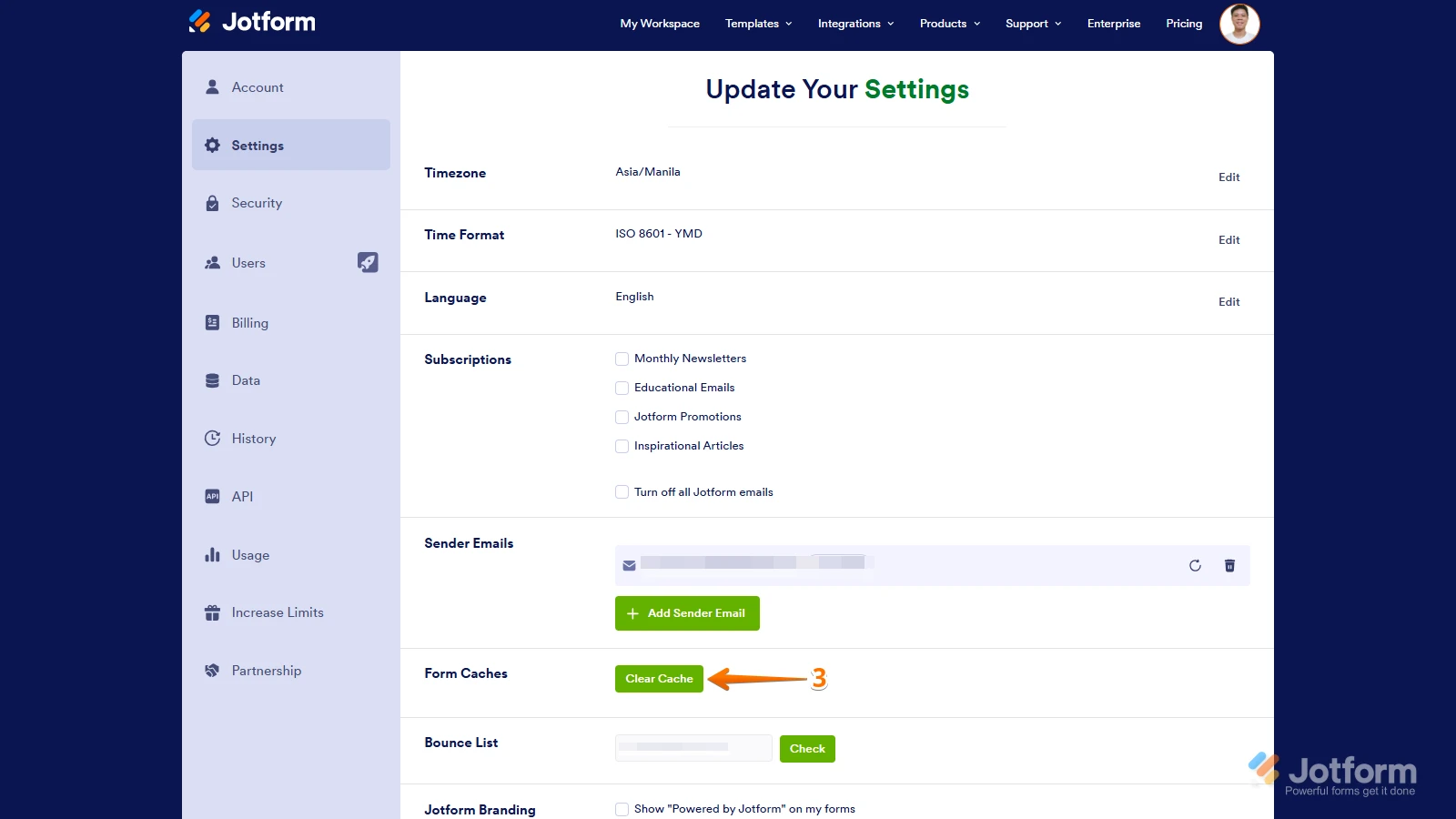
3. In the Settings menu, click on Clear Cache. And that's it, you're done.
If you’re not using the Jotform Mobile App, can you tell us which app you’re referring to or share the app link? Also, can you provide the version and device model where the issue occurs?Keep us updated and let us know if you need any more help.
-
AAlan Healy
Hi Jeanette,
thank you for the screenshots. It seems to happen when the form is filled in, when you get to the payment part it does not scroll down to the end.
I’m using an app company called Buildfire and use the option to link to jotform forms.
-
AAlan Healy
-
 Joeni JotForm Support
Hi Alan,
I tried to replicate the issue, but everything is working as expected. Take a look at the screencast below:
Could you explain a bit more about how you’re adding the form to your app? That will give us a clearer picture of what’s happening. Also, does the same issue occur when you test the form on its own, outside of the app?
Once we hear back from you, we'll be able to help you better with this.
-
AAlan Healy
Hi joeni,
the app builder is called Buildfire. Within the dashboard inside the app there is the option to link to jotform forms which is what I do.
thats pretty much it.
how do I check the form outside the app?
-
AAlan Healy
Hi I was able to submit the form from within the jotform app.
-
 Jerlan JotForm Support
Hi Alan,
Since the issue occurs when the form is linked through the Buildfire app, it seems the issue might be related to how the Buildfire app handles the embedded or linked Jotform forms, especially the scrolling behavior to the payment section. Here’s how you can further troubleshoot and potentially resolve this:
- Check the Buildfire app settings: Review any settings related to embedded web content or scrolling behavior within the Buildfire dashboard. Sometimes, apps have options to enable or disable automatic scrolling or iframe behaviors.
- Try to remove the form and re embed it to the Buildfire app.
- Contact Buildfire support: Since the issue is specific to the Buildfire app environment, their support team might have insights or solutions for handling embedded forms and scrolling issues.
Give it a try and let us know how it goes.
-
AAlan Healy
Thanks I’ll give that a try.



 If you’re not using the Jotform Mobile App, can you tell us which app you’re referring to or share the app link? Also, can you provide the version and device model where the issue occurs?
Your Reply
Something Went Wrong
An error occurred while generating the AI response. Please try again!