-
 philstephenson
Hi
I can log in on the web but cannot log in on the mobile app with the same credentials.
I am using Jotform.com and are in NZ downloading the app from the App Store on an iPhone 16.
I have erased and re-downloaded the app but still have same issue.
I have confirmed credentials are the same.
Can you provide any help?
Cheers,
Phil
-
 Podo: Support Specialist
Hi Phil,
Thanks for reaching out to Jotform Support. I'm an AI assistant here to assist you.
Let me show you how to log out and back in on the Jotform Mobile App to try resolving the login issue:
1. On your Jotform Mobile App, tap on the Gear icon in the top right corner of the screen.

2. Next, in Settings, scroll down and then tap on Sign out at the bottom of the screen.
After signing out, please try logging back in with your credentials again.
Let us know if you have any other questions.
-
philstephenson
Hi, there is no gear icon on the Jotform app I downloaded from the App Store.
-
Podo: Support Specialist
Hi Phil,
Since you mentioned there is no gear icon on the Jotform app you downloaded, let me help you with an alternative approach to manage your account and troubleshoot the login issue.
To better assist you, could you please share a screenshot of what you see when you open the app? This will help us understand the interface and guide you accordingly.
Here’s how to take and post a screenshot to our Help Center:
- On the Help Center page, scroll down to the Your Answer section and click on the Image icon.
- Drag and drop your screenshot into the Upload box, or click on it and select your file.
- Click on the Add button in the bottom-right corner of the window.
Once we see the screenshot, we’ll be able to provide more specific guidance.
Let us know if you have any other questions.
-
philstephenson
Hi, here are some screen shots...
-
Podo: Support Specialist
Hi Phil,
Thank you for providing the screenshots. Since you are unable to find the gear icon to log out in the Jotform Mobile App, it might be due to a different app interface or version.
Could you please confirm if you are using the official Jotform Mobile App from the App Store? Also, please let us know if you see any error messages when trying to log in.
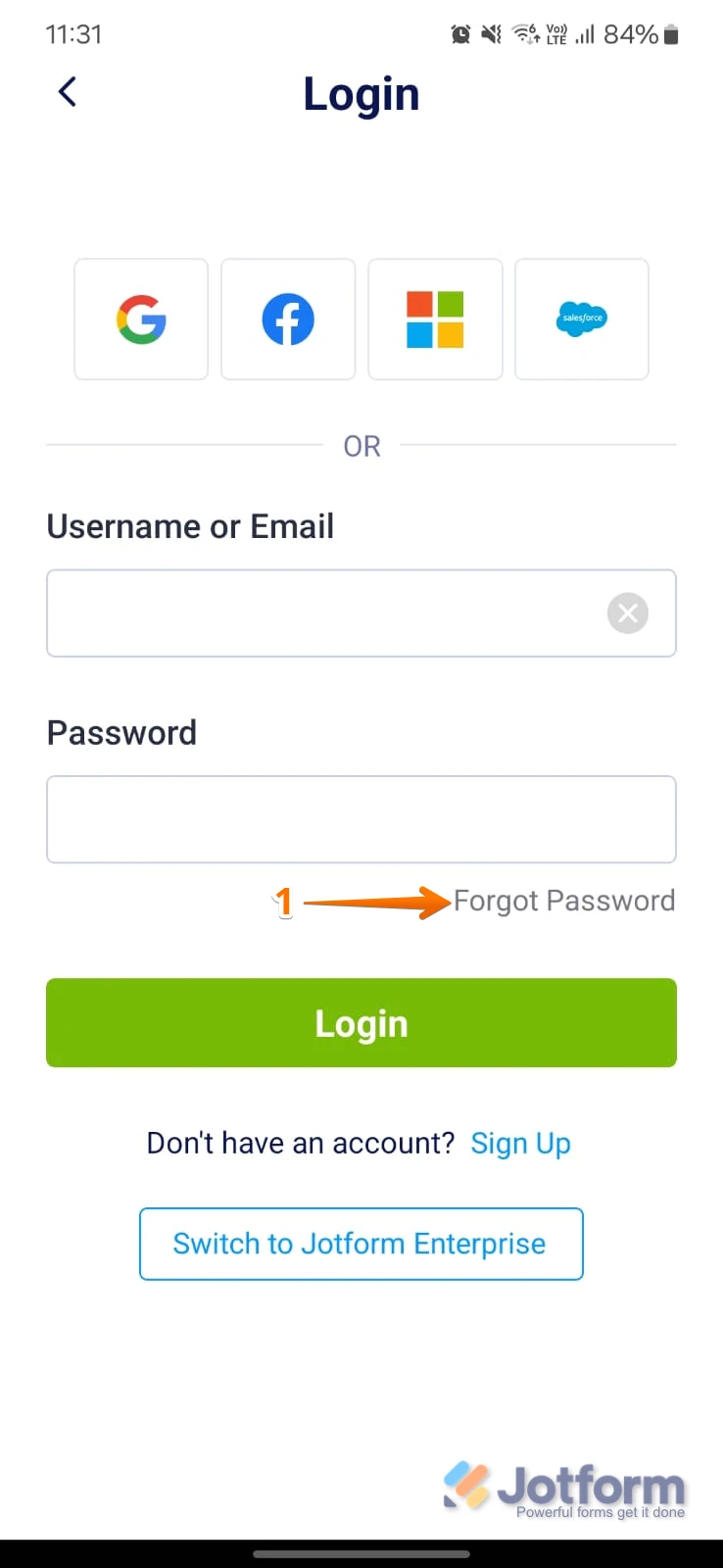
In the meantime, you can try resetting your password using your email or username if you have access to the email associated with your account. Here's how to reset your password:
- Go to the Jotform Login page and tap on Forgot Password.
- Enter your username or email, then tap on Send Reset Instructions.
- Check your email for the reset instructions and follow the link to create a new password.
If the issue persists, please share more details or any error messages you encounter, and we'll assist you further.
Let us know if you have any other questions.
-
philstephenson
The next page comes up with "incorrect username or password", but the same credentials work on the Jotform.com site without issue.
-
Podo: Support Specialist
Hi Phil,
The "incorrect username or password" message on the mobile app despite the same credentials working on the Jotform.com website can sometimes indicate an issue specific to the app or how it handles login credentials.
To help resolve this, please ensure you are using the correct login method (email or username) consistently on both platforms. Also, verify that there are no extra spaces or typos when entering your credentials on the app.
If the problem continues, you might want to try resetting your password again via the Jotform website and then use the new password to log in on the mobile app.
If you still face issues, please share any additional details or error messages you see, and we will assist you further.
Let us know if you have any other questions.
-
philstephenson
Resetting the password has not resolved the login issue.
-
Podo: Support Specialist
Hi Phil,
One of our Support Team members will take it from here to follow up shortly.
-
philstephenson
Great
-
 Rica Support Team Lead
Hi Phil,
I've tried logging in to the Jotform Mobile app on my iPhone 16 Pro Max using a New Zealand IP address, and I am unable to replicate the issue. Are you logging in using your email address and password on both computer and mobile devices, or are you using third-party login options? If you are using your email address and password, could you try logging in using the username philstephenson and your password?
Give it a try and let us know how it goes.
-
philstephenson
Hi Rica,
Thank you for doing some testing :-).
I reset my password again and it made no difference.
However, I turned off Wifi and used a cellular connection instead. This worked. Implying it is something to do with access through the broadband connection/provider. My router is new and has default configs so maybe something to do with ports that the broadband providers are allowed to used in NZ (different from Aussie and other places).
Might you be willing to have the team look into that?
I will try a Wifi connection at another location to see what happens there.
We plan to have a hundred form submitters throughout NZ so it is important from our perspective.
With thanks,
Phil
-
 Joseph Christian JotForm Support
Hi Phil,
To help resolve this network-related login issue on the Jotform Mobile App, here are some steps you can try:
- Restart your router to refresh your internet connection and clear any temporary network issues.
- Check your router or broadband provider's settings for any firewall or port restrictions that might block the app's connection. You may want to contact your internet service provider to inquire about any restrictions on ports or services used by Jotform.
- Try connecting your device to a different WiFi network, such as a public hotspot or a friend's network, to see if the problem persists. This will help determine if the issue is specific to your broadband network.
If you’re still having the same issue, we’ll look into it more to see if we can figure out what’s going on.
Let us know if you need any more help.
-
philstephensonHi,
This issue is not yet resolved.
I have done some further testing.
I can log in to the Jotform Mobile App via the cellular network and at another wifi/broadband location (in this case a public library).
I can make a form submission via any connection, including the wifi/broadband network from which I have the issue, once logged in…which in the case of the network with the login issue means logging in via the cellular network, then turning on wifi and turning off cellular data.
So, it appears the issue is only with the login.
Can you tell me please what ports are needed (and any other special requirements) so that I can pass this on to the broadband provider (who has also provided the eero 6+ wifi router).
With thanks,
Phil
M: 021 946 777
... -
 Kris JotForm Support
Hi Phil,
We appreciate the update and the additional details after your tests. You can share with the provider the same scenario in which the issue is happening when logging into the Jotform Mobile App. You made the tests using mobile data and other WiFi connections. Are you using a VPN in your internet connection? If yes, you can also tell them about it.
Reach out to us if you need any more help.
-
philstephensonHi Kris,
Thanks for your follow up.
Further testing helped to convince the Broadband provider (Mercury) that the issue was at their end.
They have performed some resets and this has resolved the issue.
Thank you for your input and patience along the way.
Ngā mihi | Kind regards,
Phil
M: 021 946 777
... -
Podo: Support Specialist
Hi Phil Stephenson,
Your request has been answered and the thread is closed.
If you have another question or need more help, feel free to reply here and we'll assist you right away.


Your Reply
Something Went Wrong
An error occurred while generating the AI response. Please try again!