-
 ITFDT
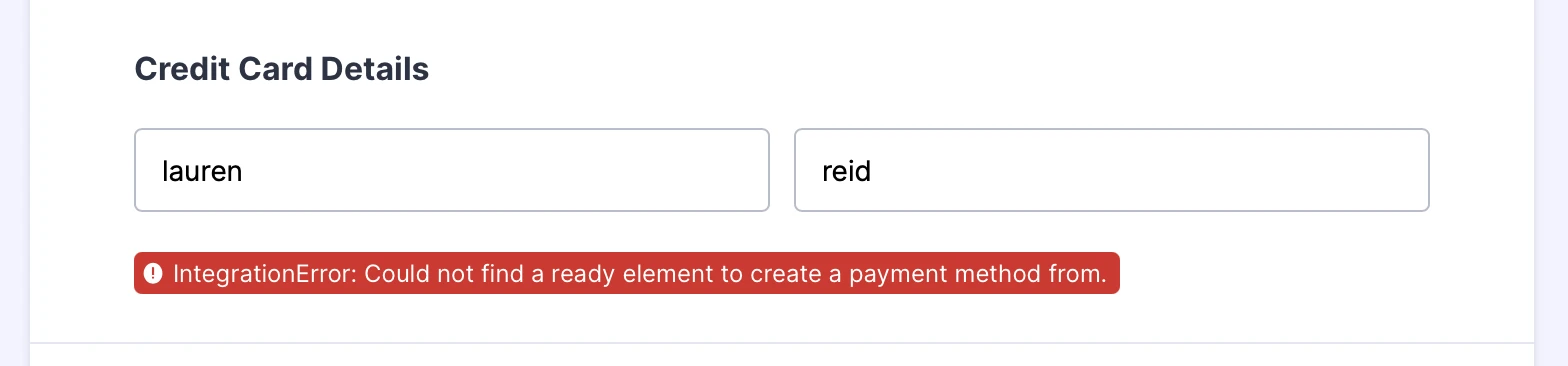
ITFDTHave tried multiple ways to get Jotform to recognize the stripe connection but it won't. Even cloned a previous Jotform (which had successfully taken payment) and it still didn't work. When I look at the live view of the form, it doesn't ask for the credit card details.

Have tried re-creating the page from scratch and worked with AI to try other remedies with no luck. Very frustrating.
-
 Podo: Support Specialist
I’m sorry this has been such a hassle — we’ll sort it out together.
First, I need to take a look at the specific form where Stripe isn’t showing the credit card fields.
• Please send me the form’s direct URL (the link you share with respondents) or the form ID. • Once I have that, I’ll check how Stripe is integrated on that form and we can go step by step from there.
-
ITFDT
-
Podo: Support Specialist
Hi Jenny,
Thanks for sharing the form link. Based on the information from our knowledge base, here are some key points and steps to check for your Stripe integration issue where the credit card fields are not showing and you see the error "IntegrationError: Could not find a ready element to create a payment method from."
Key points to verify and steps to fix:
- Stripe Integration Setup: Ensure you have added the Stripe payment element from the Payments tab in the Form Builder and connected your Stripe account properly by selecting the correct mode (Live or Test) and clicking Connect.
- Reusable Payment Connections: If you are using reusable payment connections, make sure the connection is properly saved and selected in your form's Stripe payment settings.
- Payment Type and Currency: Confirm that you have selected a valid payment type (Sell Products, Sell Subscriptions, Collect Donations, or User-Defined Amount) and a supported currency.
- Billing Information: If you enabled "Ask Billing Information to Customer," ensure the related fields are correctly set up.
- Form Fields and Stripe Elements: The error indicates Stripe cannot find the payment method element. This can happen if the Stripe payment field is not properly embedded or if there is a conflict with other form elements or custom scripts.
- Browser and Cache: Try clearing your browser cache or testing the form in an incognito/private window or a different browser to rule out caching issues.
- Stripe Dashboard Settings: Check your Stripe dashboard to ensure payment methods are enabled and configured correctly, especially if you are using Stripe Checkout.
If after verifying these points the issue persists, you might want to remove the Stripe element from the form and add it again fresh, then reconnect your Stripe account.
Here are some helpful guides from Jotform's knowledge base that cover Stripe integration and troubleshooting:
- How to Integrate Stripe With Jotform
- How to Integrate Stripe Checkout With Jotform
- How to Enable or Disable Payment Methods with Stripe Checkout
Give it a try and let us know how it goes.
-
ITFDT
I HAVE DONE ALL OF THESE THINGS> I NEED HUMAN SUPPORT ASAP.
-
Podo: Support Specialist
Hi Jenny,
One of our Support Team members will take it from here to follow up shortly.
-
 Kyle JotForm Support
Hi Jenny,
I checked your form and the Stripe field isn’t initializing, which is why the credit card input doesn’t appear. The console log shows repeated 401 Unauthorized errors on Stripe API requests and WebSocket unauthorized access, even though Stripe V3 loads. Check out my screenshot below to see the result
Since you’re using Standard Stripe with Sell Products, this points to an authentication issue. Can you remove and reconnect the Stripe integration, clear your form cache, and test again? Also, check your Stripe account directly to confirm it’s active and properly authorized. It’s easy to delete a reusable payment connection from the form. Let me show you how:
- In Form Builder, click on the Product List field, then click on the Credit Card icon.
- Then, in the menu that comes up on the right side of the page, click on the Trash Can icon in the Payment Connection section.
- Now, click on Yes, Remove.
Reach out again if there’s anything else we can help you with.

Your Reply
Something Went Wrong
An error occurred while generating the AI response. Please try again!