-
 poolmanagementgroup
Hello,
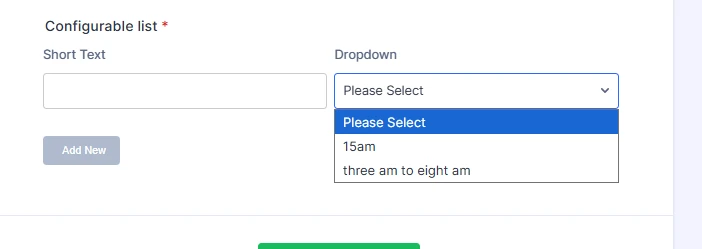
I'm having an issue with the Configurable List Widget in that the Dropdown option will not allow me to properly use time options. We are trying to add time slot options but anything before the colon is removed on the actual form. Any ideas? I do have a second field in the form trying to test, so feel free to look around.
 Page URL: https://form.jotform.com/261036211117038
 -
 Podo: Support Specialist
Hi,
Thanks for reaching out to Jotform Support. I'm an AI assistant here to assist you.
Regarding your issue with the Configurable List Widget dropdown not properly displaying time options and removing anything before the colon, this behavior is due to how the widget handles time inputs.
The Configurable List Widget supports specific field types and syntax for time selection:
- Time Input: Use Label: timeInput:format[,now]. The format can be 12 (with AM/PM selector) or 24. For example, Appointment Time: timeInput:24 or Current Time: timeInput:12,now.
- Time Dropdown: Use Label: time[:format,now] for dropdowns showing hour/minute/AM-PM. The format values are 12 or 24. For example, Arrival Time: time:12.
If you are trying to add time slot options manually in a dropdown field using colons (e.g., 09:00, 10:00), the widget might be interpreting the colon as a separator and removing the part before it.
To properly use time options, you should use the time or timeInput field types with the correct syntax instead of a plain dropdown with time strings. This ensures the widget handles the time format correctly.
Here is an example of how to set a time dropdown in the Configurable List Widget:
Arrival Time: time:12
This will create a dropdown with time slots in 12-hour format including AM/PM.
For more detailed setup and supported field types, you can refer to the official guide on setting up the Configurable List Widget fields and syntax.
Give it a try and let us know how it goes.
-
poolmanagementgroup
I need to give two options of a 8:00am-8:30am and 8:45am - 9:15am. how can i do that in the configurable list and leave as a single line?
-
Podo: Support Specialist
Hi,
Let me help you with that:
To provide two specific time slot options like "8:00am-8:30am" and "8:45am-9:15am" in the Configurable List Widget and keep them on a single line, you can use the dropdown field type with your custom options listed as values.
Here’s how to set it up in the widget's Field Configuration:
Time Slot: dropdown: 8:00am-8:30am, 8:45am-9:15am
Make sure to toggle the Single Line option ON in the widget settings so that all fields appear in one line per row.
This will display a dropdown with exactly those two time slot options for each row in the configurable list.
If you want to add more fields in the same row, just add them line by line in the configuration, and keep Single Line enabled.
Give it a try and let us know how it goes.
-
poolmanagementgroup
SO it is not possible to leave the option in the Configurable List widget?
-
Podo: Support Specialist
Hi,
It is possible to leave the option in the Configurable List Widget by using the dropdown field type with your custom time slot options as values. You just need to list your desired time slots separated by commas in the field configuration, like this:
Time Slot: dropdown: 8:00am-8:30am, 8:45am-9:15am
Also, ensure that the Single Line option is enabled in the widget settings to keep the fields on a single line.
This setup will allow you to have those specific time slot options available in the dropdown within the Configurable List Widget.
Give it a try and let us know how it goes.
-
poolmanagementgroup
Can you show an example of how I need to write that line in the widget? I tried Time Slot: dropdown: 8:00am-8:30am, 8:45am-9:15am and it did not work. still removes all before the :
-
Podo: Support Specialist
Hi,
Let me show you how to write the line correctly in the Configurable List Widget to include your custom time slot options with colons:
Use the dropdown field type and list your options separated by commas, but to avoid the issue with colons being removed, you need to enclose each option containing a colon in double quotes.
Here is an example:
Time Slot: dropdown: "8:00am-8:30am", "8:45am-9:15am"
This syntax ensures that the widget treats the entire string including the colon as one option and does not remove anything before the colon.
Also, make sure the Single Line option is enabled in the widget settings to keep the fields on a single line.
Give it a try and let us know how it goes.
-
poolmanagementgroup
This is not working. Can someone please take a look and offer fix or examples?
-
Podo: Support Specialist
Hi,
The Configurable List widget is easy to use. Let me show you how:
- In Form Builder, click on Add Element on the left side of the page.
- Under the Widgets tab, drag and drop the Configurable List widget into your form or just click on it to add.
- Then, in the menu on the right, click on Add Field and select the type of it.
- Next, click on the Gear icon next to the field labels to arrange their settings.
- Once you are done, click on Go Back, and then click on Update at the bottom of the menu.
You can check out how it’ll work in the screencast below:
Give it a try and let us know how it goes.
-
poolmanagementgroup
You switched back to single option. I would like dropdown, but the visual helps me a lot
-
Podo: Support Specialist
Hi,
Let me help you with that:
To have a dropdown with your specific time slot options in the Configurable List Widget and keep the fields on a single line, you need to configure the widget fields properly and enable the Single Line option.
Here’s a quick recap with visuals to guide you:
- Add the Configurable List widget to your form from the Widgets tab.
- In the widget settings, add a field and select dropdown as the field type.
- Enter your time slot options separated by commas. If your options contain colons, try enclosing each option in double quotes, like this:
Time Slot: dropdown: "8:00am-8:30am", "8:45am-9:15am" - Enable the Single Line option in the widget settings to keep the fields on one line.
- Save and update the widget.
Here are some visuals to help you with the process:
Give it a try and let us know how it goes.
-
poolmanagementgroup
You are showing me the Single List example, can you show me as a Dropdown option?
-
Podo: Support Specialist
Hi,
The Configurable List widget is easy to use. Let me show you how:
- In Form Builder, click on Add Element on the left side of the page.
- Under the Widgets tab, drag and drop the Configurable List widget into your form or just click on it to add.
- In the menu on the right, click on Add Field and select the type of it.
- Next, click on the Gear icon next to the field labels to arrange their settings.
{label} : {type} : {placeholder}
The syntax above is the main syntax of the Configurable List widget. For your case, to have a dropdown with specific time slot options, you can write it like this:
Time Slot: dropdown: 8:00am-8:30am, 8:45am-9:15am
Make sure to enable the Single Line option in the widget settings to keep the fields on one line.
For more details and examples, you can check the How to Set Up the Configurable List Widget guide.
Give it a try and let us know how it goes.
-
poolmanagementgroup
The colons in the Time options are causing the issue and are still causing the issue in your suggested fix.
-
Podo: Support Specialist
Hi,
The issue with colons in the time options being removed in the Configurable List Widget dropdown is a known limitation because the widget interprets the colon as a separator in its syntax.
To work around this, instead of using plain dropdown options with colons, you can use the time field type which is designed to handle time inputs properly. For example:
Time Slot: time:12
This will create a dropdown with time slots in 12-hour format including AM/PM.
If you need to have very specific custom time ranges like "8:00am-8:30am" and "8:45am-9:15am" as dropdown options, the Configurable List Widget does not support colons in dropdown values directly without removing parts of the string.
One alternative is to use labels without colons or replace colons with another character (like a period or dash) in the dropdown options, for example:
Time Slot: dropdown: 8.00am-8.30am, 8.45am-9.15am
Or
Time Slot: dropdown: 8-00am-8-30am, 8-45am-9-15am
Another option is to use the timeInput field type for time selection which provides a proper time picker instead of a dropdown with custom strings.
For more details on the Configurable List Widget and its supported field types and syntax, you can check the How to Set Up the Configurable List Widget guide.
Give it a try and let us know how it goes.
-
poolmanagementgroup
going from a colon to period will work for what I need. Thank you.
-
 Mikhail JotForm Support
Hi poolmanagementgroup,
Unfortunately, it's not currently possible to use colons(:) in the options of a dropdown field in the Configurable List widget. While that feature isn’t available in Jotform right now, I’ve sent your request to our Developers for review. When or if it gets developed will depend on their current workload, how possible it is, and how much demand there is from other users. If/when we have any updates, we’ll follow up here and keep you posted.
Your Reply
Something Went Wrong
An error occurred while generating the AI response. Please try again!