-
 ahmadayman24789
I have created the form successfully, and I can see it stores responses correctly.
Now I want to show the COUNT of these responses as a static field in my form, how to do so?
-
 Podo: Support Specialist
Hi Ahmed,
Thanks for reaching out to Jotform Support. I'm an AI assistant here to assist you.
Currently, Jotform does not have a built-in feature to display the count of form submissions as a static field directly within the form itself. The submission count is typically viewed in the form analytics or submission tables after submissions are collected.
However, you can check the number of submissions your form has received by going to your Jotform Tables or Form Analytics. Unfortunately, showing this count dynamically inside the form as a static field is not supported natively.
If you want to display submission counts on a webpage or external site, you might consider using Jotform API to fetch submission data and display it externally, but this requires custom coding outside of the form builder.
Let us know if you need guidance on using the API or other alternatives.
Give it a try and let us know how it goes.
-
ahmadayman24789
If by using that API design to make a simple URL that just returns a number in browser and then embed that url as iframe in form, it would be totally fine for me as well...
-
Podo: Support Specialist
Hi Ahmed,
Let me help you with that:
Using the Jotform API, you can create a simple URL endpoint that returns the count of form submissions as a number. Then, you can embed this URL as an iframe inside your form to display the submission count.
Here’s how to do it:
- Use Jotform API to fetch the total number of submissions for your form. The API endpoint for submissions can provide this data.
- Create a simple web page or script that calls this API, extracts the count, and outputs just the number as plain text or minimal HTML.
- Host this page on a web server or service that can serve this content via a URL.
- Embed the URL as an iframe in your Jotform form using the iframe embed widget or an HTML element.
This approach requires some external hosting and basic coding, but it will effectively display the live submission count inside your form.
Give it a try and let us know how it goes.
-
ahmadayman24789
Where is the details of creating that API?
-
Podo: Support Specialist
Hi Ahmed,
Let me help you with the details of creating and using the Jotform API to get the submission count:
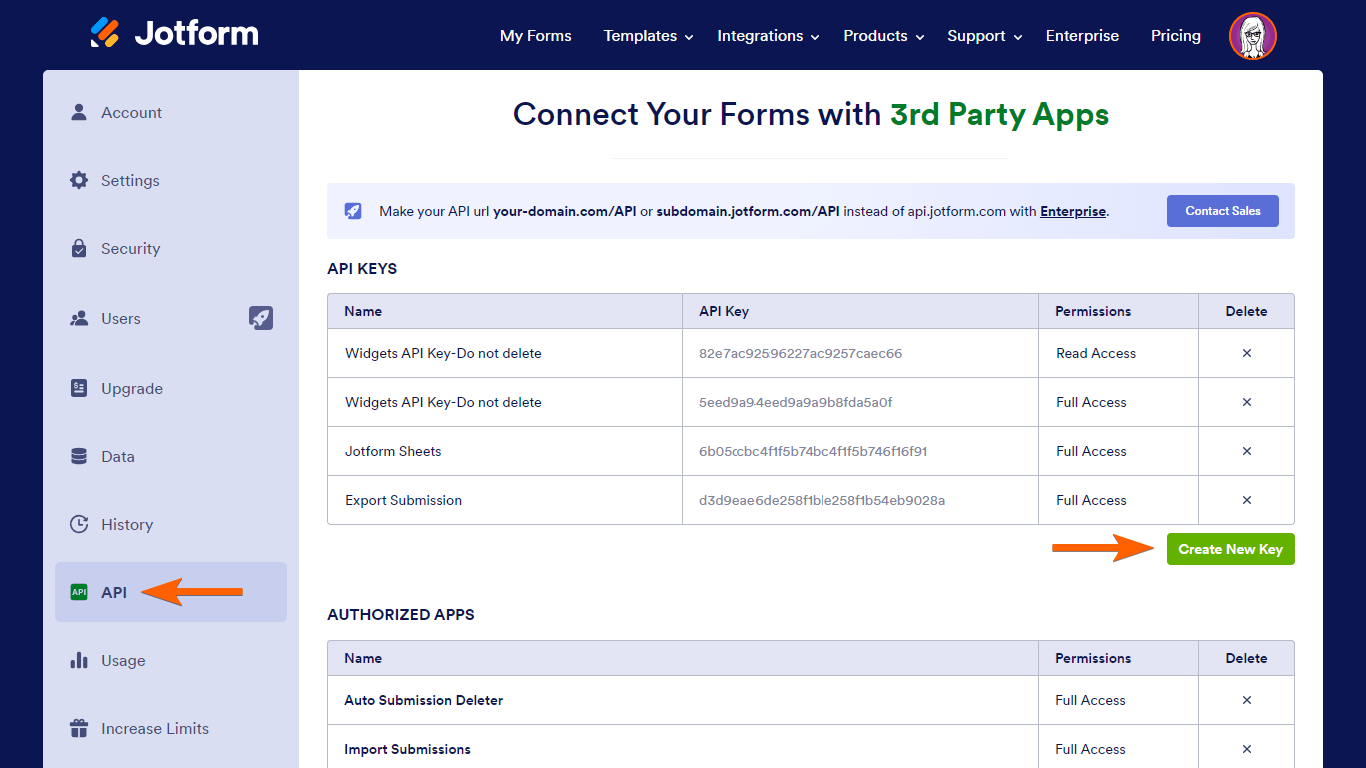
- Create your Jotform API key: Go to your Account API page and select Create New Key.
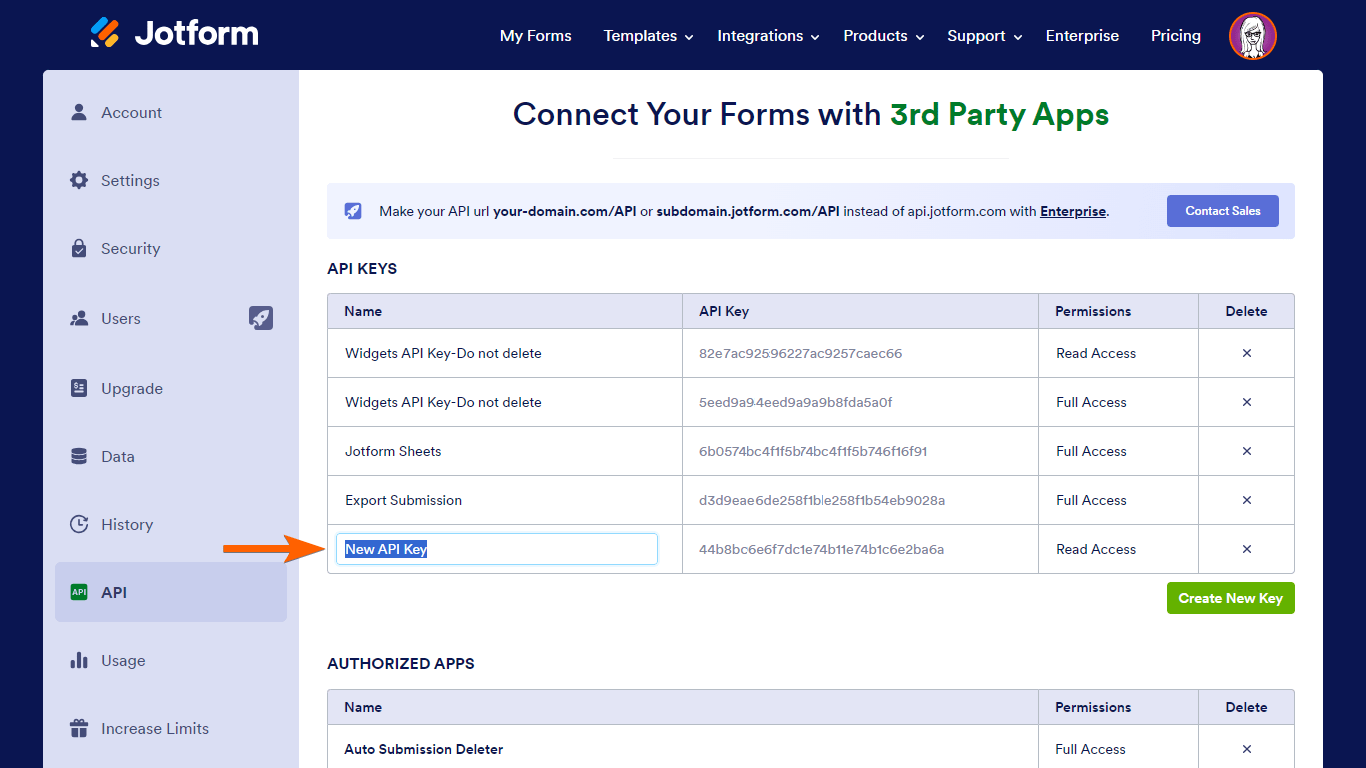
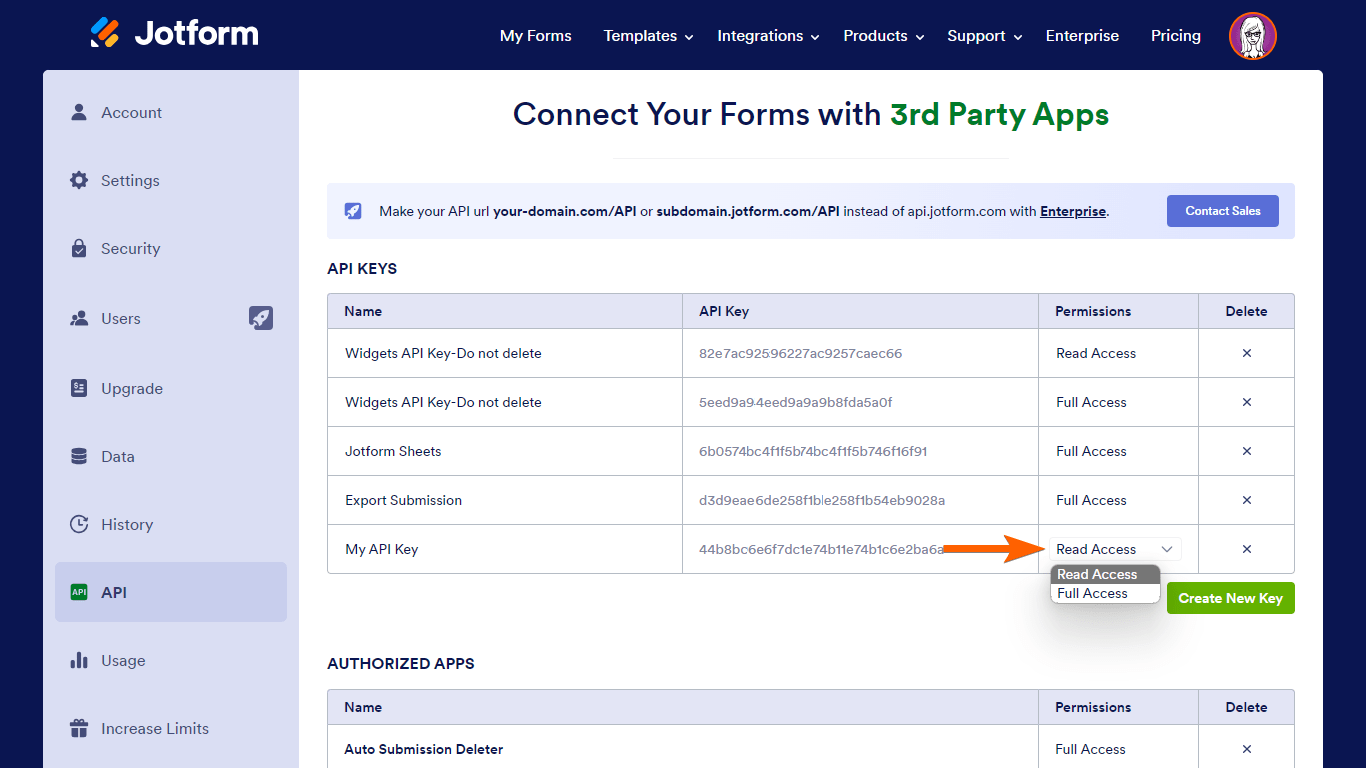
- Name your API key and set the desired permission. For fetching submission counts, Read Access permission is sufficient.
- Use the API endpoint for submissions to fetch the total number of submissions for your form. You can find the API documentation and endpoints here: Jotform API Documentation.
- Create a simple script or web page that calls this API, extracts the submission count, and outputs just the number as plain text or minimal HTML.
- Host this script or page on a web server or hosting service to make it accessible via a URL.
- Embed the URL as an iframe in your Jotform form using the iframe embed widget or an HTML element.
Keep in mind there are daily API call limits depending on your subscription plan, which reset daily at midnight EST. You can learn more about these limits here: Daily API Call Limits.
Here are some helpful images from the API key creation process:

Give it a try and let us know how it goes.
-
ahmadayman24789
From documentation I came to this:
https://api.jotform.com/form/261111733945555/submissions?apiKey=**********
{"responseCode": 200,
"message": "success",
"content": [
{
"id": "6526558266518831983",
"form_id": "261111733945555",
"ip": "197.35.9.156",
"created_at": "2026-04-22 04:30:26",
"status": "ACTIVE",
"new": "1",
"flag": "0",
"notes": "",
"updated_at": null,
"answers": {
"1": {
"name": "input1",
"order": "1",
"text": "معًا لإلغاء التوقيت الصيفي في مصر لأضراره البليغة والمدمرة للوطن والمواطن",
"type": "control_head"
},
"2": {
"name": "input2",
"order": "7",
"text": "الإرسال",
"type": "control_button"
},
"3": {
"name": "input3",
"order": "5",
"sublabels": "{\"prefix\":\"Prefix\",\"first\":\"\\u0627\\u0644\\u0627\\u0633\\u0645 \\u0627\\u0644\\u0623\\u0648\\u0644\",\"middle\":\"Middle Name\",\"last\":\"\\u0627\\u0633\\u0645 \\u0627\\u0644\\u0639\\u0627\\u0626\\u0644\\u0629\",\"suffix\":\"Suffix\"}",
"text": "الاسم",
"type": "control_fullname",
"answer": {
"first": "أحمد",
"last": "باشا"
},
"prettyFormat": "أحمد باشا"
},
"6": {
"name": "input6",
"order": "6",
"sublabels": "{\"day\":\"Day\",\"month\":\"Month\",\"year\":\"Year\",\"last\":\"Last Name\",\"hour\":\"Hour\",\"minutes\":\"Minutes\",\"litemode\":\"\\u0627\\u0644\\u062a\\u0627\\u0631\\u064a\\u062e\"}",
"text": "التاريخ",
"timeFormat": "AM/PM",
"type": "control_datetime",
"answer": {
"month": "04",
"day": "22",
"year": "2026",
"datetime": "2026-04-22 00:00:00"
},
"prettyFormat": "04-22-2026"
},
"22": {
"name": "tags",
"options_array": "{\"jhd4czwvrr4k\":{\"key\":\"jhd4czwvrr4k\",\"value\":\"{\\\"todo\\\":{\\\"key\\\":\\\"todo\\\",\\\"value\\\":\\\"Todo\\\",\\\"color\\\":\\\"#FED3DB\\\"},\\\"inprogress\\\":{\\\"key\\\":\\\"inprogress\\\",\\\"value\\\":\\\"In Progress\\\",\\\"color\\\":\\\"#FBEBB5\\\"},\\\"done\\\":{\\\"key\\\":\\\"done\\\",\\\"value\\\":\\\"Done\\\",\\\"color\\\":\\\"#D3FED4\\\"}}\",\"color\":\"#FFEBB3\"}}",
"order": "8",
"submissionWidget": "Yes",
"text": "Tags",
"type": "control_checkbox"
},
"33": {
"name": "input33",
"order": "2",
"text": "لماذا نطالب بإلغاء التوقيت الصيفي؟",
"type": "control_head"
},
"49": {
"name": "input49",
"order": "4",
"text": "المعلومات الشخصية",
"type": "control_head"
},
"52": {
"cfname": "تضمين Iframe",
"name": "input52",
"order": "3",
"selectedField": "5295629cba137d764f000004",
"static": "Yes",
"text": "",
"type": "control_widget"
}
}
},
{
"id": "6526547276519325022",
"form_id": "261111733945555",
"ip": "197.35.9.156",
"created_at": "2026-04-22 04:12:08",
"status": "ACTIVE",
"new": "0",
"flag": "0",
"notes": "",
"updated_at": null,
"answers": {
"1": {
"name": "input1",
"order": "1",
"text": "معًا لإلغاء التوقيت الصيفي في مصر لأضراره البليغة والمدمرة للوطن والمواطن",
"type": "control_head"
},
"2": {
"name": "input2",
"order": "7",
"text": "الإرسال",
"type": "control_button"
},
"3": {
"name": "input3",
"order": "5",
"sublabels": "{\"prefix\":\"Prefix\",\"first\":\"\\u0627\\u0644\\u0627\\u0633\\u0645 \\u0627\\u0644\\u0623\\u0648\\u0644\",\"middle\":\"Middle Name\",\"last\":\"\\u0627\\u0633\\u0645 \\u0627\\u0644\\u0639\\u0627\\u0626\\u0644\\u0629\",\"suffix\":\"Suffix\"}",
"text": "الاسم",
"type": "control_fullname",
"answer": {
"first": "ابنه",
"last": "التاني"
},
"prettyFormat": "ابنه التاني"
},
"6": {
"name": "input6",
"order": "6",
"sublabels": "{\"day\":\"Day\",\"month\":\"Month\",\"year\":\"Year\",\"last\":\"Last Name\",\"hour\":\"Hour\",\"minutes\":\"Minutes\",\"litemode\":\"\\u0627\\u0644\\u062a\\u0627\\u0631\\u064a\\u062e\"}",
"text": "التاريخ",
"timeFormat": "AM/PM",
"type": "control_datetime",
"answer": {
"month": "04",
"day": "22",
"year": "2026",
"datetime": "2026-04-22 00:00:00"
},
"prettyFormat": "04-22-2026"
},
"22": {
"name": "tags",
"options_array": "{\"jhd4czwvrr4k\":{\"key\":\"jhd4czwvrr4k\",\"value\":\"{\\\"todo\\\":{\\\"key\\\":\\\"todo\\\",\\\"value\\\":\\\"Todo\\\",\\\"color\\\":\\\"#FED3DB\\\"},\\\"inprogress\\\":{\\\"key\\\":\\\"inprogress\\\",\\\"value\\\":\\\"In Progress\\\",\\\"color\\\":\\\"#FBEBB5\\\"},\\\"done\\\":{\\\"key\\\":\\\"done\\\",\\\"value\\\":\\\"Done\\\",\\\"color\\\":\\\"#D3FED4\\\"}}\",\"color\":\"#FFEBB3\"}}",
"order": "8",
"submissionWidget": "Yes",
"text": "Tags",
"type": "control_checkbox"
},
"33": {
"name": "input33",
"order": "2",
"text": "لماذا نطالب بإلغاء التوقيت الصيفي؟",
"type": "control_head"
},
"49": {
"name": "input49",
"order": "4",
"text": "المعلومات الشخصية",
"type": "control_head"
},
"52": {
"cfname": "تضمين Iframe",
"name": "input52",
"order": "3",
"selectedField": "5295629cba137d764f000004",
"static": "Yes",
"text": "",
"type": "control_widget"
}
}
},
{
"id": "6526537236517147137",
"form_id": "261111733945555",
"ip": "197.35.9.156",
"created_at": "2026-04-22 03:55:24",
"status": "ACTIVE",
"new": "1",
"flag": "0",
"notes": "",
"updated_at": null,
"answers": {
"1": {
"name": "input1",
"order": "1",
"text": "معًا لإلغاء التوقيت الصيفي في مصر لأضراره البليغة والمدمرة للوطن والمواطن",
"type": "control_head"
},
"2": {
"name": "input2",
"order": "7",
"text": "الإرسال",
"type": "control_button"
},
"3": {
"name": "input3",
"order": "5",
"sublabels": "{\"prefix\":\"Prefix\",\"first\":\"\\u0627\\u0644\\u0627\\u0633\\u0645 \\u0627\\u0644\\u0623\\u0648\\u0644\",\"middle\":\"Middle Name\",\"last\":\"\\u0627\\u0633\\u0645 \\u0627\\u0644\\u0639\\u0627\\u0626\\u0644\\u0629\",\"suffix\":\"Suffix\"}",
"text": "الاسم",
"type": "control_fullname",
"answer": {
"first": "ابن",
"last": "الوطن"
},
"prettyFormat": "ابن الوطن"
},
"6": {
"name": "input6",
"order": "6",
"sublabels": "{\"day\":\"Day\",\"month\":\"Month\",\"year\":\"Year\",\"last\":\"Last Name\",\"hour\":\"Hour\",\"minutes\":\"Minutes\",\"litemode\":\"\\u0627\\u0644\\u062a\\u0627\\u0631\\u064a\\u062e\"}",
"text": "التاريخ",
"timeFormat": "AM/PM",
"type": "control_datetime",
"answer": {
"month": "04",
"day": "22",
"year": "2026",
"datetime": "2026-04-22 00:00:00"
},
"prettyFormat": "04-22-2026"
},
"22": {
"name": "tags",
"options_array": "{\"jhd4czwvrr4k\":{\"key\":\"jhd4czwvrr4k\",\"value\":\"{\\\"todo\\\":{\\\"key\\\":\\\"todo\\\",\\\"value\\\":\\\"Todo\\\",\\\"color\\\":\\\"#FED3DB\\\"},\\\"inprogress\\\":{\\\"key\\\":\\\"inprogress\\\",\\\"value\\\":\\\"In Progress\\\",\\\"color\\\":\\\"#FBEBB5\\\"},\\\"done\\\":{\\\"key\\\":\\\"done\\\",\\\"value\\\":\\\"Done\\\",\\\"color\\\":\\\"#D3FED4\\\"}}\",\"color\":\"#FFEBB3\"}}",
"order": "8",
"submissionWidget": "Yes",
"text": "Tags",
"type": "control_checkbox"
},
"33": {
"name": "input33",
"order": "2",
"text": "لماذا نطالب بإلغاء التوقيت الصيفي؟",
"type": "control_head"
},
"49": {
"name": "input49",
"order": "4",
"text": "المعلومات الشخصية",
"type": "control_head"
},
"52": {
"cfname": "تضمين Iframe",
"name": "input52",
"order": "3",
"selectedField": "5295629cba137d764f000004",
"static": "Yes",
"text": "",
"type": "control_widget"
}
}
}
],
"duration": "141.26ms",
"info": null,
"resultSet": {
"offset": 0,
"limit": 20,
"count": 3
},
"limit-left": 995
}
I see that it shows a limit... left? also i only want to return this count "3" value not all of that! -
Podo: Support Specialist
Hi Ahmed,
The "limit-left" you see indicates how many API calls you have remaining for the day based on your subscription plan's daily API call limits.
To return only the submission count (the "count" value) without all the other data, you will need to create a simple script or web page that calls the Jotform API, parses the JSON response, and extracts just the "count" value from the "resultSet" object.
Here’s how to do it:
- Make the API request to the submissions endpoint with your API key.
- Parse the JSON response to access the "resultSet" object.
- Extract the "count" value which represents the total number of submissions.
- Output only this number as plain text or minimal HTML.
This script or page can then be hosted and its URL embedded as an iframe in your form to display the submission count dynamically.
Give it a try and let us know how it goes.
-
ahmadayman24789
I want something directly from your side, I won't be able to host a full website just to return a count!
-
Podo: Support Specialist
Hi Ahmed,
One of our Support Team members will take it from here to follow up shortly.
-
 Nikola JotForm Support
Hi Ahmed,
If you want to show the count of form submissions, you can add the Submissions Counter widget to your form. Let me show you how:
1. In Form Builder, click on Add Element on the left side of the page.
2. Under the Widgets tab, search for the Submissions Counter widget, and drag and drop it into your form or just click on it to add.
3. It will be set by default to show Total Submission, so just click on Update at the bottom of the menu.
Give it a try and let us know how it goes.
-
ahmadayman24789
Thanks! That is it.. works now
-
Podo: Support Specialist
Hi Ahmed Ayman,
Your request has been answered and the thread is closed.
If you have another question or need more help, feel free to reply here and we'll assist you right away.
Your Reply
Something Went Wrong
An error occurred while generating the AI response. Please try again!