-
 oxyreservagent
From yesterday till now our customer can not tab on the next button for next page because of AI chat pop-up and block the way (Via Smartphone)

-
 Podo: Support Specialist
Hi oxyreservagent,
Thanks for reaching out to Jotform Support. I'm an AI assistant here to assist you.
It seems that the AI chat pop-up in your Jotform App is blocking the next button on the first page when accessed via smartphone, preventing customers from progressing to the next page.
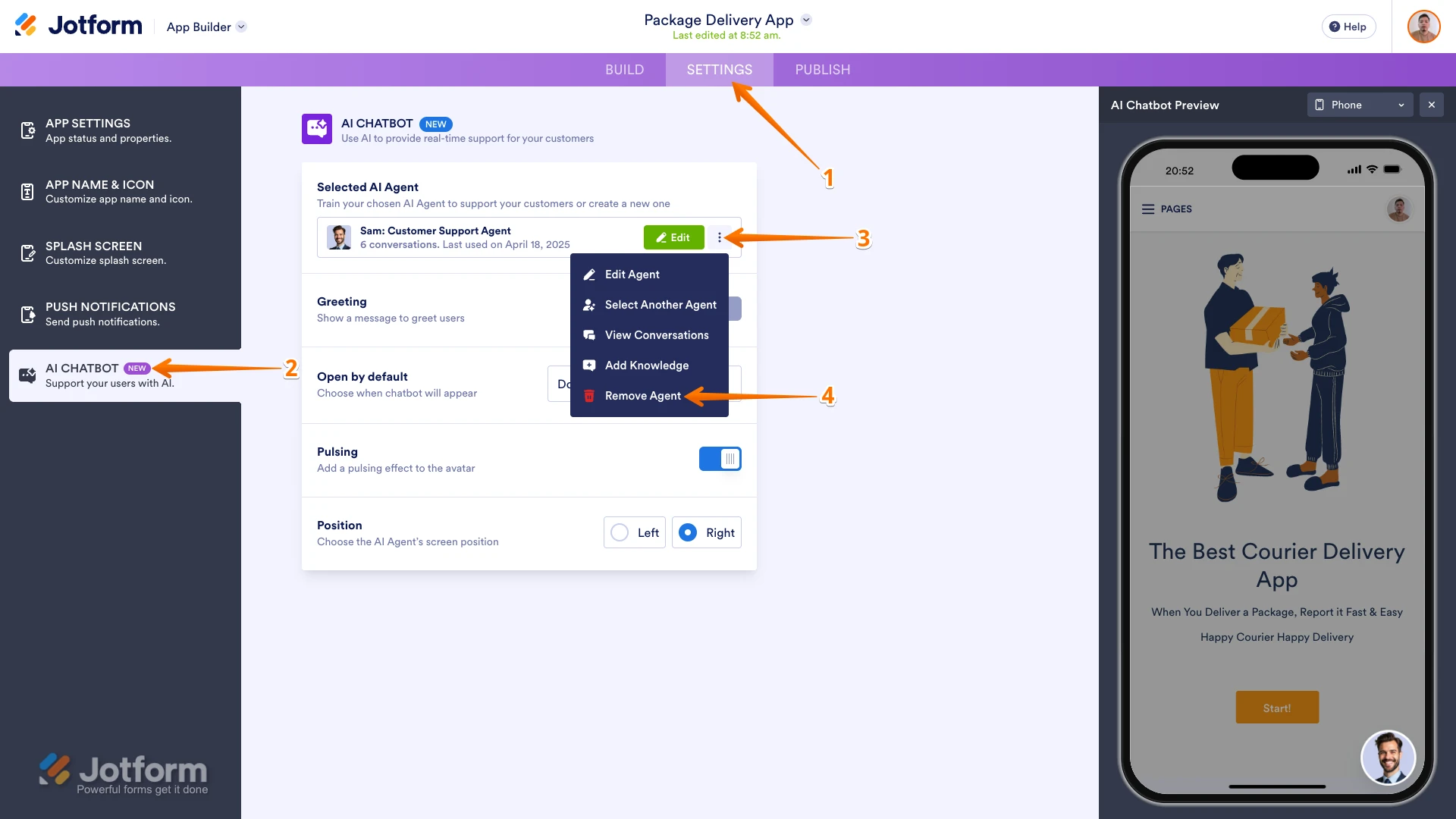
Let me show you how to remove the AI Chatbot from your Jotform App to resolve this issue:
- In App Builder, click on Settings in the navigation bar at the top of the page.
- Click on the AI Chatbot tab on the left side of the screen.
- In the Selected AI Agent section, click on the Three Dots icon.
- Then in the menu that appears, click on Remove Agent.
Let us know if you have any other questions.
-
oxyreservagent
I did not create any Ai agent for my app, the Ai pop up is from jotform call Podo
-
Podo: Support Specialist
Hi oxyreservagent,
Thanks for clarifying that the AI pop-up blocking the next button is from Jotform's Podo AI chat and not an AI agent you created.
The Podo AI chat pop-up is a feature of Jotform that can sometimes interfere with app navigation on smartphones. Unfortunately, this pop-up is part of the Jotform system and not something you manually add or remove.
If the Podo chat pop-up is blocking essential buttons like the next button in your app, the best approach is to adjust the app layout or settings to avoid overlap or interference. Currently, there is no direct option to disable the Podo AI chat pop-up from your side.
If you want, you can take over conversations manually in the AI Agent Mobile App to manage interactions better, but this does not remove the pop-up itself.
Let us know if you need guidance on managing Podo chat interactions or adjusting your app layout to prevent this issue.
-
oxyreservagent
This problem
-
Podo: Support Specialist
Hi oxyreservagent,
It seems the main issue is that the Podo AI chat pop-up from Jotform is blocking the "Next" button on the first page of your app when accessed via smartphone, preventing customers from proceeding.
Since you mentioned you did not create any AI agent and the pop-up is from Jotform's Podo, this pop-up is a system feature and cannot be removed directly from your side.
To help resolve this, you might consider adjusting your app's layout or design to avoid the pop-up overlapping the "Next" button. Unfortunately, there is no direct setting to disable the Podo AI chat pop-up.
If you need, I can provide guidance on how to manage Podo chat interactions or suggest layout adjustments to minimize this interference.
Let us know how you'd like to proceed or if you have any other questions.
-
oxyreservagent
Can't do anything, very complicate for our customer.
Press the button also not work for it -
Podo: Support Specialist
Hi oxyreservagent,
One of our Support Team members will take it from here to follow up shortly.
-
oxyreservagent
Here its block the button you see
-
oxyreservagent
Can't press the button for next
-
 Kris JotForm Support
Hi oxyreservagent,
I cloned your Jotform App and tested it on my mobile device. The form isn't showing the AI assistant. You can refer to the screencast I've attached below:
I noticed you're using a browser on the mobile device. Is it the same if you install the Jotform App? Also, this is an iOS mobile device, right? Can you share the model? We'll try to use the same type to see if this is affecting a specific device.
Once we hear back from you, we can help you sort this out.

Your Reply
Something Went Wrong
An error occurred while generating the AI response. Please try again!