-
 WTBAlex
There is an issue with your forms today.
Form submit form button disappears after form is filled out and photo uploaded and ready to send.
This issue has been reported by many online today
-
 Podo: Support Specialist
Hi Alex,
Thanks for reaching out to Jotform Support. I'm an AI assistant here to assist you.
It seems you are experiencing an issue where the form submit button disappears after filling out the form and uploading a photo. Let me show you how to upload an image and use it as your form's Submit button, which might help you customize or troubleshoot the button behavior:
- In Form Builder, click on the Submit button, and then click on the Gear icon in its upper right.
- Then, in the Submit button menu on the right, go to the General tab.
- Scroll down to the Button Image section, and then click on Choose a File.
- Finally, click on Upload File, and then select an image file from your device.

That's it. Reach out again if you need any more help.
-
 Jerlan JotForm Support
Hi Alex,
I have tested the form on your website, and I can replicate the issue. But when I tested it directly on the form, the submit button is working fine. Take a look at the screenshot below:
Since the issue is happening on the embedded form, can you try to remove it and add it back? Let me show you how to get the code:
- In Form Builder, in the orange navigation bar at the top of the page, click on Publish.
- In the menu on the left side of the page, click on Embed.
- Now, select the embed option you want to use, and click on Copy Code. (I used the iFrame method only to show in this case.)
- Paste your code into your webpage's embed area, and that’s it.
-
WTBAlexNo, It is not working!
The button reduces by 75% when the form is filled out and photo attached.
You did NOT test by submitting a form.
... -
 Kevin JotForm Support
Hi WTBAlex,
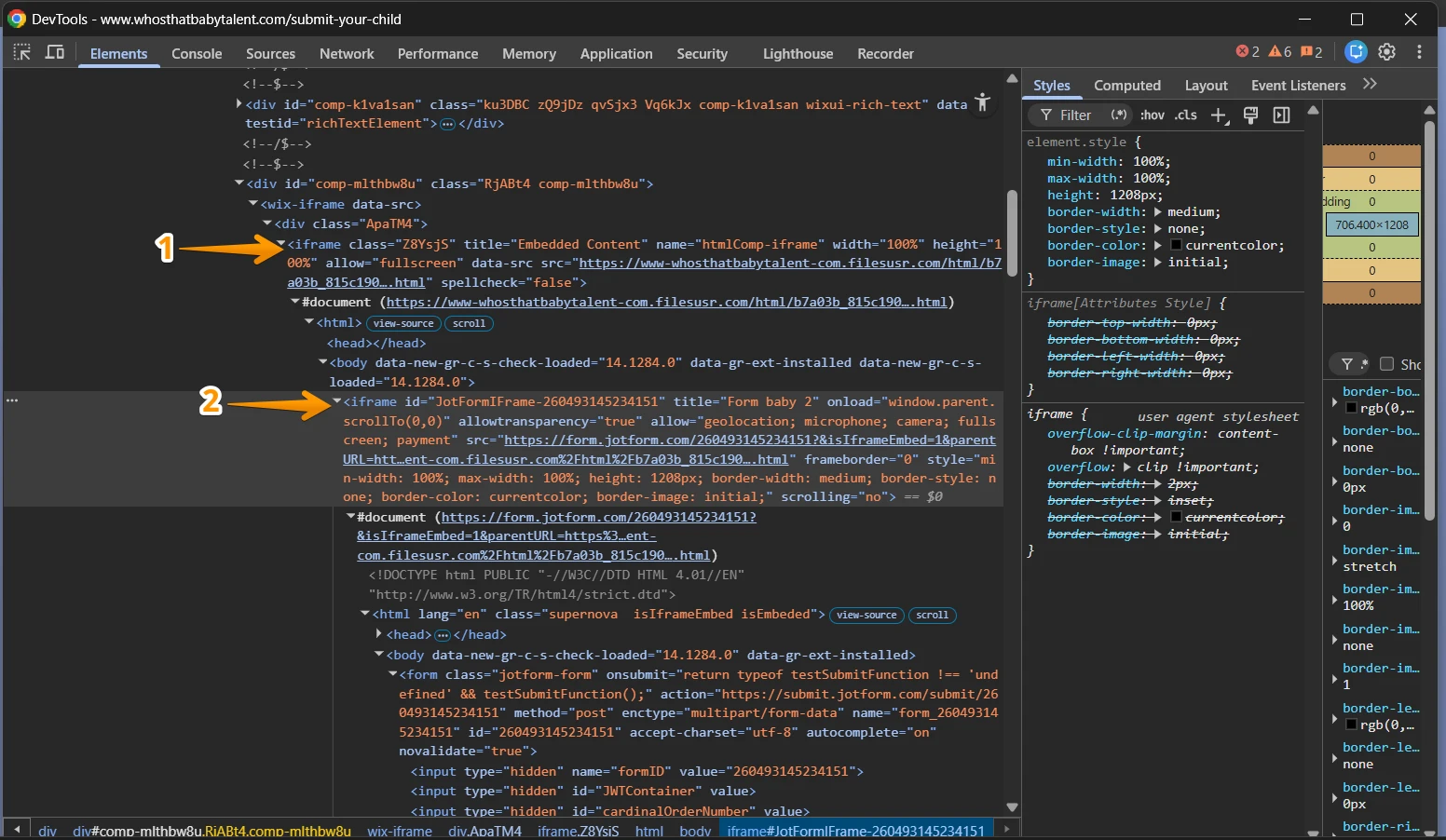
I have tested your webpage and I can see there is a scrollbar; however, if you start uploading files the Submit button gets hidden. After inspecting the source code of your webpage, I can see the Jotform iFrame code is wrapped inside another iFrame code that could be causing the conflict, if the main iFrame code is limited to display the content and doesn't allow scrolling or it's not automatically increasing its height according to the content inside, this is most likely the cause of the issue, here is a screenshot of what I could see:
I recommend that you double check that additional iFrame code and make sure it is set to have a dynamic height, there could have been an update that caused this, but you should double check with your website builder/provider.
Give it a try and let us know how it goes.
-
WTBAlexNo, that's not the issue. The form has worked fine for months now. This
issue only started today and I even deleted and re-embedded the code. Same
issue.
... -
 Sheena JotForm Support
Hi WTBAlex,
When I tested your form using the Jotform URL, the Submit button remains visible and functions as expected, even after completing the form and uploading a photo. Since the issue only occurs when the form is embedded on your website, this indicates that the behavior is being affected by the environment where the form is placed rather than the form itself.
Based on what we’ve observed, the issue is most likely related to how the form is embedded on your page. If it’s inside a container or iframe with a fixed height or limited scrolling, the layout may not adjust properly after actions like file uploads, causing the Submit button to move out of view or appear reduced. Nested iframes or custom CSS can also affect how the form resizes dynamically.
We recommend ensuring the form isn’t embedded inside another iframe and that the container allows dynamic height adjustment. You can also try switching to the default embed code, which auto-resizes the form.
Give it a try and let us know if you need any help.
-
WTBAlexWe got it working again.
We had to change the code height to 1400 and remove all the scrolling code
"no"
Not sure if maybe wix had some update, but you may want to check and make
note of it.
Thnaks
... -
Podo: Support Specialist
Hi Alex,
Your request has been answered and the thread is closed.
If you have another question or need more help, feel free to reply here and we'll assist you right away.


Your Reply
Something Went Wrong
An error occurred while generating the AI response. Please try again!