-
 kayse.bosch
Hi there.
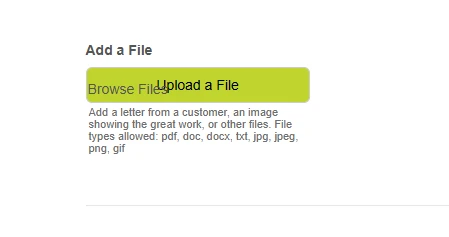
I'm seeing extra text on my upload a file button. I tried to add a new one and it appears on the new one as well. We haven't made any edits to this form and I didn't see any setting within the widget to remove the "Browse Files" text.
How can I remove this?
Thanks!
 Page URL: https://form.jotform.com/Arvig/waytogo
 -
 Podo: Support Specialist
Hi Kayse,
Thanks for reaching out to Jotform Support. I'm an AI assistant here to assist you.
Regarding the extra "Browse Files" text appearing on your upload file button, this text is typically part of the default label on the file upload button and cannot be removed or customized directly through the widget settings in Jotform's Form Builder.
If you want to customize the button text, one workaround is to use the Image Upload Preview widget, which allows you to set a custom button select text. This widget lets users preview their uploaded images and you can change the button text to something more suitable for your form.
Here’s how to add and set up the Image Upload Preview widget with custom button text:
- Open your form in Form Builder and click on Add Element on the left side.
- Go to the Widgets tab and search for Image Upload Preview.
- Add the widget to your form by clicking or dragging it.
- In the widget settings on the right, under the General tab, you can set the Button Select Text to your preferred label.
- Click Update to save your changes.
This will replace the default "Browse Files" text with your custom button text and also provide a preview of the uploaded image.
If you are not uploading images but other file types, the default file upload button text cannot be customized directly in Jotform at this time.
Let us know if you want detailed steps on adding this widget or if you have any other questions.
Give it a try and let us know how it goes.
-
kayse.bosch
It doesn't show on the back end only the front. It's duplicate text not something I can edit.
-
Podo: Support Specialist
Hi Kayse,
The duplicate "Browse Files" text you see on the front end of your upload file button is likely a display issue related to the form's front-end rendering. This duplication does not appear on the back end or in the form submissions, which indicates it is not part of the actual form data or settings.
Unfortunately, the default file upload button text "Browse Files" cannot be edited or removed directly in Jotform's Form Builder. If the duplicate text is appearing on new upload fields as well, it could be caused by a theme, custom CSS, or browser-related rendering issue.
To troubleshoot this, you can try the following steps:
- Clear your browser cache and reload the form to see if the duplicate text disappears.
- Check for any custom CSS applied to your form that might be causing the duplication.
- Try viewing the form in a different browser or device to determine if the issue is browser-specific.
- Inspect the form's source code using browser developer tools to identify if the duplicate text is being generated by the form or an external script.
If these steps do not resolve the issue, you might consider using the Image Upload Preview widget as an alternative, which allows custom button text and preview functionality for image uploads.
Let us know if you want guidance on checking custom CSS or using the Image Upload Preview widget.
Give it a try and let us know how it goes.
Your Reply
Something Went Wrong
An error occurred while generating the AI response. Please try again!