-
 JoshAdler
HI
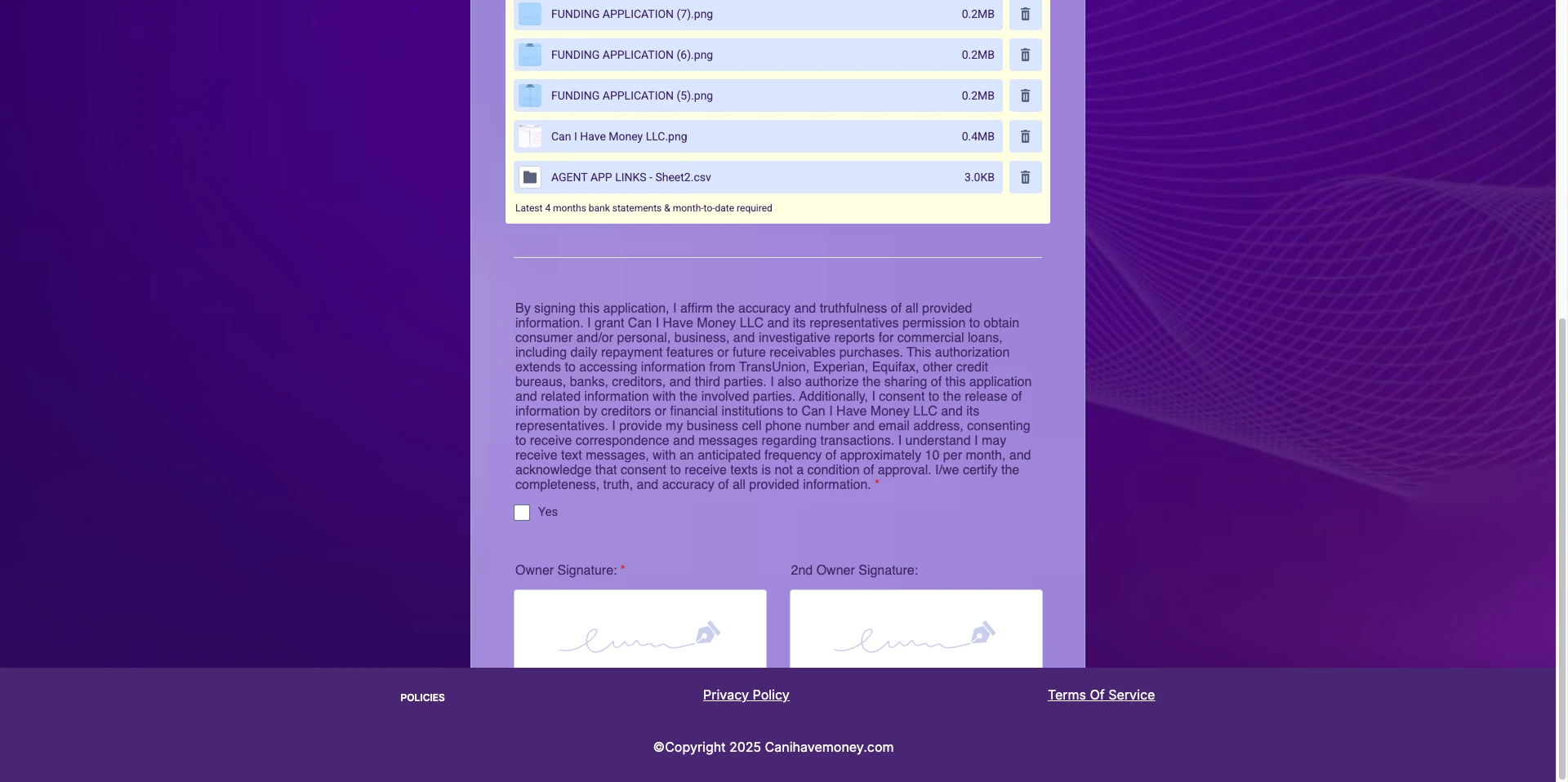
WHEN I ADD FILES, THE SUBMIT BUTTON DOESN'T SHOW, IT WONT SCROLL AND WONT ALLOW ME TO SUBMIT!!
-
 Podo: Support Specialist
Hi Josh,
Thanks for reaching out to Jotform Support. I'm an AI assistant here to assist you.
It sounds like the Submit button is getting cut off when you add files, and the form won't scroll to allow submission. Let me show you how to ensure the Submit button is properly added and visible on your form:
- In Form Builder, click on the Add Element menu on the left side of the page.
- Under the Basic tab, scroll down to Submit and drag it into your form if it's not already there.
If the Submit button is present but still cut off or not scrollable, this might be related to form layout or container issues. You might want to check the form's height settings or container CSS to allow scrolling.
Give it a try and let us know how it goes.
-
JoshAdler
I am not using any CSS
-
Podo: Support Specialist
Hi Josh,
One of our Support Team members will take it from here to follow up shortly.
-
JoshAdler
AGENT ASAP PLEASE!!!!!
-
Podo: Support Specialist
Hi Josh,
One of our Support Team members will take it from here to follow up shortly.
-
JoshAdler
YALLA
-
 Eduardo_Ca
Hi Josh,
I cloned your form and tried to replicate the issue, but everything worked the way it should. Check out my results in the screencast below:
Are you receiving any error messages when trying to submit?
After we hear back from you, we’ll have a better idea of what’s going on and how to help.
-
JoshAdler
????
THIS IS VERY URGENT
-
JoshAdler
We host this application on a weblink using the embed link. our link is cihm.app/abe for example.
this was working for 2 years and all the sudden now it doesnt -
 Kyle JotForm Support
Hi Josh,
I cloned your form again and wasn’t able to replicate the issue. The Submit button displayed and worked as expected on my end. Looking at the screenshot you shared, I noticed the form is embedded on your site. In many cases, display or scrolling issues like the one you described are related to the embed method rather than the form itself.
To fix this, I recommend re-embedding the form using the iFrame embed code instead of the default embed script. The iFrame method isolates the form from your site’s CSS and layout, which usually resolves cut-off or scrolling problems. Let me show you how:
- In Form Builder, in the orange navigation bar at the top of the page, click on Publish.
- In the menu on the left side of the page, click on Embed.
- Now, select the iFrame embed option.
- Paste your code into your webpage's embed area, and that’s it.
If the same thing happens, share with us the link to your website so we can check.
Try that and reach out again if you need more help.
Your Reply
Something Went Wrong
An error occurred while generating the AI response. Please try again!