-
 soniaht
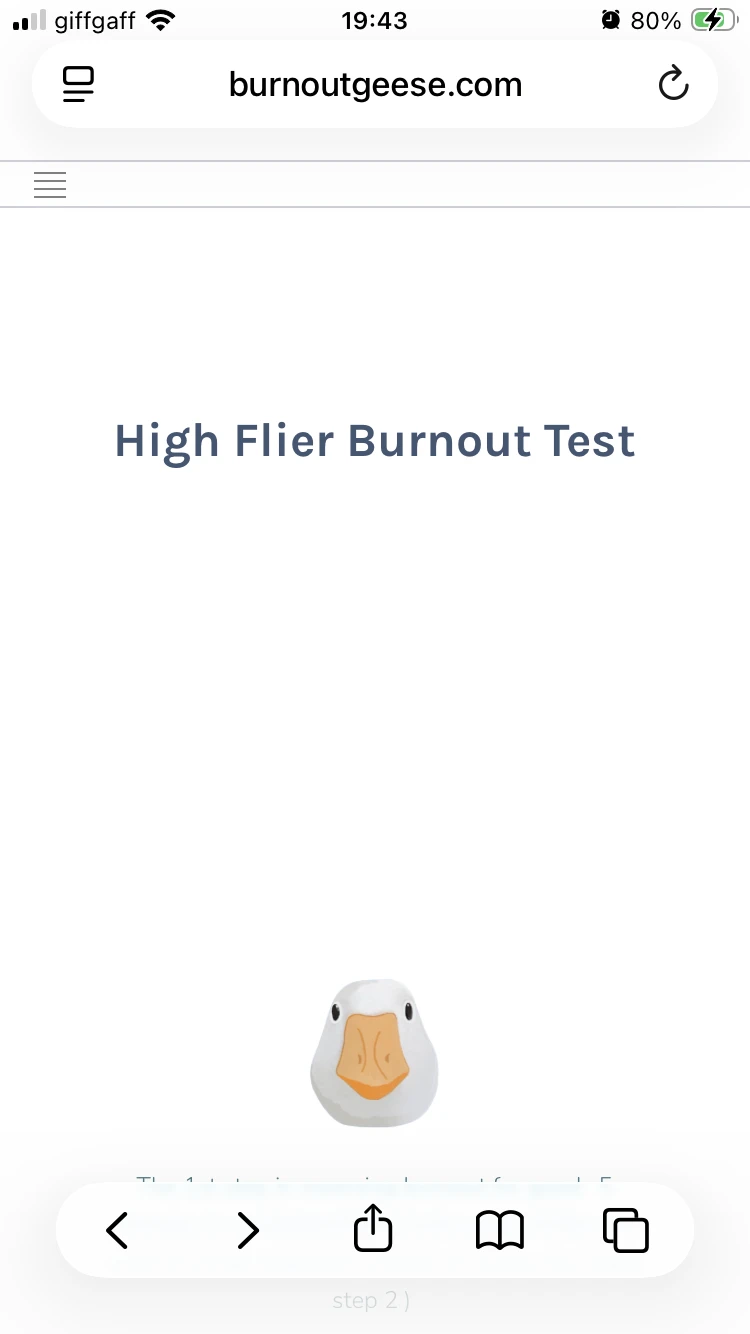
the layout of my form on mobile is really poor and i have tried changing the title into my own website but the form is still half way down the page
i have tried change from card format
i have shifted from the inial embed to iframe
and adding the title above the form but whatever i do all my clients see is the head and white space - this is not helping my business one bit.
please advise - as this is a deal breaker - ihave been a member for years and this has always been a problem but i have recently canvased my clients and they all say it nearly put them off - so how many IS ITY putting off.
i can try getting a landing page not on weebly but this will involve extra expense and i'd prefer to have it on my own website.
the jotorm link on its own is fine - but i don't want clients to see jotform in the url
all suggestions gratefully accepted
sonia
 Page URL: https://burnoutgeese.com/test
 -
 Joeni JotForm Support
Hi Sonia,
Thanks for reaching out to Jotform Support. I tested your embedded form on a mobile device, and everything appears to be working as expected. Take a look at the screencast below:
Can you try accessing your embedded form on a different mobile device to see if the issue persists? If it does, can you share the device model and version so we can attempt to replicate the issue on our end?
Once we hear back from you, we'll be able to move forward with the solution.
Your Reply
Something Went Wrong
An error occurred while generating the AI response. Please try again!