-
 IsonFamRestaurant
https://form.jotform.com/240713184935155
Trying to get the score to calculate right?
Also, when it sends the answer to the person it is not looking align? How do we fix that? To give the correct answer as well. -
 Podo: Support Specialist
Hi Ison,
Thanks for reaching out to Jotform Support. I'm an AI assistant here to assist you.
Regarding your issue with the score calculation and alignment of the answer in the email notification, here’s how you can address both:
1. Correct Score Calculation:
Ensure that your calculation widget or calculation conditions in the form are set up properly. Double-check the formulas or calculation logic you have applied to make sure they correctly sum or compute the score based on the user inputs.2. Fixing Email Notification Alignment:
The alignment issue in the email notification can be due to the way the email template is formatted. To fix this:- Go to your form's Settings tab.
- Click on Emails on the left panel.
- Edit the Notification Email by clicking the Pencil icon.
- In the Email Editor, check the content layout and use the alignment tools to adjust text alignment as needed.
- Make sure to use tables or proper HTML tags if you are customizing the email template in the source code view to maintain alignment.
Also, test the form submission and check the received email to confirm the alignment looks correct.
If you want a detailed guide on setting up email notifications properly and troubleshooting email issues, you can refer to Setting up Email Notifications.
Give it a try and let us know how it goes.
-
 Jerlan JotForm Support
Hi IsonFamRestaurant,
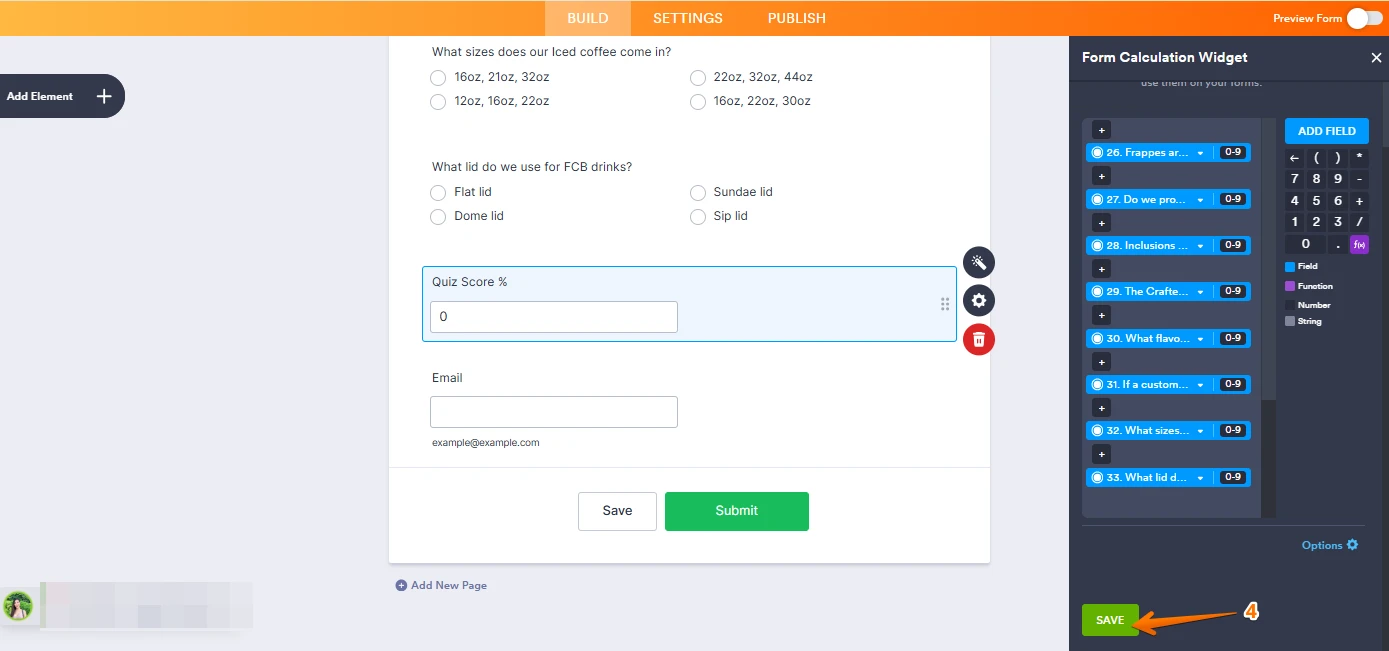
As I have checked, each question has calculation values but your calculation widget has an incorrect formula. You need to add each question field to the calculation widget. Let me show you how:
1. In Form Builder, click on the Form Calculation Widget and click the Wand icon.
2. Under the Form Calculation Widget delete your existing formula.
3. Once deleted, click on Add field and add all questions field.

4. Then click on the Save button at the lower part of the widget.
I’ve gone ahead and moved your other question to a separate thread to keep things tidy, and someone from our Support Team will help you out with it here.Give it a try and let us know how it goes.
 I’ve gone ahead and moved your other question to a separate thread to keep things tidy, and someone from our Support Team will help you out with it
 Your Reply
Something Went Wrong
An error occurred while generating the AI response. Please try again!